


What Is a Vendor Register?
Your purchasing team needs a vendor register with Claude Code when supplier status, review history, and renewal decisions are stuck in a shared spreadsheet only one person knows how to work. This Vendor Register turns that process into a ToolJet application for a small manufacturer, so the team can review contracts, capture fresh notes, and clear new suppliers through approval. An agent generated this and the result is a structured ToolJet application, with data, queries, and interface together, that the team keeps running. By the end, you can reproduce the same register and adapt it to your own supplier list.
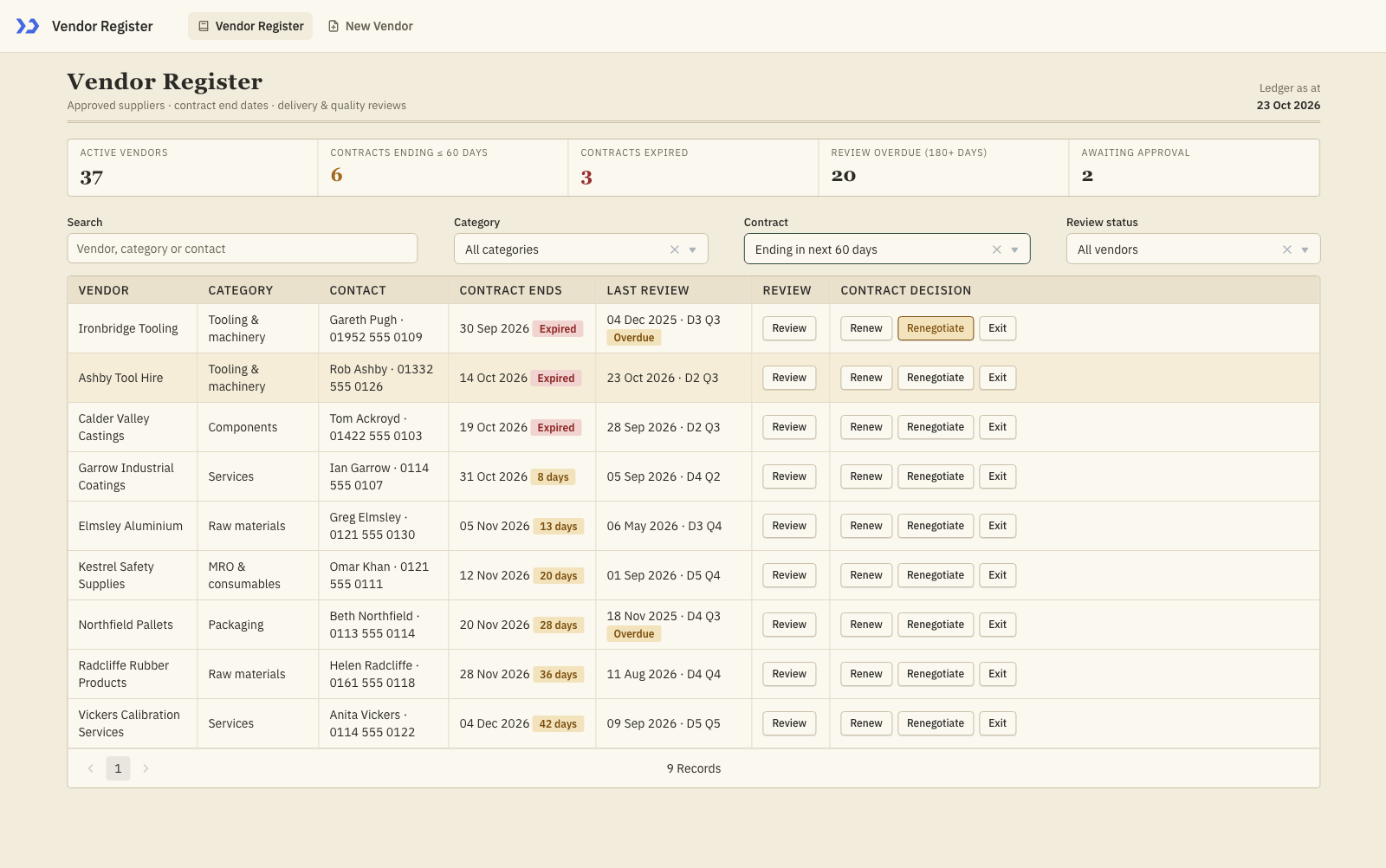
The register filtered to contracts ending in the next 60 days, with amber day-count chips, red Expired chips, last-review scores and one-click Renew, Renegotiate and Exit buttons.
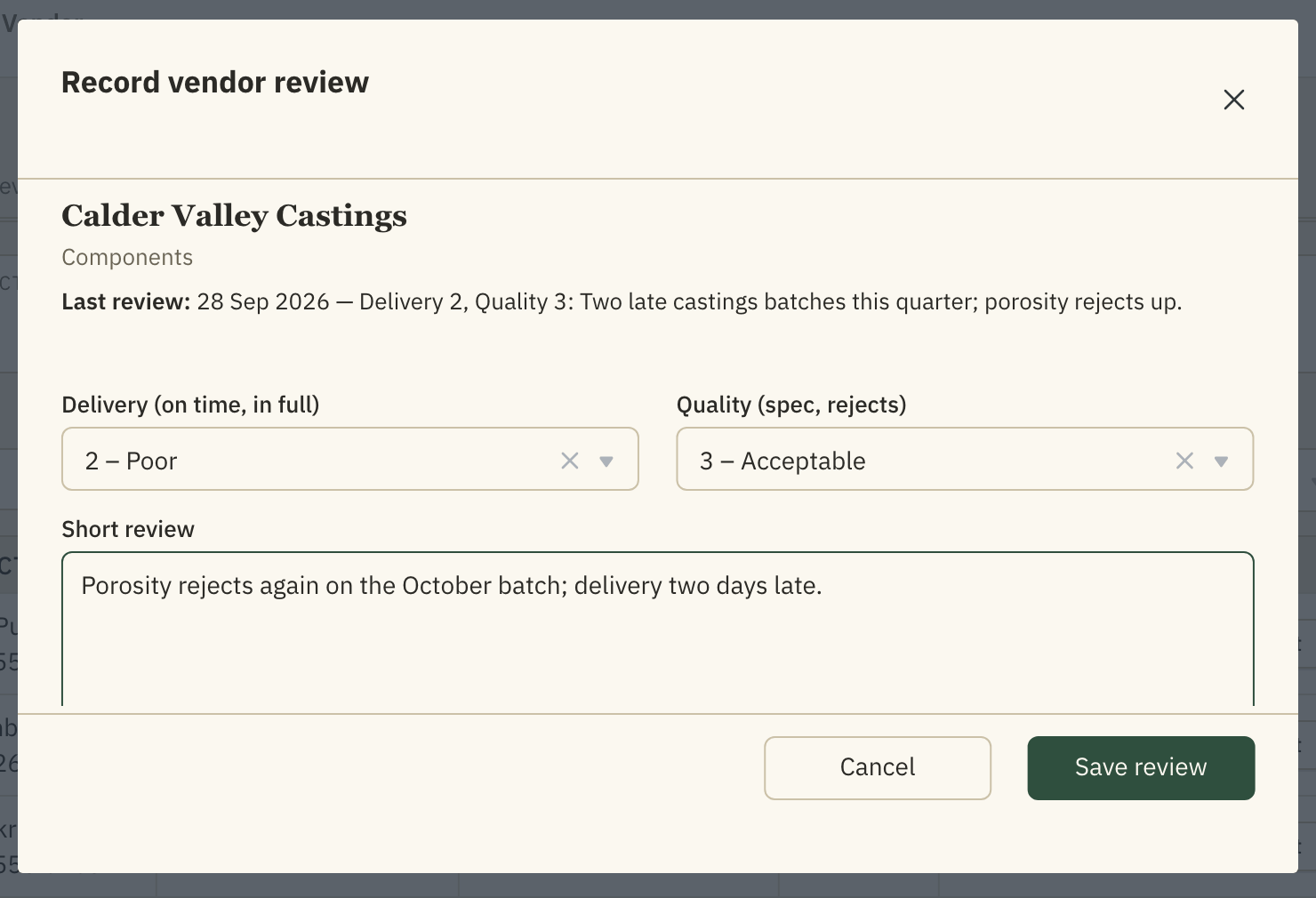
The review modal: vendor and last review at the top, delivery and quality ratings and a short note below.
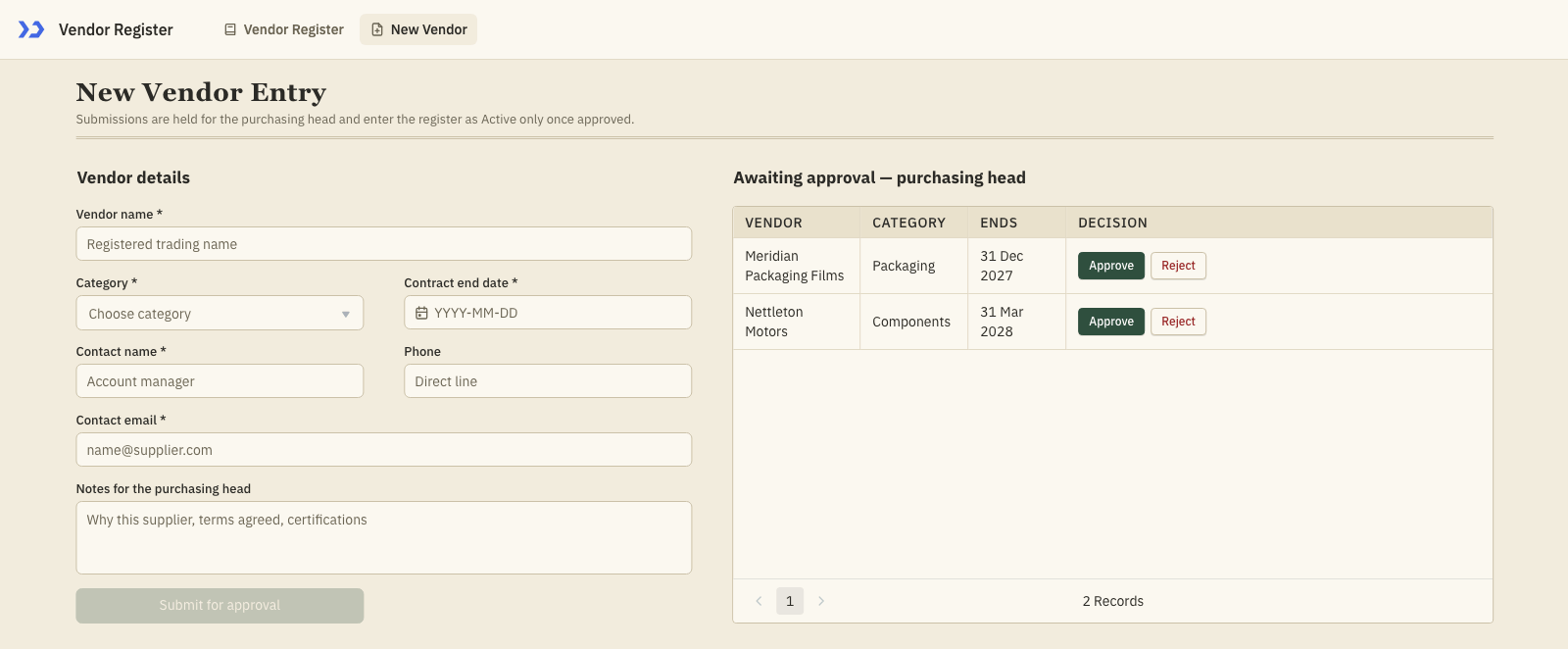
The New Vendor page: intake form on the left, the purchasing head’s approval queue on the right.
How Do You Track Supplier Reviews and Renewals?
Track supplier decisions by keeping contract dates, review history, notes, and approval status in one register that buyers can update as suppliers change without rebuilding the process in spreadsheets by hand. ToolJet MCP lets a coding agent turn that plan into a working app in ToolJet.
- Gather supplier status, contract dates, and review history
- Separate active vendors from new vendor intake
- Flag contracts ending soon and reviews that are overdue
- Route new suppliers through approval before activation
- Record decisions and review notes in one register
How Do the Register and Intake Pages Work?
The register page opens with the summary strip, then the buyer works from a dense table that sorts by soonest contract end and filters the list by category, contract window, and review status. Each row shows the vendor, contact, contract state, and the latest review so the buyer can see what needs attention without leaving the page. The row actions update the vendor directly, and the review button opens a modal for delivery and quality scores plus a short note. The second page keeps new supplier intake separate, with a submission form on one side and an approval queue on the other, so the purchasing head can clear pending vendors before they enter the register.
- Summary strip shows active vendors, expiring contracts, expired contracts, overdue reviews, and pending approvals
- Filters narrow the register by search, category, contract window, and review status
- Row actions let buyers renew, renegotiate, or exit without leaving the list
- Review modal records delivery and quality scores plus a short note
- New-vendor form routes submissions into an approval queue before the register updates
Build a Vendor Register with Claude Code in ToolJet
Want to build it yourself? Start with the ToolJet MCP repository and connect it to Claude Code.
How Was the Requirements Prompt Consolidated?
The build took several passes, and the requirements have been consolidated into one prompt that could have been used from the start. You can reproduce the same app in a single shot by giving the agent the prompt and letting it work from there.
Build a two-page ToolJet app called Vendor Register for a purchasing team at a small manufacturer that manages about 80 suppliers. Use only native ToolJet components and give the app an auditor’s register look: parchment neutrals, ink text, a deep ledger-green accent, serif mastheads, square-ish corners, dense layout, and slightly larger type. Page one, Vendor Register, shows a masthead with the ledger date, a summary strip for active vendors, contracts ending soon, expired contracts, overdue reviews, and awaiting approval, plus filters for search, category, contract window, and review status. The table shows active vendors only, sorted by soonest contract end, with an amber day-count chip or a red Expired chip, last review date with delivery and quality scores, and an Overdue chip when the review is older than 180 days or never reviewed. Include a Review button and Renew, Renegotiate, and Exit actions that appear only when the contract is ending soon or already expired. The Review modal shows the vendor and its last review, with delivery and quality dropdowns from one to five and a short review text area. The Save button stays disabled until all three fields are filled, then closes the modal and refreshes the list. Page two, New Vendor, contains a form for vendor details and notes for the purchasing head, plus an awaiting approval table with Approve and Reject actions. The Submit for approval button stays disabled until the required fields are filled, creates a Pending approval vendor, clears the form, and shows a confirmation. The queue records who decided and when, and approved vendors appear in the register. Use ToolJet Database with two tables, pv_vendors and pv_reviews. pv_vendors holds supplier details, status, decision, notes, submitted by and at, and approved by and at. pv_reviews holds delivery and quality ratings, a short note, reviewer, and review date. Load both pages through one RunJS loader that reads both tables, shapes rows and summary counts, and re-runs after every write.
How Does ToolJet MCP Build the App?
The ToolJet MCP documentation shows how the coding agent works through the data model, pages, components, queries, and wiring, then assembles the result as a structured ToolJet application inside the platform, not a loose handoff. That matters because enterprise app building does not stop at the interface, the runtime carries data connectivity, workflows, permissions, deployment, and ongoing change where supported, so the team keeps one application instead of a codebase to assemble and operate separately. The path stays open for AI generation, then visual editing, then code where a case needs it, so a buyer workflow can be shaped once and refined as the approval process changes.
Which Review Column Name Needed Fixing?
The review table failed to create when the first schema used comment as a column name, and the data layer rejected it. Renaming that field to review_note fixed the issue, and the tables were created on the next pass successfully.
What Did the Verification Checks Show?
The results table shows the checks that confirmed the register page, the intake page, the filters, the row actions, the review modal, and the approval flow worked together.
| Metric | Result |
|---|---|
| Pages | 2 |
| ToolJet DB tables | 2 |
| Queries | 10 |
| Components | 27 |
| Code files to maintain | 0 |
| Repair cycles | 1 |
| Final validation | 0 errors |
Which Manufacturing Teams Use This Register?
Small and mid-sized manufacturers, workshops and distributors whose purchasing team tracks suppliers and contract renewals in a spreadsheet. The same pattern fits facilities, construction and any team that has to decide renew, renegotiate or exit before a vendor contract lapses.
Who Can Use the Register and Approvals?
As built, there is no role split: every user who can open the app sees both pages and can record reviews, mark contract decisions, submit vendors and press Approve or Reject. The intended model is that buyers use the register and the form while only the purchasing head approves, which would need a custom group with permissions on the approve and reject queries.
SOC 2 Type II and GDPR Compliance in ToolJet
A Vendor Register app usually has to pass a security review before rollout, and ToolJet supports that review with regular SOC 2 Type II audits, GDPR compliance and documented data protection controls. Reviewers can check the platform against standards they already use instead of starting from scratch.
Security, legal, and auditors care about the vendor contact details and approval history in this register, and that is where SOC 2 and GDPR reviews start.

SOC 2 Type II and GDPR Compliance in ToolJet
Audited Standards: SOC 2 Type II and GDPR
- SOC 2 Type II audits: ToolJet undergoes regular SOC 2 Type II audits to validate its security, availability and confidentiality standards.
- GDPR compliance: ToolJet states that it fully complies with the General Data Protection Regulation and follows a GDPR-compliant data deletion policy, removing personal data on request or at the end of the retention period.
- Trust center: ToolJet points reviewers to trust.tooljet.com for the latest security documentation and compliance certifications.
Data Protection Controls Behind the Audits
- Encryption in transit and at rest: traffic between users and ToolJet servers uses TLS, and sensitive stored data is encrypted at rest.
- Encrypted workspace secrets: constants and secrets are encrypted before storage, and secrets resolve on the server so they never reach the browser.
- Audit logs for reviews: record user, app and data query activity with who, what, when and IP address.
- CJIS configuration guidance: criminal justice agencies get a guide to configuring a self-hosted deployment for CJIS Security Policy controls. There is no CJIS certification for platforms, so compliance remains the agency’s responsibility.
For the Vendor Register app, this gives security and legal reviewers audited evidence plus concrete controls to check, and teams with stricter data rules can pair it with self-hosted deployment to keep data on their own infrastructure.
Enterprise Features for Your Vendor Register
A vendor register handles contact details, contract dates, and approval history. ToolJet covers that governance at the platform layer, so you configure it once instead of rebuilding the same controls in every app.
- SSO and SCIM: sign in with SAML, OIDC or LDAP, and provision users automatically
- Role-based access control: scope permissions to the app, the data source, and each query
- Audit logs: track every login, edit, and approval decision for compliance review
- Air-gapped deployment: self-host on Docker or Kubernetes so your data stays in your network
- Multiplayer editing: several builders work on the same app, with versioning and Git sync
- ToolJet AI inside your own deployment: run the AI features in your tenancy rather than a shared service
You could add a notification layer with ToolJet Workflows. For example, a workflow could fire when a vendor is approved, post a short summary to the purchasing head in Slack, email the submitter through Gmail, and write the approval back to pv_vendors.
Final Takeaways
The vendor register built with Claude Code gives the purchasing team a live place for supplier status, contract dates, review notes, and approval decisions. The app replaces a spreadsheet workflow where the same answers have to be checked in more than one place. Buyers can filter expiring contracts, record a review from the row, and send new vendors into approval without changing tools. Because the result is a real ToolJet application, the team keeps one editable system instead of a pile of disconnected notes and follow up steps that drift away from the work.
Build your own with Claude Code
Build a vendor register with Claude Code on ToolJet Cloud, then request a ToolJet demo.


