


What Is a PPE Compliance Desk?
A shared spreadsheet only one person knows how to work does not hold up when site photos, hard hat calls, and hi-vis checks need fast review. You build a PPE compliance desk with ToolJet MCP that turns photo review into a queue, corrective actions, and weekly trends. By the end, you see how a safety officer confirms uncertain detections first. You also see how accepted findings become follow-up work, and how the structured ToolJet application keeps data, queries, and interface together. The app also shows repeat contractors so the same issue stands out across weeks, without forcing the officer to sort a messy inbox.
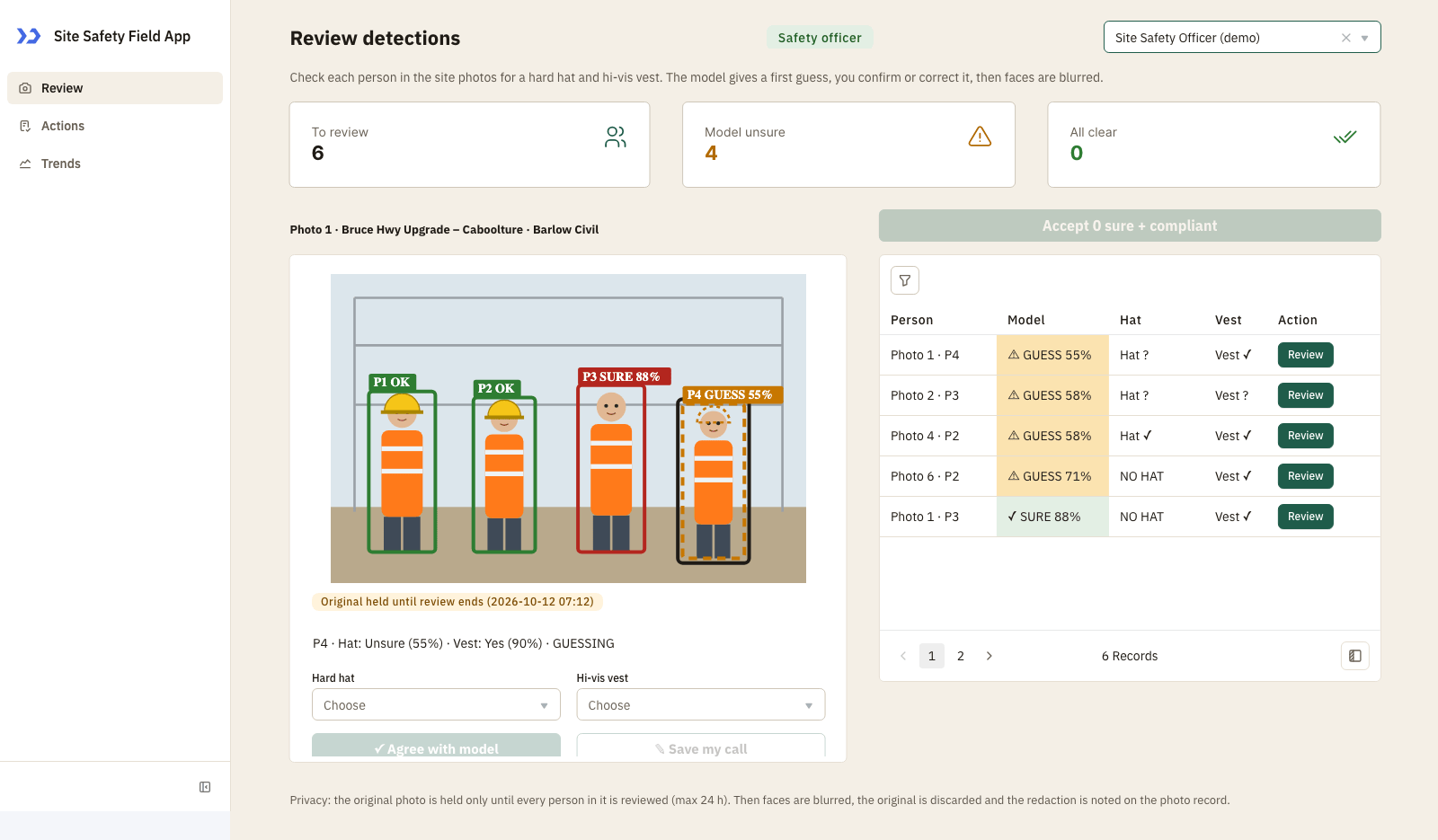
Review page as a Safety officer: the photo with a box per person, the model’s reading, decision controls and the queue.

Trends page: weekly findings, findings by contractor and issue, repeat findings and the contractor by week heat table.
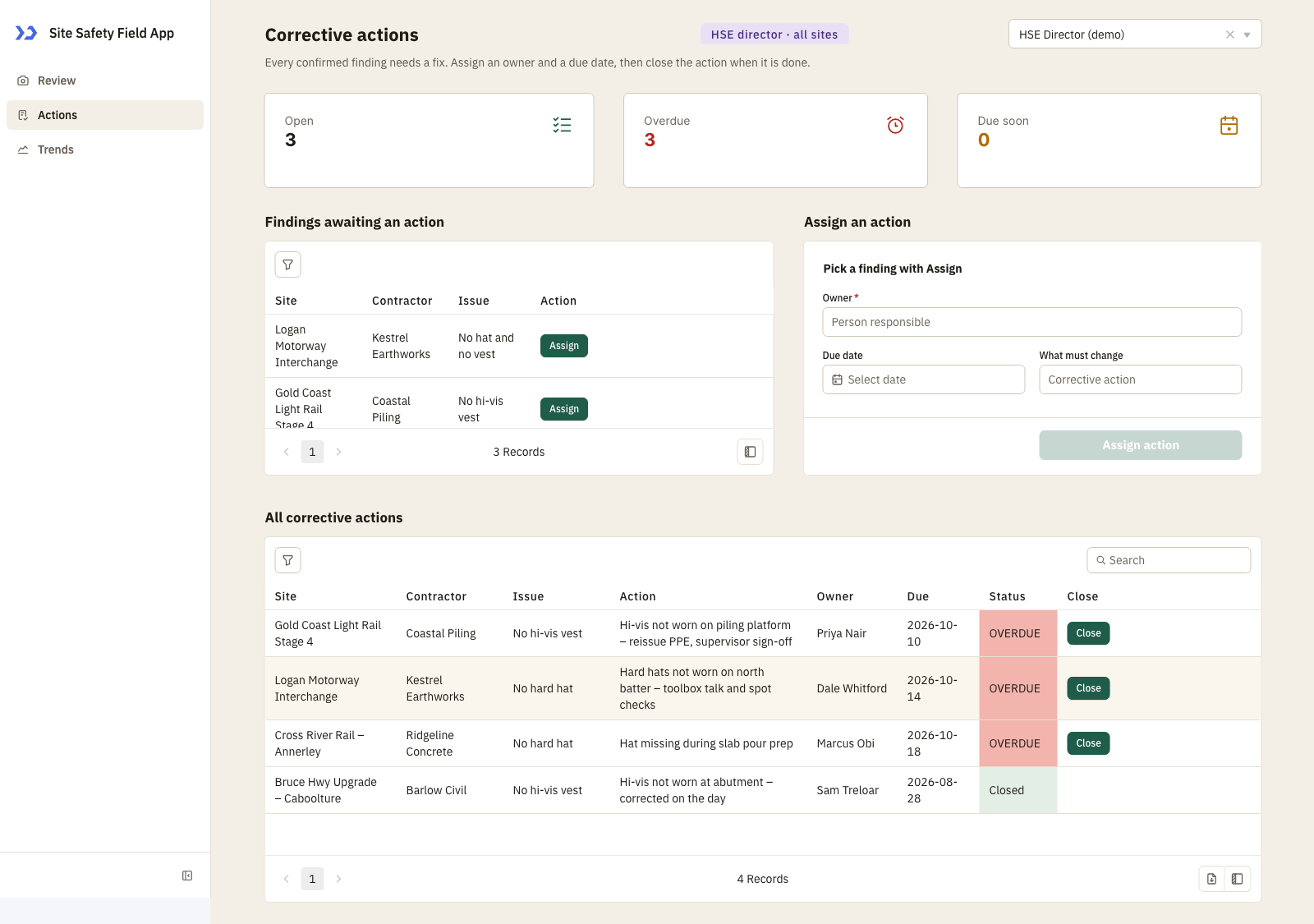
Actions page: findings awaiting an action, the assign form and every corrective action with status.
How do you review PPE findings quickly?
Triage hard hat and hi-vis findings by sorting uncertain detections first, confirming the call, and turning accepted issues into corrective actions with an owner and due date. A coding agent can build it through ToolJet MCP, then the result stays inside ToolJet for the team to keep using.
- Collect site photos and run the detector
- Sort uncertain findings to the top
- Confirm the reading or correct it
- Create corrective actions with an owner and due date
- Review weekly trends for repeat issues
What does the Review queue show?
The Review page centers on one photo and a queue of people detected in that image. You inspect each person, compare the model’s reading with the hard hat and hi-vis fields, and decide whether the detection is correct or needs a correction. Uncertain rows rise first, fully compliant people can be accepted in bulk, and the View as control lets each demo role see the same app through the right access path. The Actions page turns confirmed findings into owned work with a due date, while the Trends page groups findings by week and contractor so patterns are easy to read. Once a photo has no pending people left, the app blurs the faces, discards the original image, and records that redaction.
- Queue detections with uncertain people first
- Review each person against the photo
- Bulk accept fully compliant people
- Turn confirmed findings into corrective actions
- See weekly trends and repeat contractors
Build a PPE Compliance Desk with ToolJet MCP Flow
Want to build it yourself? Start with the ToolJet MCP repository for setup instructions, supported agents, and everything you need to follow along.
How does one prompt shape the build?
The real build took several passes, and the requirements are now consolidated into one prompt. You can use that single prompt from the start and reproduce the same app in one shot.
Build a three-page ToolJet app called Site Safety Field App for a Queensland civil contractor. Use ToolJet Database tables sf_sites, sf_contractors, sf_users, sf_photos, sf_detections and sf_actions, seeded with demo data. Page 1, Review: three number tiles (to review, model unsure, all clear); a photo card showing the site photo with a box and label per person, the model’s reading, Hard hat and Hi-vis vest dropdowns, an Agree with model button and a Save my call button; a queue table of pending detections sorted with uncertain ones first, each with a Review button; and a bulk-accept button for people the model was sure about and who are fully compliant. After a photo has no pending people, blur faces, discard the original and note the redaction. Page 2, Actions: tiles for open, overdue and due soon; a table of confirmed findings awaiting an action with an Assign button; an Assign form with owner, due date and what must change; and a table of all corrective actions with a Close button. Page 3, Trends: tiles for findings in 8 weeks, repeats and compliance; line chart of findings per week, bar chart by contractor, donut chart by issue type; a repeat-findings list (same issue, same contractor, consecutive weeks) tagged WATCH or PATTERN; and a contractor by week heat table. Roles come from sf_users: safety officer (reviews, assigns, closes), HSE director (sees everything, assigns, closes, cannot review) and contractor manager (sees only their own contractor). Add a View as dropdown on each page for demos. Use native components and queries only, a light linen theme with one deep green accent, readable on a phone with no sideways scrolling where possible.
How does ToolJet MCP assemble it?
ToolJet MCP works through the whole application, not just the screen, so the data model, queries, component tree, and wiring between them land as one structured ToolJet application. Enterprise app building does not end at the interface, data connectivity, workflows, permissions, deployment, and ongoing change are the rest of the job, and the generated app sits on a runtime that carries those where supported rather than handing the team a codebase to operate themselves. If you want the setup details, see ToolJet MCP documentation, then keep moving from generation to visual editing to code where a case needs it.
Why did the Trends chart break?
The Trends page showed blank charts because the chart data came back in the wrong shape. Once the line, bar, and donut inputs were reshaped to match what the charts expected, the weekly view rendered again and the repeat patterns became visible.
What Did ToolJet MCP Generate?
| Metric | Result |
|---|---|
| Pages | 3 |
| ToolJet DB tables | 6 |
| Queries | 22 |
| Components | 60 |
| Code files to maintain | 0 |
| Repair cycles | 2 |
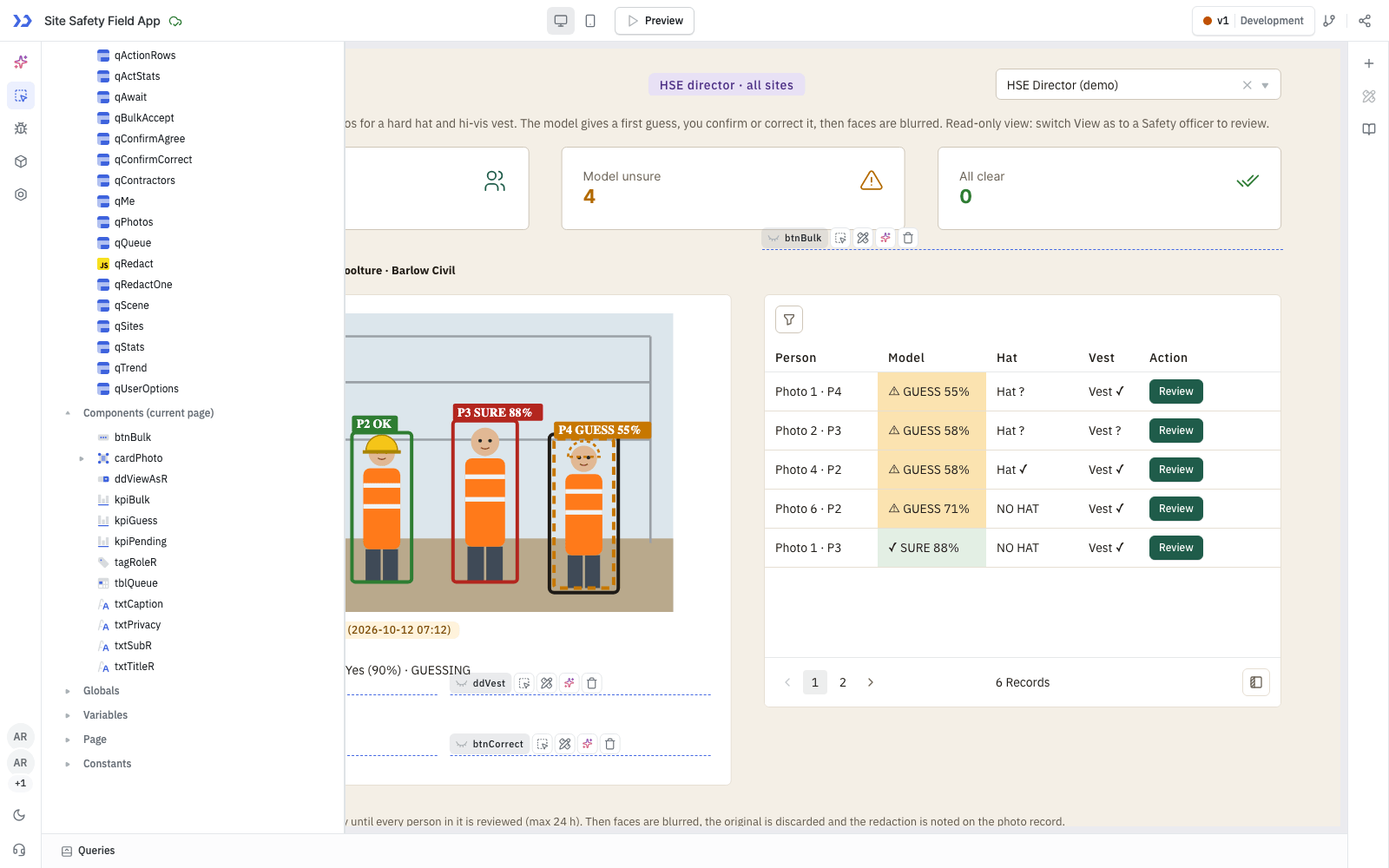
The components ToolJet MCP created, in the ToolJet inspector
Which teams use this workflow?
Construction and civil engineering, mining, utilities, oil and gas, manufacturing and any site-based business that audits PPE compliance across contractors.
Who can review and follow up?
Access depends on the role stored for each user. A safety officer can review detections, assign actions and close them. The HSE director sees every site and contractor and can assign and close actions but cannot review detections. A contractor manager sees only their own contractor’s findings and actions. These limits are applied in the app’s query transformations; per-group query permissions are not set, so the app is a demo of the pattern rather than enforced security.
Audit Logs and OpenTelemetry Observability in ToolJet
A PPE Compliance Desk app that changes real records needs a trail of who did what, and ToolJet provides audit logs for user activity plus OpenTelemetry metrics for platform health. Security teams get evidence for reviews, and platform teams watch performance in the monitoring tools they already run.
The app records approvals and edits on the same safety records, so audit logs and metrics can show who changed them and how the queries behave.
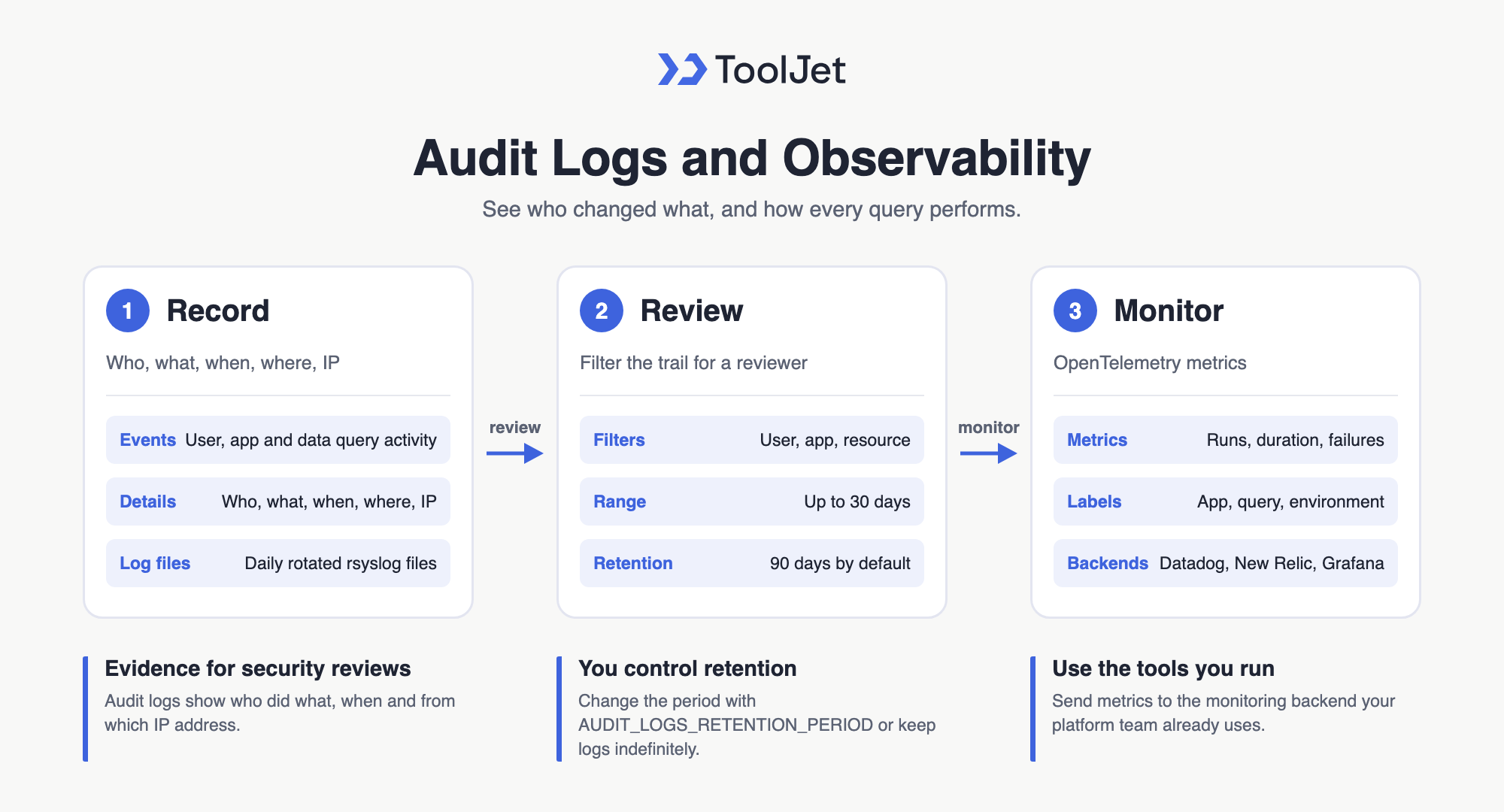
Audit Logs and OpenTelemetry Observability in ToolJet
Audit Logs: Who Did What, When and Where
- ToolJet audit logs: record who performed each action, what it was, when and where it happened, including IP address, across user, app and data query events. Filter by user, app or resource over a date range of up to 30 days.
- Retention control: logs are kept for 90 days by default, and admins can change the period with the
AUDIT_LOGS_RETENTION_PERIODenvironment variable or keep logs indefinitely. - Audit log files with rsyslog: write audit logs to daily rotated log files on the server.
- Streaming audit logs to Datadog: ship those files through a Datadog Agent for centralised search, security monitoring and long-term retention.
OpenTelemetry Metrics for Apps and the Platform
- OpenTelemetry observability: export app metrics such as query executions, duration, failures and success rates, labelled by app, query and environment, alongside HTTP, database and Node.js runtime metrics.
- Any OTEL-compatible tool: send traces and metrics to Datadog through a Datadog Agent, New Relic, Grafana or another OpenTelemetry backend.
Together, audit logs and metrics show both who changed the PPE Compliance Desk app’s data and how its queries perform in production. Audit logs are included from the Team plan, and the ToolJet pricing page lists unlimited audit log retention on Enterprise.
Enterprise Features for Your Site Safety App
A site safety app handles site photos, contractor assignments, and corrective actions. ToolJet covers that governance at the platform layer, so you configure it once instead of rebuilding it in every app.
- SSO and SCIM: sign in with SAML, OIDC or LDAP, and provision users automatically
- Role-based access control: scope permissions to the app, the data source, and each query
- Audit logs: track every login, edit, and approval decision for compliance review
- Air-gapped deployment: self-host on Docker or Kubernetes so your data stays in your network
- Multiplayer editing: several builders work on the same app, with versioning and Git sync
- ToolJet AI inside your own deployment: run the AI features in your tenancy rather than a shared service
You could add a notification layer with ToolJet Workflows. For example, a workflow could fire when a corrective action is assigned, post to the manager in Slack, email the contractor manager through Gmail, and write the update back to sf_actions.
Final Takeaways
This build shows a PPE compliance desk that moves from photo review to corrective action tracking without leaving the app. The Review page handles uncertain detections first, the Actions page turns confirmed findings into owned follow-up, and the Trends page shows weekly patterns and repeat contractors. The result is a real, editable ToolJet application, not a one-off screen, so the team keeps one place for review, action, and trend work across the same live workflow as site conditions change, with the same data visible to each role. If you want to build a PPE compliance desk with ToolJet MCP for your own sites and review roles, build it on [ToolJet Cloud].
Build your own with ToolJet MCP
Build your own PPE compliance desk from site photos and corrective actions, then request a ToolJet demo. Start free on ToolJet Cloud.


