


What Is an Employee Onboarding Hub?
You can build an employee onboarding app with ToolJet MCP to keep start dates, checklist tasks, and equipment requests in one place. An onboarding hub is a single workflow for tracking hires from offer accepted to completed. The draft shows a ToolJet application with data, queries, and interface built together. It gives a people-operations team one place to track starters, task ownership, and equipment handoffs. By the end, you see how the hub keeps hires moving while the team watches progress in one place.
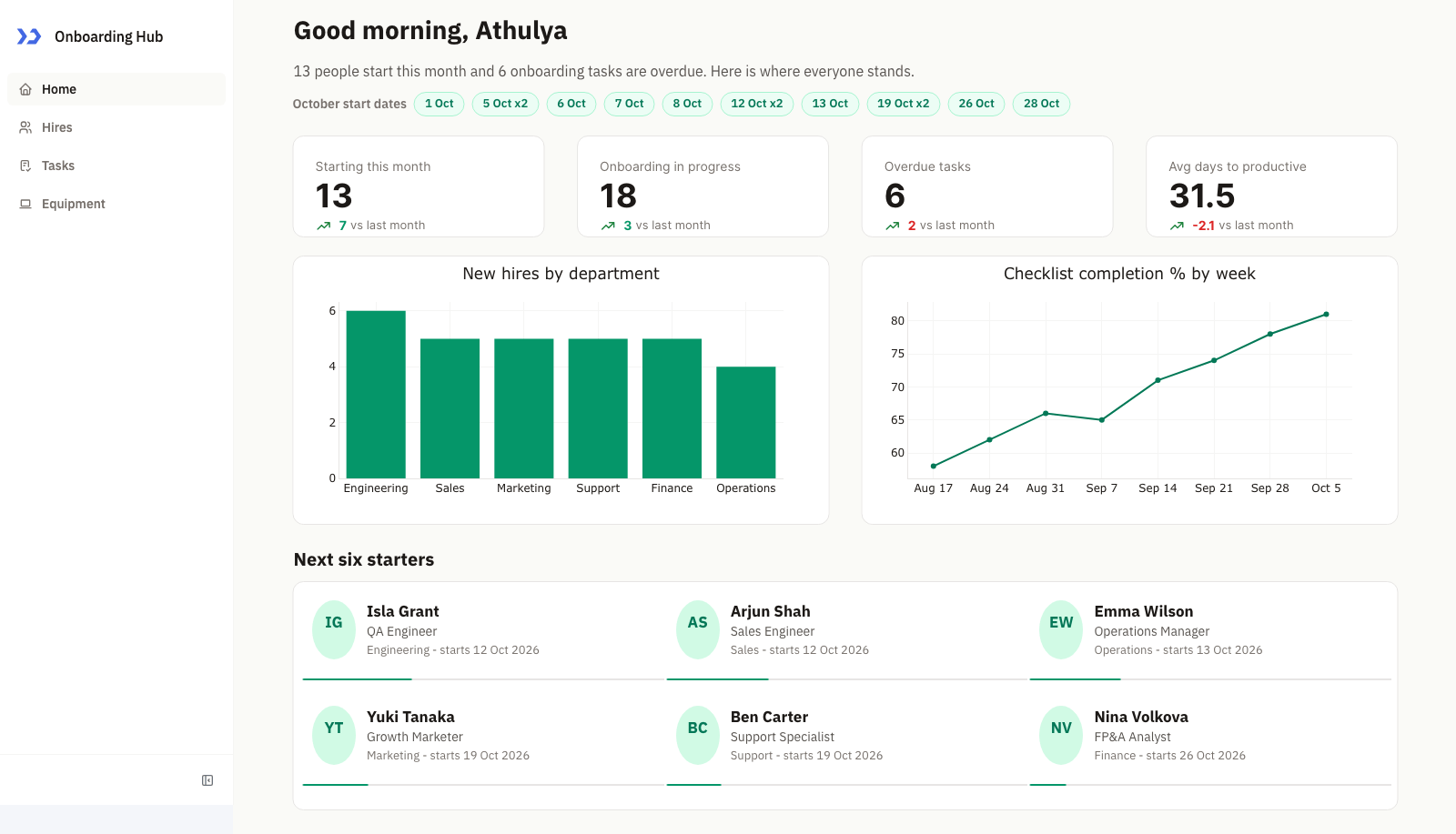
Home: this month’s start dates, four metric cards with trends, hires by department beside the checklist completion trend, and the next six starters

Hires: five evenly spaced Kanban columns with roomier cards (name, role, department and start date), aligned under the department and start-month filters

Tasks: overdue items pinned on top, then Monday to Friday groups with owner initials and status tags, beside the Assign a task form with comfortable field spacing
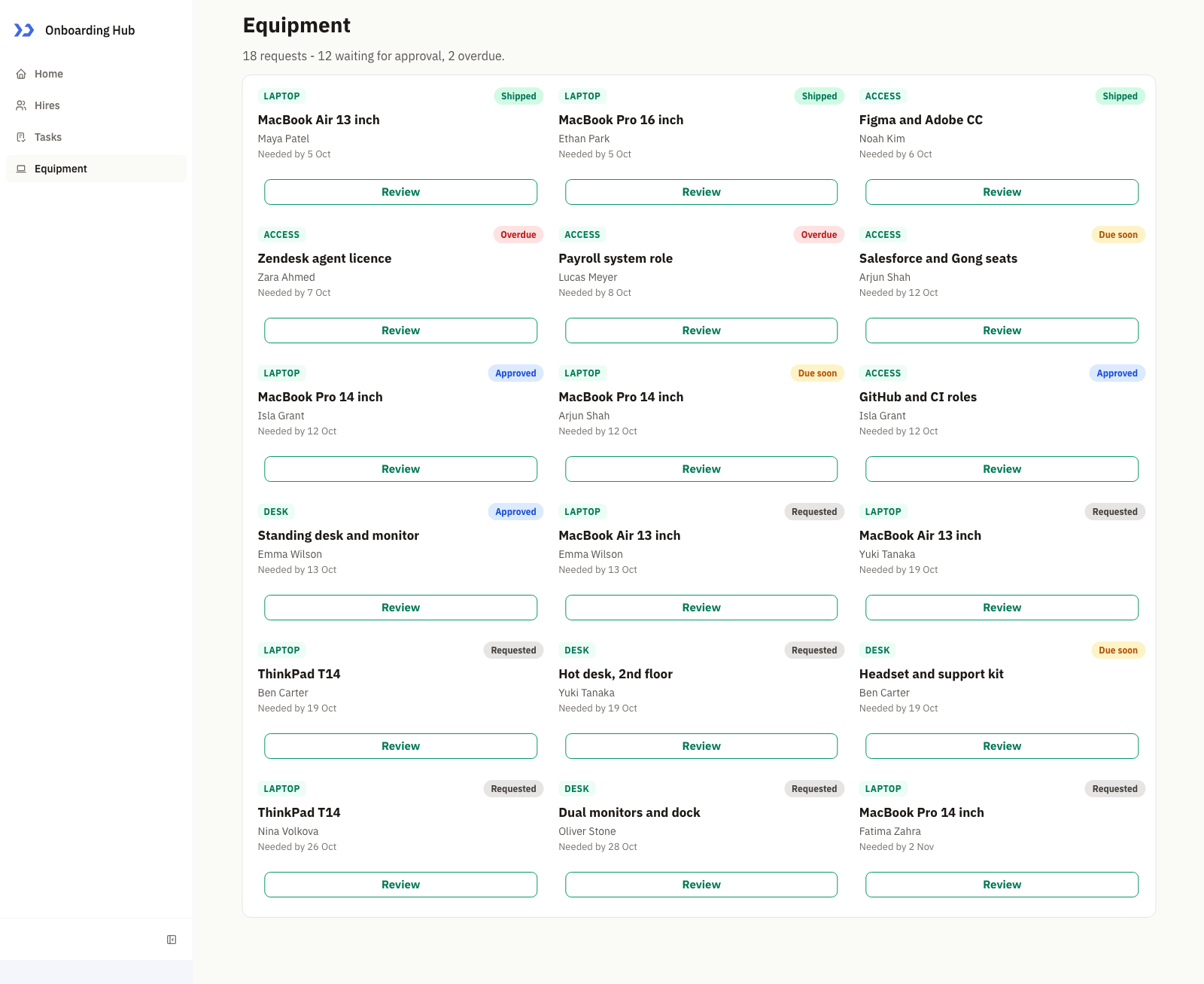
Equipment: request cards with category, item, requester, needed-by date, a status tag and a Review button shown in full
How Do You Manage Employee Onboarding?
Track onboarding by centralising hires, checklist work, equipment requests, and weekly progress in one structured workspace that people operations can update during the week. A coding agent can build the working version with ToolJet MCP, turning the process into a real app instead of loose screens and notes.
- List new hires by department and stage
- Group checklist work by due day
- Pin overdue items first
- Assign a new task to a hire
- Review equipment requests and update status
What Does The Onboarding Hub Do?
Home gives the team a live snapshot, with this month’s start dates, four metrics, a department bar chart, a weekly completion trend, and the next six starters in a compact grid. The cards show initials, names, roles, departments, start dates, and progress bars, so the people-ops lead can scan the pipeline without opening each record.
The Hires page turns the same data into a five-stage Kanban board with department and start-month filters. Selecting a card opens that hire’s checklist, while the Tasks page groups this week’s work by due day and pins overdue items first. Equipment uses review cards with request details and actions for approval or shipping, so each page answers a different part of the same workflow.
- Home combines greeting, start-date chips, metric cards, and two trend views
- Hires uses a five-stage Kanban with department and start-month filters
- Tasks groups work by due day and pins overdue items first
- Equipment reviews requests in a card grid with approval and shipping actions
- Clicking a hire card opens that person’s checklist and progress
Build An Employee Onboarding App With ToolJet MCP Across Four Pages
Want to build it yourself? Start with the ToolJet MCP repository for setup instructions, supported agents, and everything you need to follow along.
What Prompt Built The Hub?
The build took several passes to settle the layout, data model, and card sizing. The requirements are now consolidated into one prompt you can use from the start, so you can reproduce the same onboarding hub in a single shot.
Use only native components and ToolJet Database. Keep the look warm, welcoming, and restrained, with emerald as the primary accent on a warm near-white canvas, white cards with soft borders, a dense layout with slightly larger fonts, charts in emerald shades, and status tags in grey, blue, amber, green, and red.
Create four tables: oh_hires, oh_tasks, oh_equipment, and oh_trend. Seed 30 fictional hires across Engineering, Sales, Marketing, Support, Finance, and Operations at stages Offer accepted, Pre-boarding, First week, First month, and Completed, with start dates around October 2026. Also seed checklist tasks, including overdue items and tasks due Monday to Friday of the current week, 18 equipment requests for laptop, access, and desk, and eight weeks of completion percentages.
Home opens with a greeting, this month’s start dates as chips, four metric cards, a bar chart of hires by department beside a weekly checklist completion trend, and a grid of the next six starters with initials avatars and progress bars. Hires is a five-stage Kanban board with department and start-month filters, and clicking a card opens that hire’s checklist. Tasks groups this week’s checklist work by due day with overdue items pinned on top, owner initials, and status tags, beside a form that assigns a new task to a hire. Equipment is a grid of request cards with a status tag and a Review button that opens the details with Approve and Mark as shipped actions.
How Does ToolJet MCP Assemble It?
ToolJet MCP works through the whole application, not the screen: the data model, pages, components, queries, and the wiring between them land as one structured ToolJet application inside ToolJet, not a codebase you have to assemble yourself. That matters because onboarding does not stop at the interface, and the runtime carries data connectivity, workflows, permissions, deployment, and ongoing change where supported instead of handing the team separate parts to operate. You can still move from AI generation to visual editing and then to code when a case needs it, and the ToolJet MCP documentation shows the setup path.
What Broke In The Home Layout?
The Home cards were rejected because the starter card had no surface, a fixed height, and a progress bar that collided with the layout. The card was rebuilt with a full-height root, padding around the avatar, and more space above the bar, and then it saved.
What Did The Validation Checks Confirm?
The table below summarizes the validation checks run across the four pages and the interactions exercised in the finished app.
| Metric | Result |
|---|---|
| Pages | 4 |
| ToolJet DB tables | 4 |
| Queries | 9 |
| Components | 43 |
| Code files to maintain | 0 |
| Repair cycles | 1 |
| Final validation | 0 errors |

The components ToolJet MCP created, in the ToolJet inspector
Who Uses This Onboarding Hub?
Any team that welcomes people on a schedule can use this pattern: people-operations and HR teams, IT teams issuing laptops and access, facilities teams assigning desks, and managers running a new-starter checklist. The same board, timeline and request-card layout also fits contractor onboarding, student or intern intake, and customer onboarding programmes.
Who Can Access The Onboarding Hub?
As built, the app has no groups or permission rules of its own. Anyone who can open the app in the workspace can see every page and use every action, including Approve request, Mark as shipped and Assign task. Before a team uses it, add ToolJet groups and restrict the equipment and task write queries to the people-operations team.
Cost and Speed by Model
Try the same build pattern with your own team, then see how quickly the app shape maps to your process.
You can easily build a 4-page app with ToolJet MCP for as little as $0.17 with a lean model (Luna medium), or pay more for the latest flagship reasoning (Sol) if that’s what you’re after. The cost is your call, not a floor we set for you.
| Model | Credits | Minutes | Notes |
|---|---|---|---|
| Astra | 290 to 550 | 13 to 16 | The most polished pages, when cost matters less |
| Sol (Recommended) | 300 to 650 | 14 to 22 | The best balance of quality and cost for most apps |
| Terra | 85 to 210 | 5 to 12 | The fastest, and best kept to smaller apps |
| Luna max | 35 to 55 | 33 to 62 | The most complete Luna, and by far the slowest |
| Luna high | 25 to 50 | 22 to 41 | Mid-effort Luna, between medium and max |
| Luna medium | 10 to 30 | 14 to 20 | A quick first draft or a small tool |
Three to four builds per model across four-page apps. 1 credit = 1 cent. Credits and time are estimates only and will vary with the complexity of what you ask for. This measures cost and speed only, not how complete or polished the result is.
Even averaging across model tiers, ToolJet MCP can turn $10 into a dozen or more working 4-page apps.
Enterprise Features for Your Onboarding Hub
An onboarding hub handles employee names, start dates, and equipment requests. ToolJet covers that governance at the platform layer, so you configure it once instead of rebuilding it in every app.
- SSO and SCIM: sign in with SAML, OIDC or LDAP, and provision users automatically
- Role-based access control: scope permissions to the app, the data source, and each query
- Audit logs: track every login, edit, and approval decision for compliance review
- Air-gapped deployment: self-host on Docker or Kubernetes so your data stays in your network
- Multiplayer editing: several builders work on the same app, with versioning and Git sync
- ToolJet AI inside your own deployment: run the AI features in your tenancy rather than a shared service
You could add a notification layer with ToolJet Workflows. For example, a workflow could fire when a hire moves to First week, post to the manager in Slack, email the onboarding owner through Gmail, and write the update back to oh_tasks.
Final Takeaways
This build shows how an employee onboarding app with ToolJet MCP can turn a messy handoff process into one editable hub for people operations. The article covers the home dashboard, the Hires board, the task timeline, and the equipment review flow, all backed by four ToolJet Database tables. The result gives the team one place to watch start dates, checklist work, and request status instead of juggling separate trackers. That matters because the same app stays available for future changes as the team hires new people across departments, so onboarding keeps moving inside one ToolJet project.
Build your own with ToolJet MCP
Build your own employee onboarding app with ToolJet MCP on ToolJet Cloud, then request a ToolJet demo.


