


What Is a Restaurant Order-Flow App?
Restaurant service breaks down when order entry, kitchen updates, and reporting live in a shared spreadsheet only one person knows how to work. Build a restaurant app with ToolJet MCP when the team needs the floor flow, cashier POS, and sales register tied to the same data. The build creates a structured ToolJet application with data, queries, and interface together. By the end, you can reproduce this as a four-page restaurant app that moves an order from the counter to the kitchen and into reporting.


How Do You Automate Restaurant Order Flow?
Track restaurant orders by giving cashiers one place to add dishes, send tickets to the kitchen, and surface approved orders for guests at the door. ToolJet MCP lets a coding agent build that flow as a working app inside ToolJet.
- List the menu items and prices
- Let cashiers add dishes to a cart
- Record each order and line item
- Mark dishes done in the kitchen
- Approve the ticket only after every dish is finished
- Show approved orders on the ready screen
What Do The Four Restaurant Pages Do?
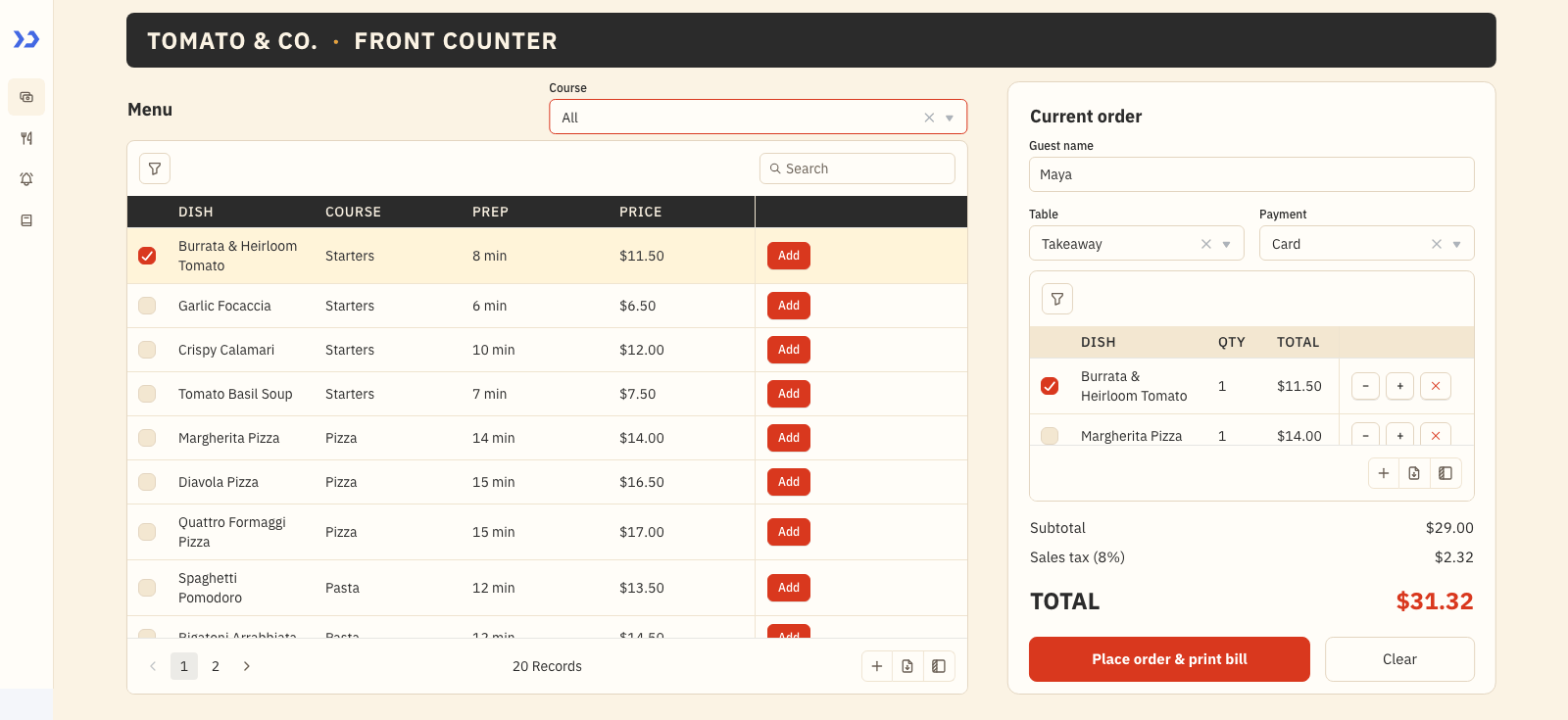
The POS page keeps the menu table, cart, guest fields, table field, and payment field on one screen, so the cashier can search, filter, add dishes, and place the ticket without leaving the register. The Kitchen page puts open orders in a list and the selected ticket’s dishes in a checklist, with Mark done, Undo, Mark all done, and a prep queue that shrinks as the line cooks finish work. Ready Orders is cards only, shows the newest 12 approved orders, and refreshes every 15 seconds so a guest sees a clean status board. Sales Register switches to a denser ledger view with KPI tiles, charts, ranked dishes, a trial-balance table, and an order ledger for the manager.
- Search and filter the POS menu before adding dishes to the cart
- Adjust quantities with minus, plus, remove, and clear controls before placing the ticket
- Keep the kitchen ticket on one side and the dish checklist on the other
- Show the newest 12 approved orders as cards and refresh them every 15 seconds
- Present KPI tiles, charts, ranked dishes, a trial-balance table, and an order ledger
Build a Restaurant App with ToolJet MCP Across Four Pages
Want to build it yourself? Start with the ToolJet MCP repository for setup instructions, supported agents, and everything you need to follow along.
What Is The Consolidated Prompt?
The real build took several passes to settle the layout, data model, and order flow. The requirements are consolidated into one prompt here, so you can reproduce the same restaurant app in a single shot.
Build a 4-page ToolJet app for a restaurant called Tomato & Co. using ToolJet DB tables for all data and only native ToolJet components. Pages: POS, Kitchen, Ready Orders, Sales Register.
Data: ToolJet DB tables rst_menu (name, category, price, prep_min, available), rst_orders (guest, table, payment, subtotal, tax, total, status, created and approved times) and rst_order_items (order_id, item_name, category, qty, unit_price, line_total, done). Seed 20 dishes, 30 orders and 65 order items.
POS page: menu table with a course filter and search; Add puts a dish in a cart. The cart has minus, plus and remove buttons, an 8% tax line and guest, table and payment fields. Place order writes the order and its items to ToolJet DB and opens a bill modal.
Kitchen page: open orders on the left; selecting one shows its dishes on the right with Mark done, Undo and Mark all done, plus a prep queue totalling the dishes still to cook. Approve stays disabled until every dish in the order is done.
Ready Orders page: customer screen showing only cards, nothing else on the page, for the newest 12 approved orders (order number, guest, dishes, ready time), refreshing every 15 seconds. An order appears here only after the kitchen has completed ALL its dishes and approved it.
Sales Register page: four KPI tiles, three charts, a ranked dishes table, a trial-balance table and an order ledger, in an Auditor’s Register / archival ledger style with a muted Nordic palette and soft neutrals, information-dense, slightly larger fonts. The other three pages use a bold warm style: charcoal, tomato red and a cream background (#FBF3E4). Side navigation, header title Tomato & Co. Max 4 pages.
How Does ToolJet MCP Build The App?
ToolJet MCP works through the whole restaurant application, the data model, pages, components, queries, and the wiring between them, then creates one structured ToolJet app inside the workspace rather than handing you a codebase to run yourself. That matters here because restaurant software keeps changing, so the generated app sits on a runtime that carries data connections, workflows, permissions, deployment, and ongoing change where supported. The path stays open from AI generation to visual editing to code when a case needs it, and the ToolJet MCP documentation shows the build path.
What Lint Issue Did We Fix?
The spec linter rejected the build because the cart read components.ddCat.value without a guard, and the page icon name was invalid. Once those references were corrected and the duplicate seed target was removed, the application applied cleanly in the next pass.
What Did ToolJet MCP Generate?
| Metric | Result |
|---|---|
| Pages | 4 |
| ToolJet DB tables | 3 |
| Queries | 16 |
| Components | 59 |
| Code files to maintain | 0 |
| Repair cycles | 1 |
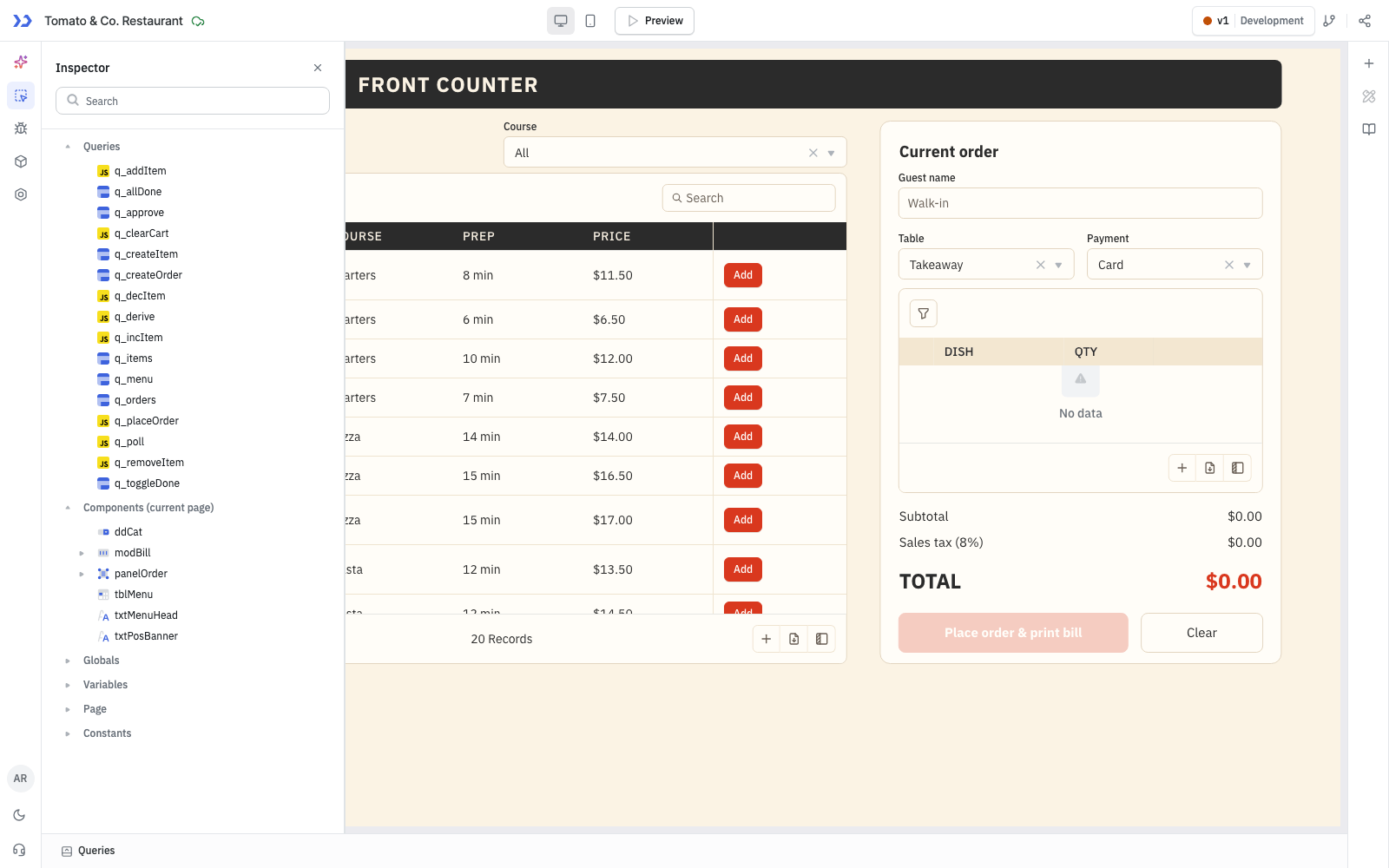
The components ToolJet MCP created, in the ToolJet inspector
Which Restaurant Teams Use This Flow?
Restaurants, cafes and food courts that want one small app for taking orders, running the kitchen and showing finished orders to guests. The same pattern suits canteens, bakeries and takeaway counters.
Who Uses The Cashier Kitchen And Sales Pages?
No groups or per-page permissions were built. Anyone with access to the app sees all four pages: cashiers use POS, the chef uses Kitchen, the customer screen runs on Ready Orders and managers use Sales Register.
Customising ToolJet Apps: Branding, Themes, Modules and Custom Code
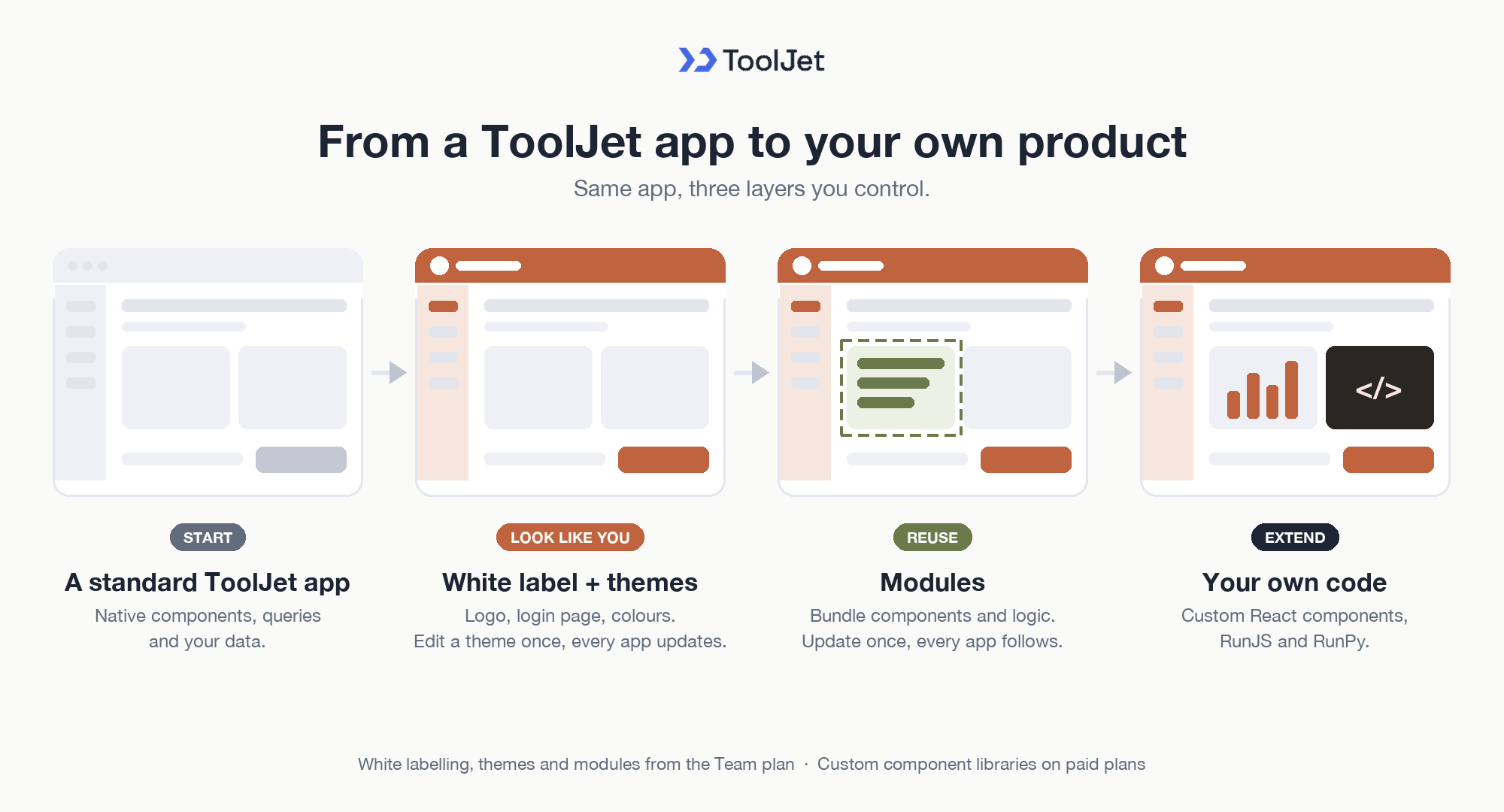
A restaurant app should look like your company’s own tool and handle logic no standard component covers, and ToolJet supports both: white-label branding and app themes for the look, and modules, custom components and JavaScript or Python code for behaviour.
The warm POS palette or the Sales Register layout could become a reusable branded module for other restaurant teams that want the same floor flow.
Customising ToolJet Apps: Branding, Themes, Modules and Custom Code
Branding, App Themes and Reusable Modules
- White labelling: replace the logo, favicon, page title and login page so ToolJet appears as your own product.
- App themes: define themes once per workspace and apply them across apps; editing a theme updates every app that uses it.
- Modules: bundle components, queries and logic into reusable blocks with inputs and outputs, and updates reflect in every app that uses the module.
Custom Components, Component Libraries and Code
- Custom Component: write a React component inside an app, pass it data and let it trigger queries.
- Custom Component Libraries: developers write React components locally, declare properties, events and actions with
@tooljet/custom-component-sdk, and publish with@tooljet/cliusingtooljet library init,devandpublish. Each publish is an immutable library version, builders drag components from the Custom tab and pin a version per app, and admins can delete libraries. - JavaScript and Python code: run custom logic in RunJS and RunPy queries, adding external JavaScript libraries or Python packages through micropip.
This lets the restaurant app match your brand today and grow with your own components tomorrow. White labelling, app themes and modules are available from the Team plan on the ToolJet pricing page, and Custom Component Libraries are a paid-plan feature.
Enterprise Features for Your Restaurant App
A restaurant app handles guest details, table assignments, and payment records. ToolJet covers that governance at the platform layer, so you configure it once instead of rebuilding it in every app.
- SSO and SCIM: sign in with SAML, OIDC or LDAP, and provision users automatically
- Role-based access control: scope permissions to the app, the data source, and each query
- Audit logs: track every login, edit, and approval decision for compliance review
- Air-gapped deployment: self-host on Docker or Kubernetes so your data stays in your network
- Multiplayer editing: several builders work on the same app, with versioning and Git sync
- ToolJet AI inside your own deployment: run the AI features in your tenancy rather than a shared service
You could add a notification layer with ToolJet Workflows. For example, a workflow could fire when an order is approved, post the ticket in Slack, email the shift lead through Gmail, and write the decision back to rst_orders.
Final Takeaways
This restaurant app shows how a single prompt turns order entry, kitchen handling, customer display, and sales reporting into one editable application. The data model keeps menu items, tickets, and line items in separate tables, so the cashier, kitchen, and register all read the same records. ToolJet MCP fits that job because the generated result stays inside ToolJet as a real application, so the team can keep editing the pages and queries as the restaurant changes. For a team that still runs service from a shared spreadsheet, that shift matters, and it keeps the customer screen and sales register in step. Build it on [ToolJet Cloud] when you want the same restaurant flow on live data.
Build your own with ToolJet MCP
Build a restaurant app with ToolJet MCP for your team, then request a ToolJet demo. Start free on ToolJet Cloud.
 Table of contents


