


What Is a Review Storm Analyzer?
A shared spreadsheet that only one person knows how to work stops scaling the week a launch floods your team with customer reviews. Build a review storm analyzer with ToolJet MCP and Jev, TypeSafe’s decision model, and one prompt gives you a governed app. Jev reads each review and returns sentiment, topic, urgency and a supporting sentence, and a person decides the final label. The result is a one-page brief with a headline, topic tiles, a filterable feed and an urgent follow-up list.
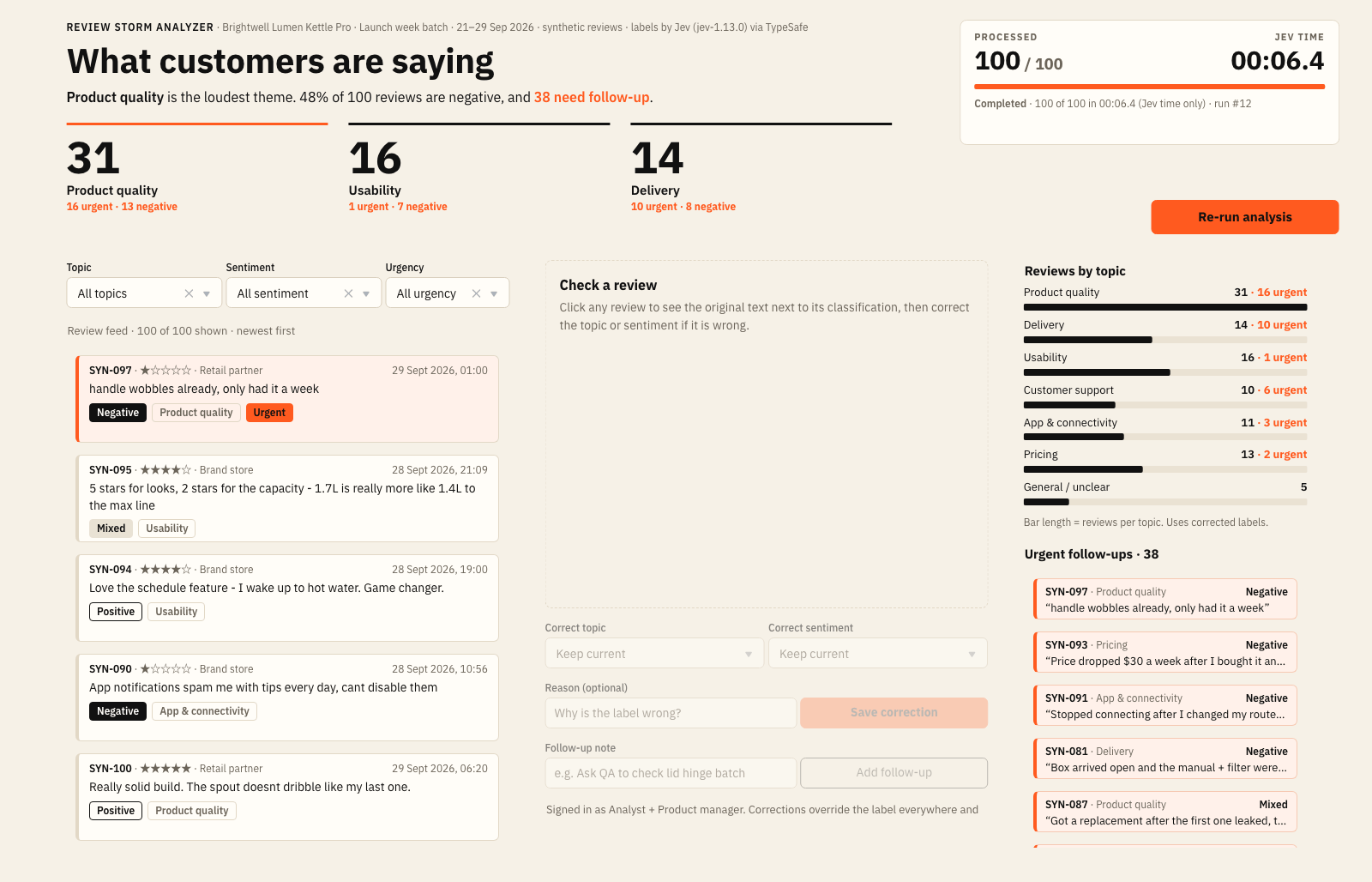
Review Storm Analyzer after a full run: 100 of 100 reviews labelled by Jev in 00:06.4 of Jev time, with product quality the loudest theme and 38 reviews flagged for follow-up

The recorded run at 1.5 times speed: the counter climbs to 100, the Jev timer stops at 00:06.4 and a review opens in the detail panel
How To Triage A Review Flood
Triage a review flood by labelling every review, grouping the loudest themes and surfacing urgent follow-ups. ToolJet MCP lets a coding agent build that as a working app inside ToolJet, with the page, queries and data model connected.
- Load: a RunJS query sends the batch to Jev through 12 parallel workers.
- Label: Jev returns sentiment, topic, an urgent flag (urgency probability of 50% or higher) and the sentence that supports the label.
- Review: the brief updates as results arrive. Analysts correct a label with a reason, and product managers add follow-up notes.
Set Up ToolJet MCP and the TypeSafe Datasource
Connect your coding agent with the ToolJet MCP overview and the ToolJet MCP repository. Then add the TypeSafe datasource to the workspace and name it typesafe, the name the build prompt uses. At build time the agent creates the app. At run time the app asks Jev typed questions through that datasource.
How Was The Prompt Consolidated?
The build took several passes, and the requirements are now consolidated into one prompt. You can use that prompt from the start and reproduce the same review brief in one shot.
Build a one-page ToolJet app called Review Storm Analyzer for a product team after a launch. Use the existing PostgreSQL datasource (postgresql_fleet) with tables rs_batches, rs_reviews, rs_synthetic_labels, rs_runs, rs_analysis, rs_corrections and rs_followups, seeded with 100 fictional reviews. Use the existing typesafe datasource (Jev) to return sentiment, topic, an urgent flag and a supporting sentence for each review. Show a headline, three topic tiles, Analyze batch with Pause and Resume, a processed counter and Jev-time timer, filters, a review feed, reviews by topic, urgent follow-ups and a detail panel for corrections and notes. Run 12 Jev workers in parallel and save results in batches with one bulk insert. Create groups Review Storm – Analysts, Product Managers and Viewers: only Analysts run Jev and save corrections, Product Managers add notes, Viewers only view.
How Does ToolJet MCP Build It?
The agent inspected the workspace, created seven PostgreSQL tables, seeded 100 synthetic reviews, then wired the queries, the RunJS analysis, the page and the permissions. It first used stand-in labels, then switched to live Jev through the typesafe datasource.
The first full run took 22.9 seconds, and Jev was not the slow part: 12 Jev calls in parallel finished in about 1.1 seconds, while each Postgres query took about 700 ms and queued. One bulk insert and rendering from memory cut the run to 8.8 seconds. The recorded run finished in 00:06.4 of Jev time.
Who Uses Review Triage, And Who Can Open It?
Product teams at consumer hardware brands, marketplace sellers and software teams after a release can use the same layout for any burst of text feedback. Analysts run Jev and save corrections, Product Managers add follow-up notes, and Viewers can only view. A viewer calling a write query got a 401 refusal.
Role-Based Access Control in ToolJet
ToolJet applies role-based access control at two levels. Platform permissions decide who can reach a workspace resource, and app permissions decide which pages, queries and components each group can open and run. The server enforces both. See the access control docs.
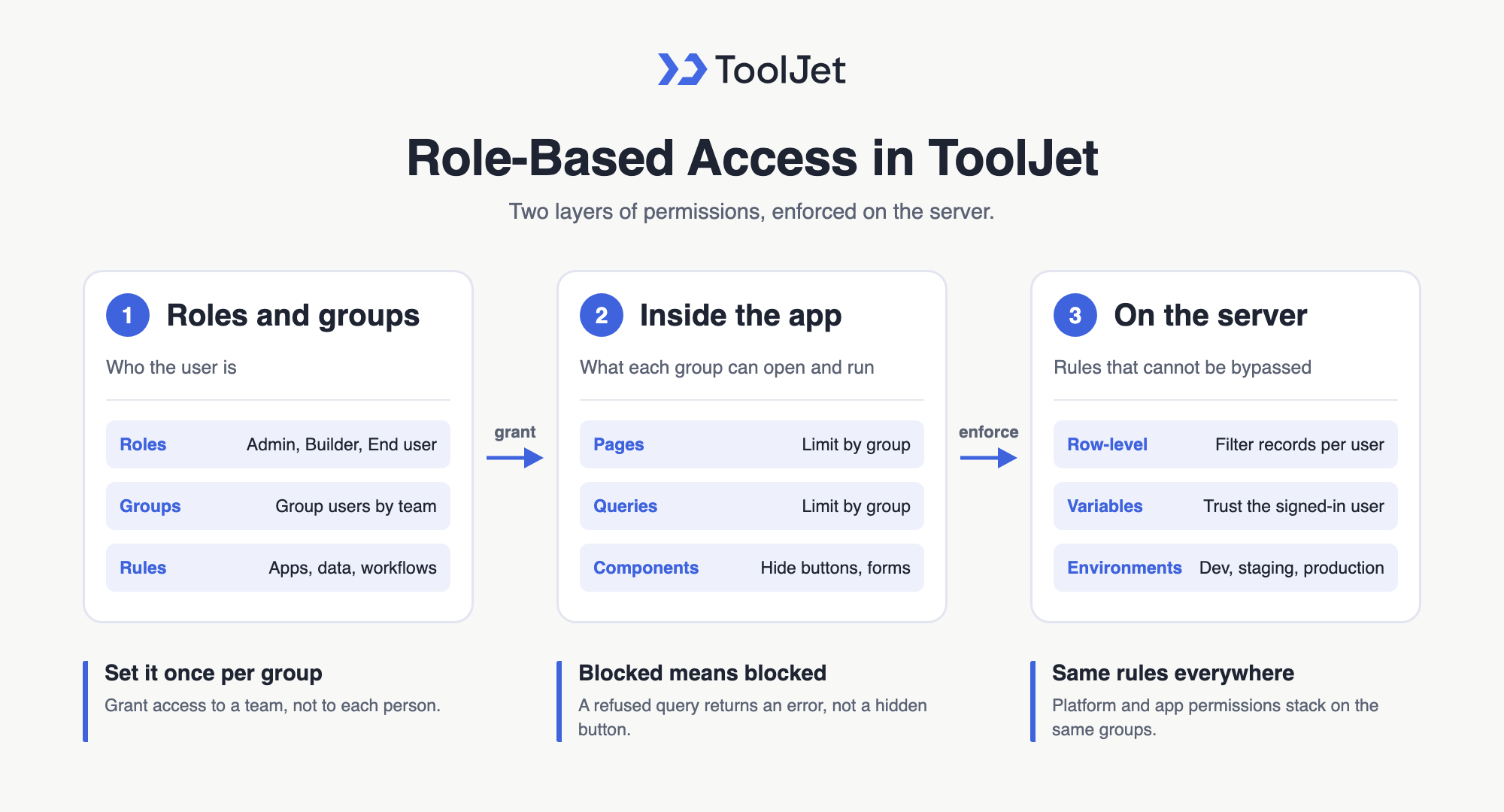
ToolJet role-based access control: roles and groups, app permissions and server-side rules
Enterprise Features for Your Review Analysis App
Review data is customer feedback, so ToolJet also offers SAML SSO, audit logs, Git Sync and Docker self-hosting for teams that need them.
Final Takeaways
A review storm becomes a one-page brief when Jev labels and a person decides. On the recorded run, Jev labelled 100 reviews in 00:06.4, with 38 flagged for follow-up. All reviews are synthetic, and the app has not been tested with real analyst logins. Build it yourself on ToolJet Cloud.
Build your own with ToolJet MCP
Build a review storm analyzer with ToolJet MCP, then request a ToolJet demo for your launch-week feedback flow. Start free on ToolJet Cloud.
 Table of contents


