


What Is a Support Ticket Sorter?
Support teams need a support ticket sorter when an inbox nobody can triage in time buries urgent messages. Build a support ticket sorter with ToolJet MCP and Jev, TypeSafe’s decision model, and 100 synthetic tickets turn into a reviewable queue. Jev returns topic, urgency, clarity, escalation guidance, confidence and a short reason for each record while a person decides what to do next. An agent generated the app, and the result is a structured ToolJet application with data, queries and interface together that the team keeps running.

Ticket detail panel: the customer’s original message next to Jev’s structured result, with team, priority and note controls for the agent

The whole 100-ticket sort at 10 times speed on the recorded run: the processed counter climbs to 100 and the Jev timer stops at 00:07.3, then the queue tabs and table fill in
How Do You Sort Support Tickets Quickly?
Sort support tickets by reading each message, classifying topic and urgency, routing unclear cases to human review, and letting a reviewer save the final decision. A coding agent can build that as a working app with ToolJet MCP, so the queue, detail panel and saved edits land inside ToolJet.
- Gather a batch of support messages
- Classify each ticket by topic and urgency
- Route unclear items into human review
- Let a reviewer edit team, priority and notes
- Save the final triage decision back to the queue
How Does Jev Sort Tickets Into Queues?
On screen, the sorter is a dense console with a top bar, queue tabs, filters, a ticket table and a detail panel on the right. The main action is Sort, which fills the queue from the batch and lets a reviewer switch between All, Untriaged, Respond now, Standard and Needs human review. Clicking a row opens the original message and Jev’s result side by side, and the reviewer can change team or priority, add a note and save. Jev returns topic, urgency, clarity, whether escalation is suggested, confidence and a short reason, with confidence shown as a percentage and clarity used as a score for routing. A live processed counter and a Jev-time timer follow completed, saved decisions so the reviewer can see how the run is moving. The original message stays visible, so the edit is about the triage, not the text.
- Sorts 100 synthetic tickets into reviewable queue tabs
- Shows Jev’s topic, urgency, clarity and escalation suggestion beside the source message
- Lets the reviewer change team or priority, add a note and save
- Tracks saved decisions with a live processed counter and Jev-time timer
- Routes unclear items into human review from the queue rules
Set Up ToolJet MCP and the TypeSafe Datasource
ToolJet MCP connects your coding agent to your ToolJet workspace, so the agent can create the tables, queries and components for you. Set it up with the ToolJet MCP overview and the ToolJet MCP repository. TypeSafe is a decision-model platform: its datasource lets a ToolJet app ask Jev typed questions and get structured answers, such as a choice, a score or a yes/no with a confidence. Add the TypeSafe datasource to the workspace and name it typesafe, which is the name the build prompt refers to.
- At build time: ToolJet MCP lets the agent create the app in your workspace.
- At run time: the app calls Jev, TypeSafe’s decision model, through the typesafe datasource and shows its typed answers next to the record.
What Prompt Built The Support Sorter?
The build reached this shape through several passes. The requirements are consolidated here so you can reproduce the same app in one shot.
Build a polished internal app called Support Ticket Sorter in ToolJet. Keep it to one page with a dense, clean console look, a pale grey canvas, a navy top bar and teal action buttons. Use native components only, with no animation, gradients or KPI cards, and hide the page header and navigation. Use existing PostgreSQL, not ToolJet DB, and create four tables: stk_tickets, stk_triage, stk_notes and stk_runs. Seed 100 fictional SaaS support tickets, all synthetic, across billing, login, bug, feature request and account access issues, with varied length, urgency and clarity. Use the existing TypeSafe datasource through Jev for triage. For each ticket, ask Jev for topic, urgency, clarity, whether escalation is suggested, confidence and a short reason grounded in the message. Derive the assigned team from topic with a visible routing rule, and route unclear items into human review when topic is unclear, topic confidence drops under 60 percent, or clarity is 1 or lower. Keep Jev’s own values alongside any agent override. Build a navy bar with the product name, a live processed counter, a Jev-time timer, Sort, Resume, Reset and a progress bar. Add queue tabs for All, Untriaged, Respond now, Standard and Needs human review, plus filters for topic, urgency, team and review status. Show a dense ticket table and a right-side detail panel with the original message, Jev’s structured result, notes, and team, priority and note inputs with Save. Support pause and resume, show the real processed count and time on completion, and never send a reply, issue a refund or change an account automatically. Run the sort with 12 parallel workers, keep results in memory, save them to PostgreSQL in bulk every 50 tickets plus one at the end, reload the board after each bulk save, and close the run and reload the board together at the end. Declare every query parameter in each query’s parameters list. Create groups Support Sorter – Agents, Support Sorter – Leads and Support Sorter – Viewers with app view access. Only Agents and admins can run the sort, Jev, save and note queries, Reset is admin-only, and Leads and Viewers are read-only. Gate the UI buttons on the current user’s groups.
How Does ToolJet MCP Create The Queue?
ToolJet MCP works through the whole application, from the data model and queries to the component tree and the wiring between them, so the result lands inside ToolJet as a structured app instead of a codebase you have to assemble yourself. Enterprise app building does not stop at the interface, and the runtime carries data connections, workflows, permissions, deployment and ongoing change where supported, which matters when the queue keeps changing. You can still move from AI generation to visual editing and then to code when a case needs it, and the ToolJet MCP documentation shows the pattern.
How Was The Undefined Run Id Fixed?
The first Sort click stopped before the queue filled, and the detail panel stayed blank. The run id was undefined because query parameters were not declared in each query’s options, so parameter interpolation resolved to an empty string. Declaring them everywhere fixed the run and the panel.
Which Tables Power The Support Queue?
The app ended up with four tables. stk_tickets stores the 100 synthetic support tickets, stk_triage keeps Jev’s structured result and any agent override, stk_notes stores ticket notes, and stk_runs records each sort run with its status, counts and Jev time.
| Page | Components | What they cover |
|---|---|---|
| Command center | 29 | Navy bar with counter and timer, queue tabs, filters, ticket table and detail panel |
What Did ToolJet MCP Generate?
| Metric | Result |
|---|---|
| Pages | 1 |
| PostgreSQL tables | 4 |
| Queries | 21 |
| Components | 29 |
| Code files to maintain | 0 |
| Repair cycles | 2 |
Who Uses Support Operations Queues?
Any team that handles a steady flow of inbound customer messages can use this pattern: SaaS and software support, e-commerce and marketplace service desks, fintech and banking support, telecoms and utilities, and IT or HR helpdesks. The same inbox-to-queue layout fits other review queues where an AI suggestion helps a person decide, such as feedback triage or internal request routing.
Who Can Access The Support Sorter?
The app uses three ToolJet groups. Support Sorter – Agents (and workspace admins) can start and resume the sort, run Jev, change team or priority and save notes. Support Sorter – Leads and Support Sorter – Viewers can view everything but cannot write. Reset is admin-only. These rules are enforced on the queries themselves, so a blocked user gets a server-side refusal, not just a hidden button. The groups currently have no members.
Automating Processes with ToolJet Workflows and Sub-Workflows
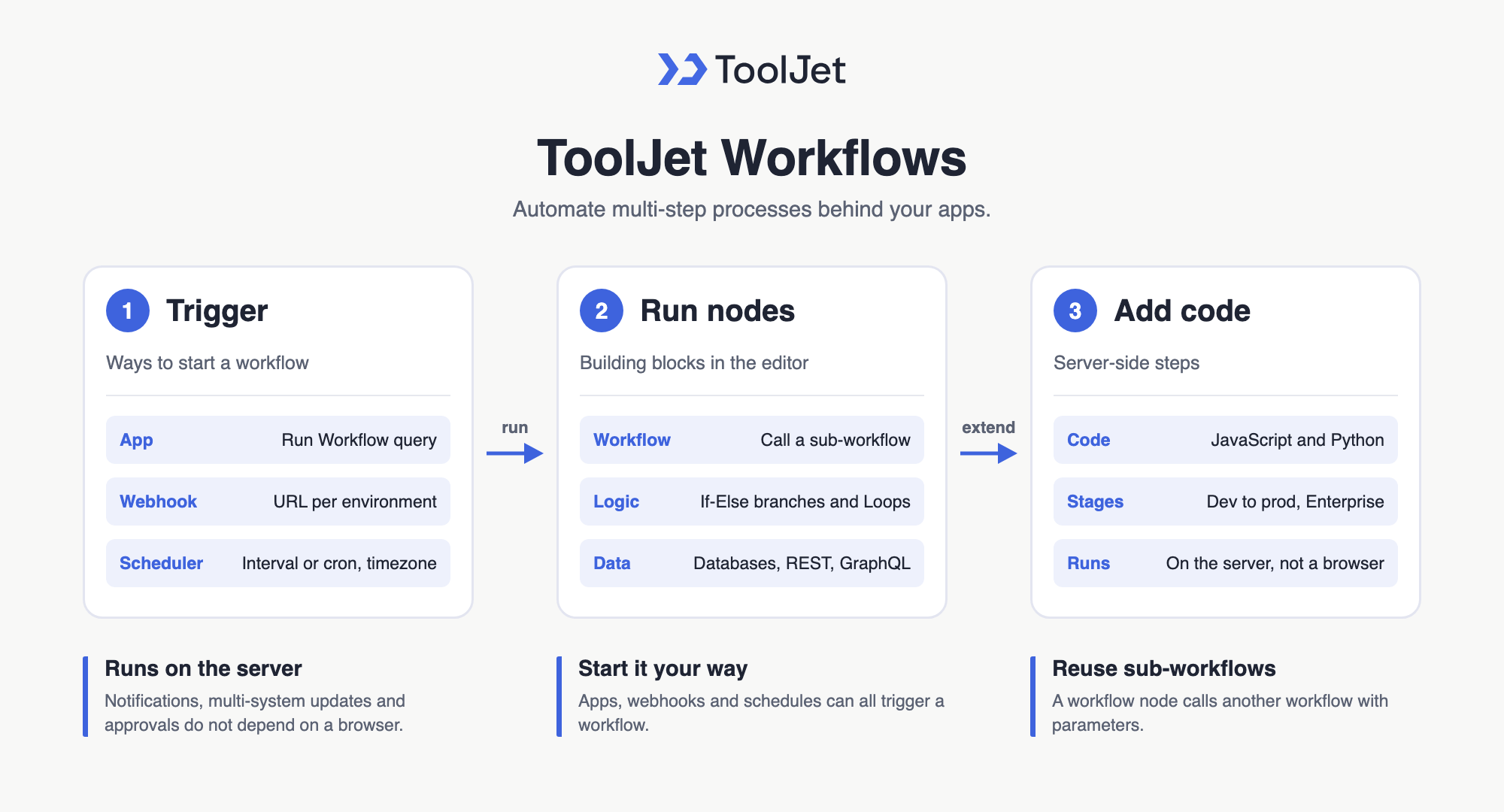
A Support Ticket Sorter app often needs work to happen behind the scenes, and ToolJet Workflows automate it with a visual, node-based editor that apps, webhooks and schedules can trigger. Notifications, multi-system updates and approvals run on the server instead of in someone’s browser.
When an agent saves a ticket into Needs human review, you can hand that handoff to a workflow so leads get an alert without leaving the queue.
Automating Processes with ToolJet Workflows and Sub-Workflows
Workflow Triggers: Apps, Webhooks and Schedules
- Triggering workflows from an app: add a Run Workflow query in the query panel, pass parameters and attach it to an event handler such as a button click or form submit.
- Webhook triggers: start a workflow when an external system sends an HTTP request, with a separate endpoint URL for each environment.
- Scheduled workflows: run on intervals or cron expressions in a chosen timezone, available from the Team plan.
Sub-Workflows, Logic and Code Nodes
- Workflow node for sub-workflows: call one workflow from another and pass parameters, so shared steps such as logging or notifications live in one reusable child workflow.
- Logic nodes: branch with If-Else and iterate with Loop nodes, as outlined in the ToolJet Workflows overview.
- Data source nodes: read and write databases, REST or GraphQL APIs and SaaS tools inside the flow.
- JavaScript and Python nodes: transform data and apply business logic in server-side code.
- Workflow environments: build and test in Development and Staging before running in Production, on the Enterprise plan.
Workflows let the Support Ticket Sorter app hand off slow or multi-step work, such as alerts or updates to other systems, to a reusable automation that any app in the workspace can call.
Enterprise Features for Your Support Ticket Sorter
Support tickets, notes, and reviewer overrides can carry customer context and internal decisions. ToolJet covers that governance at the platform layer, so you configure it once instead of rebuilding it in every app.
- SSO and SCIM: sign in with SAML, OIDC or LDAP, and provision users automatically
- Role-based access control: scope permissions to the app, the data source, and each query
- Audit logs: track every login, edit, and approval decision for compliance review
- Air-gapped deployment: self-host on Docker or Kubernetes so your data stays in your network
- Multiplayer editing: several builders work on the same app, with versioning and Git sync
- ToolJet AI inside your own deployment: run the AI features in your tenancy rather than a shared service
You could add a notification layer with ToolJet Workflows. For example, when a ticket moves into Needs human review, a workflow could post the ticket summary in Slack, email the lead through Gmail, and write the handoff note back to stk_notes.
Final Takeaways
This support ticket sorter shows how 100 synthetic messages become a reviewable queue with live counts, queue tabs, filters, a detail panel and saved triage edits. Jev reads each ticket, returns topic, urgency, clarity, escalation guidance and a reason, and the agent keeps control of the final decision. Using ToolJet MCP for a support ticket sorter turns manual triage into a structured app that stays editable after the first run. That gives you one place for the queue, the notes and the overrides, inside ToolJet, instead of scattering the work across messages and spreadsheets.
Build your own with ToolJet MCP
Build a support ticket sorter with ToolJet MCP, then request a ToolJet demo for your queue. Start free on ToolJet Cloud.
 Table of contents


