


What Is a Visual Quality Gate?
You can build a visual quality gate with ToolJet MCP for bench inspection. It compares part photos with approved references and outlines only the regions that differ, so the check stays clear. Inspectors can pass, fail, or send a second opinion, while the quality engineer manages references and sensitivity settings. The same flow gives the plant manager a summary of which region keeps failing. On a bench tablet, the team can review parts without leaving the line or relying on a printed reference photo.
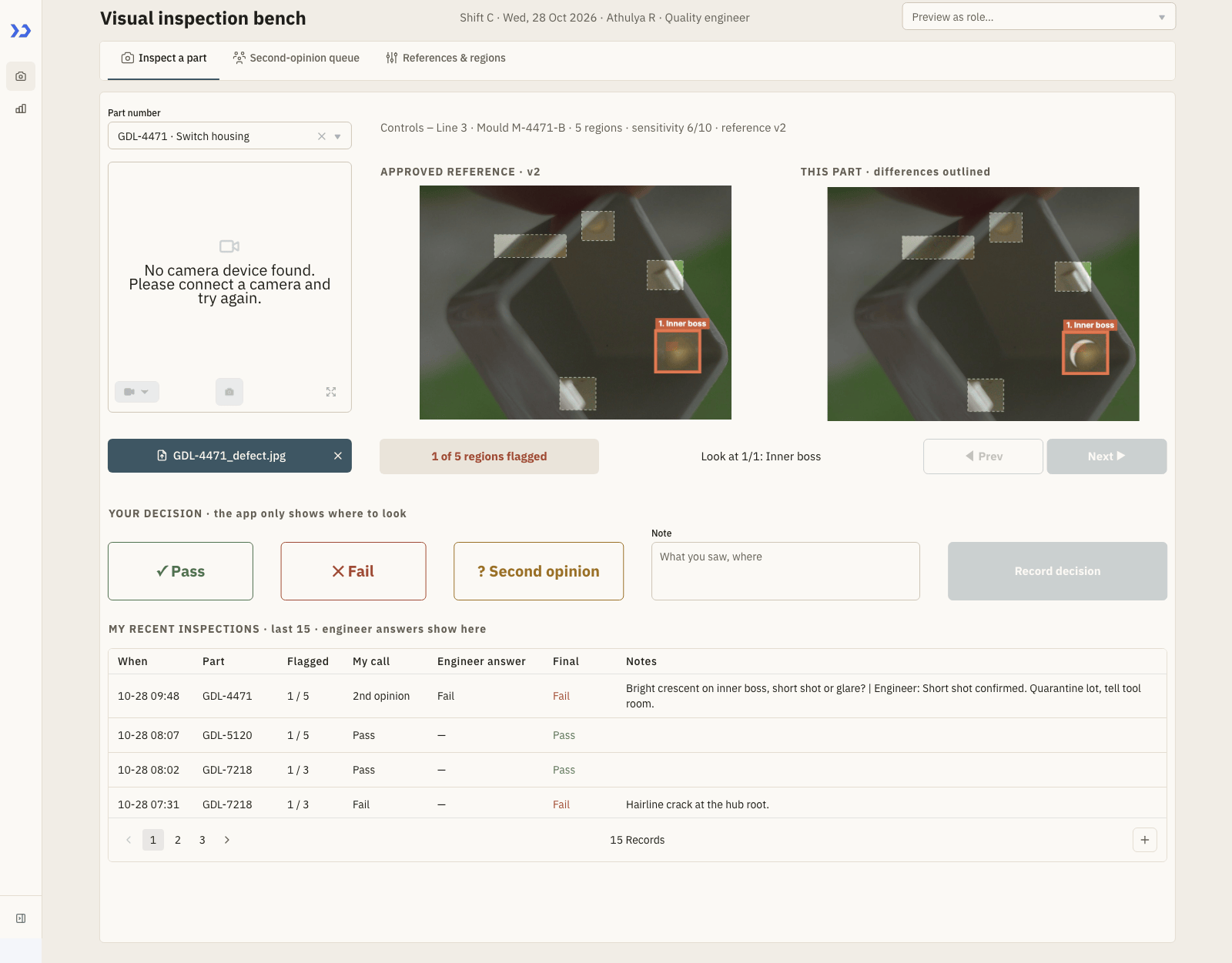
The Inspect page: the approved reference beside the part photo, with one of five regions flagged and outlined.

The second-opinion queue: the engineer sees the reference, the inspector’s photo as flagged and the note before answering.
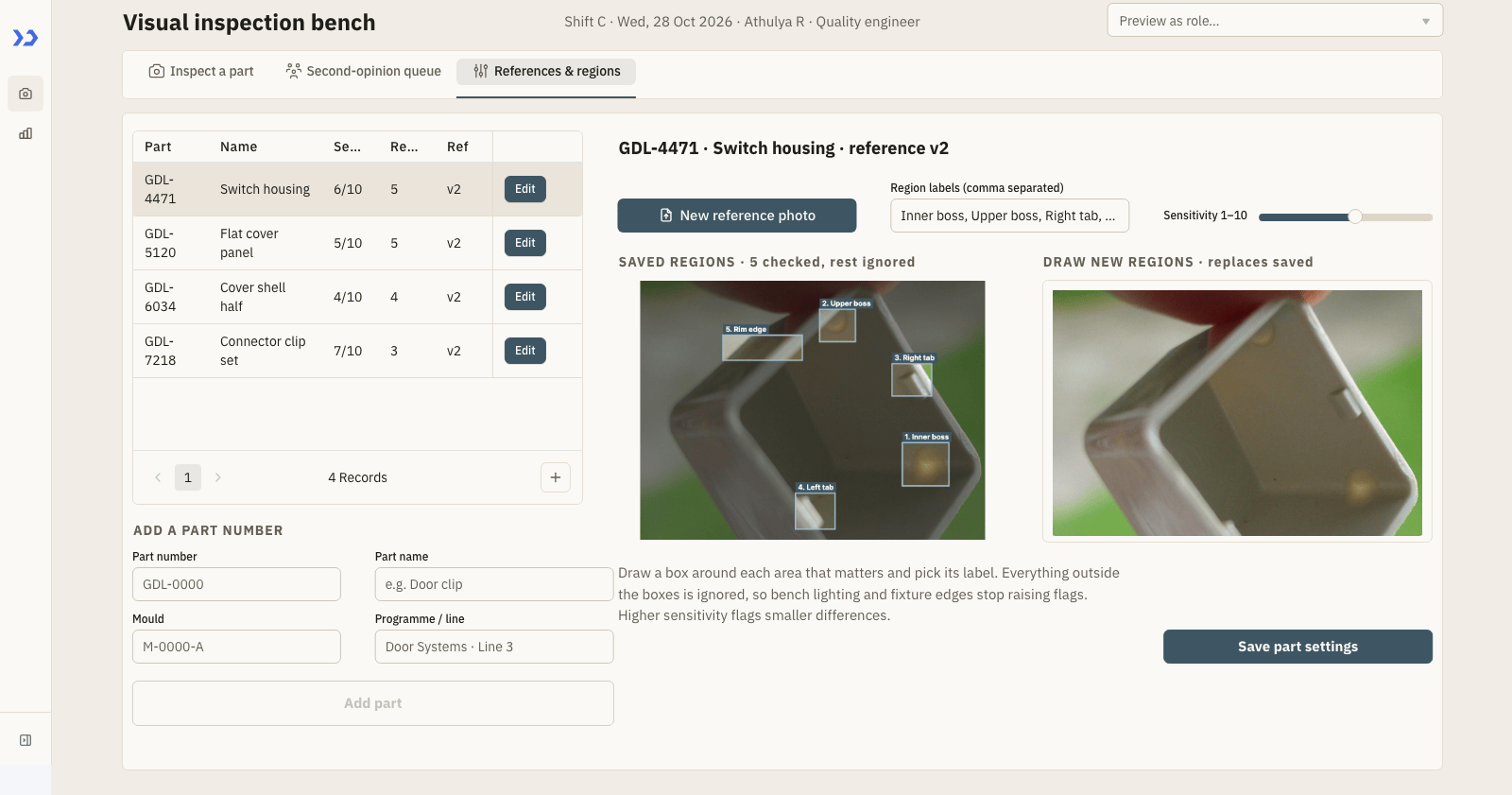
References and regions: the engineer sets the reference photo, draws the regions that matter and sets the sensitivity per part.

The Summary page: KPI tiles, pass rate by part against a 90% target, a heat-coloured part-by-shift table and where parts failed.
How to Review Part Defects?
Track moulding defects by photographing each part beside the approved reference, outlining only the regions that differ, and recording pass, fail or second opinion with a short note. ToolJet MCP lets a coding agent build that workflow as a working app with the data, screens and decision flow connected.
- Choose the part number and pull its approved reference
- Capture or upload the inspection photo
- Mark the differing regions and step through them
- Record pass, fail or second opinion with a note
- Review the engineer reply and clear the queue
How Does the Inspect Page Work?
The Inspect page keeps the capture, comparison and decision flow in one place for the inspector, with the part picker, camera upload, approved reference and photo preview arranged for a bench tablet. A single view shows only the regions that differ, and the inspector can step through the flagged boxes with Prev and Next instead of hunting across the image. The same page keeps the second-opinion queue close at hand, so the engineer sees both photos and the note, then writes back a Pass or Fail answer that the original inspector can mark as seen. References & regions lets the engineer maintain the approved photo, draw the boxes that matter, label them and set sensitivity per part, while Summary stays read only with day filters, KPI tiles, charts and the inspection log.
- Side-by-side photo review with only the differing regions outlined
- Pass, fail and second opinion decisions with a short inspector note
- Engineer-controlled references, regions and sensitivity per part
- Second-opinion replies that flow back to the original inspector
- Manager summary with region failure patterns and shift-level performance
Build a Visual Quality Gate with ToolJet MCP From Prompt to App
Want to build it yourself? Start with the ToolJet MCP repository for setup instructions, supported agents, and everything you need to follow along.
Why Was the Prompt Consolidated?
The build took several passes to shape the screens, rules and data model into one flow. The requirements are consolidated here as a single prompt that could have been used from the start, so you can reproduce the same app in one shot.
Keep it to two pages. Inspect has three tabs: part capture and review, a second-opinion queue, and references plus regions. The inspector captures or uploads a part photo, compares it with the approved reference, sees only the differing regions outlined, steps through those regions with Prev and Next, and records pass, fail or second opinion with a short note. The engineer sees second opinions with both photos and the note, then sends back Pass or Fail. Summary is read only for the plant manager. It uses a production-day picker and shows KPI tiles, pass-rate views, a heat-coloured pass-rate table, fails by region, a cluster view for repeated failures and a full inspection log. Design it as a dense bench-tablet app with muted Nordic colours, soft neutrals, restrained blue accents, compact rows, large controls and high contrast for gloved hands. Use ToolJet Database for part metadata, inspection rows and roles, plus AWS S3 for photos. Make the quality engineer own the reference photo, region boxes and sensitivity. Make the inspector decide pass, fail or second opinion. Use email-based roles for Inspector, Quality engineer and Plant manager, with a preview switch for role testing. Seed four part numbers with reference photos, region boxes and sensitivities, plus a realistic multi-shift inspection history.
How Does ToolJet MCP Assemble It?
ToolJet MCP works through the whole application, data model, pages, components, queries and the wiring between them, and it creates the result as a structured ToolJet application inside ToolJet rather than handing you a codebase to run yourself. Enterprise app building does not end at the interface, because data connectivity, workflows, permissions, deployment and ongoing change are part of the job, and the generated app sits on a runtime that carries those where supported, as the ToolJet MCP documentation describes. The path stays open, so you can move from AI generation to visual editing and then to code when a case needs it.
What Fixed the Saved Regions View?
The saved regions did not show up on the reference editor because the drawing component would not render defaults that were already stored. The fix was to show the saved region list alongside the photo, so the engineer could confirm the boxes before updating the reference.
What Did Validation Run Show?
The results table gathers the validated day-level inspection views, the role preview and the summary output for the completed app.
| Metric | Result |
|---|---|
| Pages | 2 |
| ToolJet DB tables | 4 |
| Queries | 21 |
| Components | 81 |
| Code files to maintain | 0 |
| Repair cycles | 1 |
| Final validation | 0 errors |
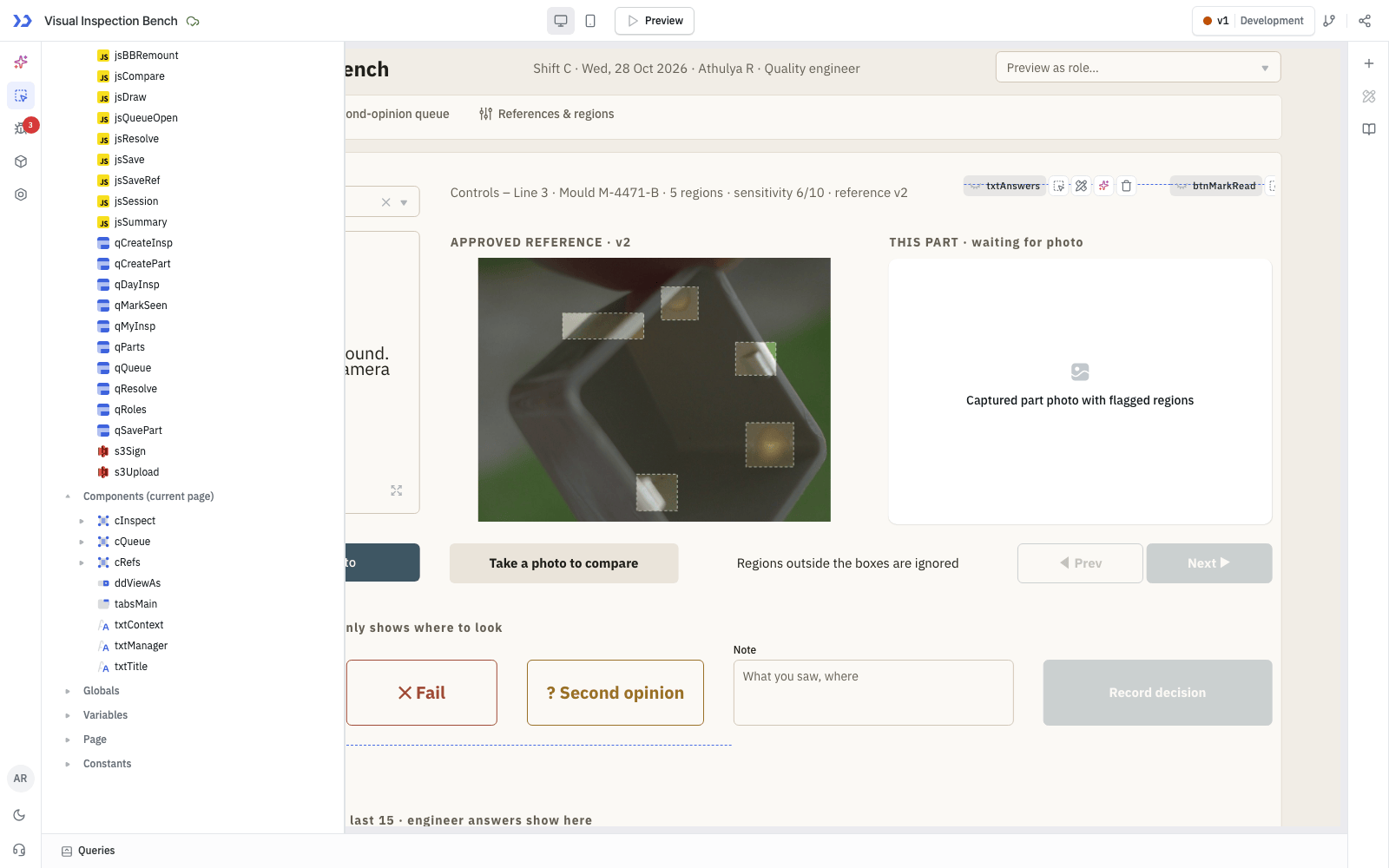
The components ToolJet MCP created, in the ToolJet inspector
Which Teams Use Visual Quality Gate?
Injection-moulding and tier-1 automotive plants that check finished parts against a golden sample. The same pattern fits any shop floor that compares a photo with an approved reference, such as electronics enclosures, packaging or medical-device housings.
Who Can Access Each View?
Three roles are kept in a table by email. Inspectors record decisions and see the engineer’s answers on their own inspections. The quality engineer sets reference photos, regions and sensitivity and answers the second-opinion queue. The plant manager gets the read-only Summary. What each role sees is controlled inside the app and a Preview as role switch lets you demo each one; no ToolJet page or query permissions were applied.
Generating Apps from a Prompt with ToolJet AI
A Visual Quality Gate app can also start from a single description: ToolJet AI, built into the product, generates a working app from a natural-language prompt, which the team then refines in the visual App Builder. It gives non-developers a fast way to create and change apps in the browser.
A coding agent builds the first version of the visual quality gate, while a quality engineer can still refine the app later through ToolJet’s in-browser AI chat. That keeps the inspection flow editable by the team that runs it.

Generating Apps from a Prompt with ToolJet AI
From Prompt to Working App
- AI app generation: describe the business app on the ToolJet home page and ToolJet builds it directly, opening the App Builder with UI components, queries and data bindings already configured.
- Edit with a prompt: update components and queries in any new or existing app, and @mention a specific component or query to target it exactly.
- Generate modules: create reusable modules from a prompt inside the Module Builder.
Queries, Code and AI Model Options
- AI query generation: create fully configured queries, write JavaScript and Python snippets, and auto-sort a crowded query panel into folders.
- AI credits: each AI operation consumes credits based on its complexity, and monthly credits are used before add-on credits.
- Bring your own LLM key: on the Enterprise plan, authenticate AI requests with your own provider key and pay the provider directly instead of using ToolJet AI credits.
- ToolJet AI Enterprise: self-hosted Enterprise customers run the AI server inside their own environment, so no AI data is sent to ToolJet.
ToolJet AI is one of the two ways to build with AI in ToolJet: the in-product chat, or ToolJet MCP from coding agents such as Claude Code. Both can create and modify apps, so the Visual Quality Gate app can be refined later by prompt from the browser as well as from a developer’s editor.
Enterprise Features for Your Visual Quality Gate
A visual quality gate holds part photos, inspection notes, and role mappings. ToolJet covers that governance at the platform layer, so you configure it once instead of rebuilding it in every app.
- SSO and SCIM: sign in with SAML, OIDC or LDAP, and provision users automatically
- Role-based access control: scope permissions to the app, the data source, and each query
- Audit logs: track every login, edit, and approval decision for compliance review
- Air-gapped deployment: self-host on Docker or Kubernetes so your data stays in your network
- Multiplayer editing: several builders work on the same app, with versioning and Git sync
- ToolJet AI inside your own deployment: run the AI features in your tenancy rather than a shared service
You could add a notification layer with ToolJet Workflows. For example, a workflow could fire when a second opinion is submitted, send a Slack message to the line lead, send a Gmail message to the quality engineer, and write the decision back to vi_inspections.
Final Takeaways
This build shows a two-page visual quality gate for an automotive moulding bench, with side-by-side part review, outlined mismatch regions, a second-opinion loop and a manager summary that surfaces repeat failures. The app replaces a taped reference-photo workflow with a structured review flow that keeps the photo, the note, the engineer reply and the role logic together. With ToolJet MCP, you move from a prompt to a working ToolJet application that stays editable as part references and inspection rules change. That matters because the team keeps the same process, but the screen and the data now live in one place.
Build your own with ToolJet MCP
Build your own visual quality gate with ToolJet MCP on ToolJet Cloud, then request a ToolJet demo to map it to your parts and photos.


