


What Is a Vendor Risk Register?
Build a vendor risk register with ToolJet MCP for procurement and compliance teams. The register uses Jev, TypeSafe’s decision model, to suggest a tier, score, needs-review percentage, and top risk while a person decides. Jev is TypeSafe’s decision model. It turns the review flow into a structured ToolJet application with data, queries, and interface together. If your current process is a shared spreadsheet only one person knows how to work, this guide shows a better register to keep running.

The Register page: KPI tiles, the vendor table with AI and confirmed tiers, and the right-hand panel with the profile, certificates and the live TypeSafe assessment for Antwerp Brokerage NV.
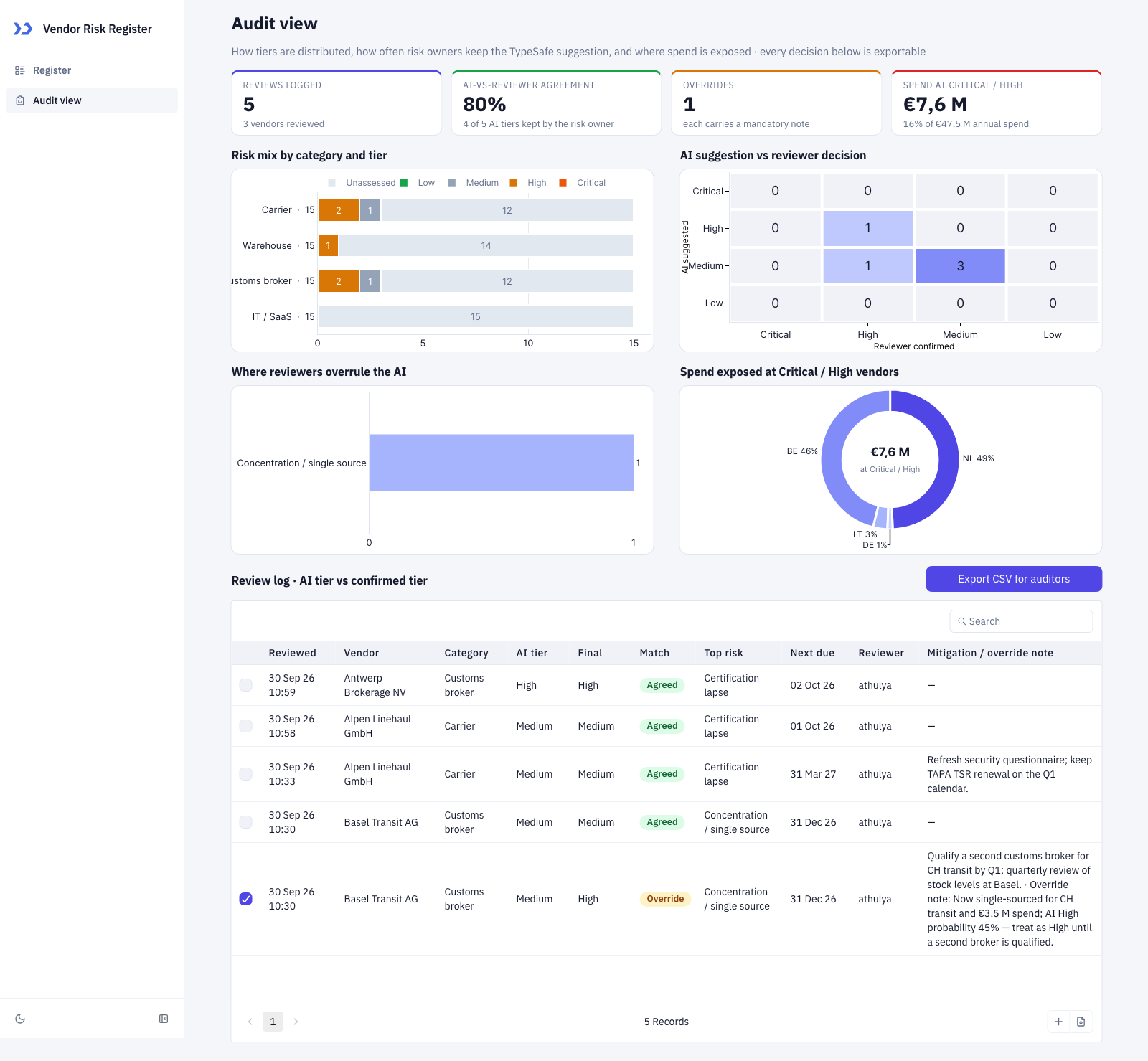
The Audit view: tier mix by category, AI-vs-reviewer heatmap, overrides by top risk, Critical / High spend by country and the exportable review log.
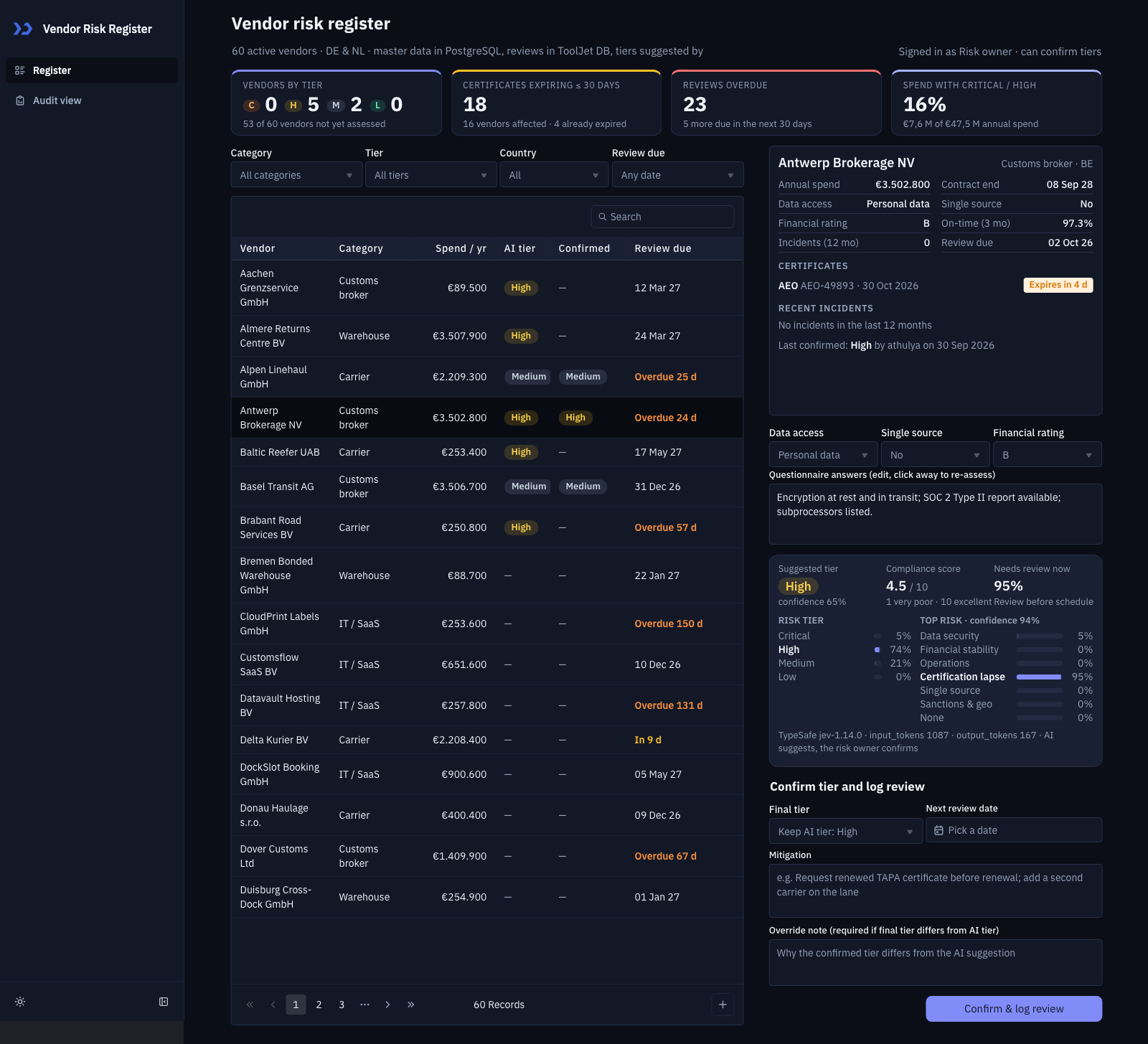
The Register page in dark mode, with the same vendor selected and the TypeSafe assessment shown.

The Audit view in dark mode: the charts and the review log switch with the app’s theme.
How to Review Vendor Risk Consistently?
Track vendor risk by keeping each supplier’s profile, certificate status, incidents, performance, and review decision in one register, then use the same record for audit notes and follow-up dates. A coding agent can build that process as a working app with ToolJet MCP.
- Collect vendor profile details and certificate status
- Check incidents, performance, and financial rating
- Score the vendor and suggest a risk tier
- Review the suggestion, add a note, and confirm or override
- Record the decision and keep the audit trail current
How Jev Scores Vendors and Reviews?
Jev returns a risk tier and top risk as choices with confidence and probability bars, plus a compliance score and a needs-review percentage. The Register page centers on a dense vendor table, KPI tiles, and a right-hand detail panel. Selecting a vendor opens its profile, certificate badges, recent incidents, the Jev assessment card, and the review form in one place, so the reviewer does not jump between screens. Filters narrow the list by category, tier, country, and review status. The Audit view adds stacked bars, a comparison heatmap, override trends, and a review log with CSV export, and the same layout works in light and dark mode.
- Two page register and audit flow
- Dense vendor table with filters and detail panel
- Jev assessment card with confidence and review fields
- Required note when the confirmed tier changes
- CSV export for auditor review
Set Up ToolJet MCP and the TypeSafe Datasource
ToolJet MCP connects your coding agent to your ToolJet workspace, so the agent can create the tables, queries and components for you. Set it up with the ToolJet MCP overview and the ToolJet MCP repository. TypeSafe is a decision-model platform: its datasource lets a ToolJet app ask Jev typed questions and get structured answers, such as a choice, a score or a yes/no with a confidence. Add the TypeSafe datasource to the workspace and name it typesafe, which is the name the build prompt refers to.
- At build time: ToolJet MCP lets the agent create the app in your workspace.
- At run time: the app calls Jev, TypeSafe’s decision model, through the typesafe datasource and shows its typed answers next to the record.
What Is the One Prompt for the Register?
The build took several passes to settle the data model, page layout, and review rules. Those requirements are consolidated here into one prompt you can use from the start and reproduce in a single shot.
Build a polished internal app called Vendor Risk Register in ToolJet.
The Register page shows vendors with risk tier, certificate status, review status, filters, KPI tiles, and a detail panel for the selected vendor. Seed sixty vendors across the four categories, with some certificates expiring within thirty days.
Design it as a dense enterprise operations app with dark indigo and a matching light mode, one indigo accent, compact rows, strong hierarchy, and status colours used only where they help. Use ToolJet native components only, and size table columns so headers and values are never cut off.
Use PostgreSQL for vr_vendors, vr_certificates, vr_incidents, and vr_performance, and ToolJet DB for vr_reviews, vr_ai_assess, and vr_buyer_scope. The database split should keep the vendor master, certificates, incidents, performance, review decisions, cached Jev output, and buyer scope clear.
Use only the existing TypeSafe datasource for the AI step. When a vendor is selected, and again after any profile edit, run the evaluation with the vendor profile and return a suggested risk tier, compliance score, needs-review percentage, and top risk. Show confidence and probability bars for the choices, and let the risk owner confirm or override the AI tier. A note is required when the final tier differs from the suggestion, and saving twice must not create a second review. The owner confirms or overrides the AI tier, and the review is logged for NIS2 and customer audits.
How Does ToolJet MCP Assemble the App?
ToolJet MCP works through the whole application, not just the screen, so the data model, pages, components, queries, and the wiring between them land together as one structured ToolJet application. The ToolJet MCP documentation shows the same path, and the TypeSafe datasource handles the evaluation flow while the generated app sits on a runtime that carries data connections, workflows, permissions, deployment, and ongoing change where supported instead of handing you a codebase to operate yourself. That matters here because a vendor review is not only a score, it is a record, a decision, and a trail that procurement and compliance both need to read. The path stays open, so you can move from AI generation to visual editing and then to code where the case needs it.
Why Did the Audit View Load Blank?
The audit page opened with empty charts and a blank log when you landed on it directly from a link. The cause was that the data refresh chain only ran after an earlier page action, so the page never loaded its own data on entry. The fix makes the audit view load on open.
What Verification Checks Did We Cover?
The results table lists the verification checks that show the register loads, re-evaluates on edits, records review overrides, opens the audit view directly, and renders cleanly in both themes.
| Metric | Result |
|---|---|
| Pages | 2 |
| PostgreSQL tables | 7 |
| Queries | 19 |
| Components | 35 |
| Code files to maintain | 0 |
| Repair cycles | 1 |
Which Logistics Teams Use the Register?
Third-party logistics, freight forwarding, warehousing and customs brokerage firms that must justify supplier risk under NIS2 and customer audits. The same pattern fits any procurement or compliance team that tiers vendors, tracks certificates and reviews, and wants an AI suggestion a named owner has to confirm.
Who Can Use the Risk Register?
Three groups were created: Risk Owners (procurement) can confirm tiers and log reviews, Compliance can view everything and export the audit log but not edit, and Category Buyers see only their own category’s vendors. The two write queries are restricted to Risk Owners and admins on the server. The buyer category filter runs in the browser, and the groups have no members yet.
ToolJet Database: Built-In PostgreSQL Storage for Full-Stack Apps
A Vendor Risk Register app needs somewhere to keep its records, and ToolJet Database gives it a built-in, PostgreSQL-backed database with no separate server to provision or connect. Builders can create tables, relate them and query them from the same platform where the app is built.
This register keeps vr_reviews, vr_ai_assess, and vr_buyer_scope in ToolJet DB, so procurement and compliance keep the review data inside the app without a separate database server.
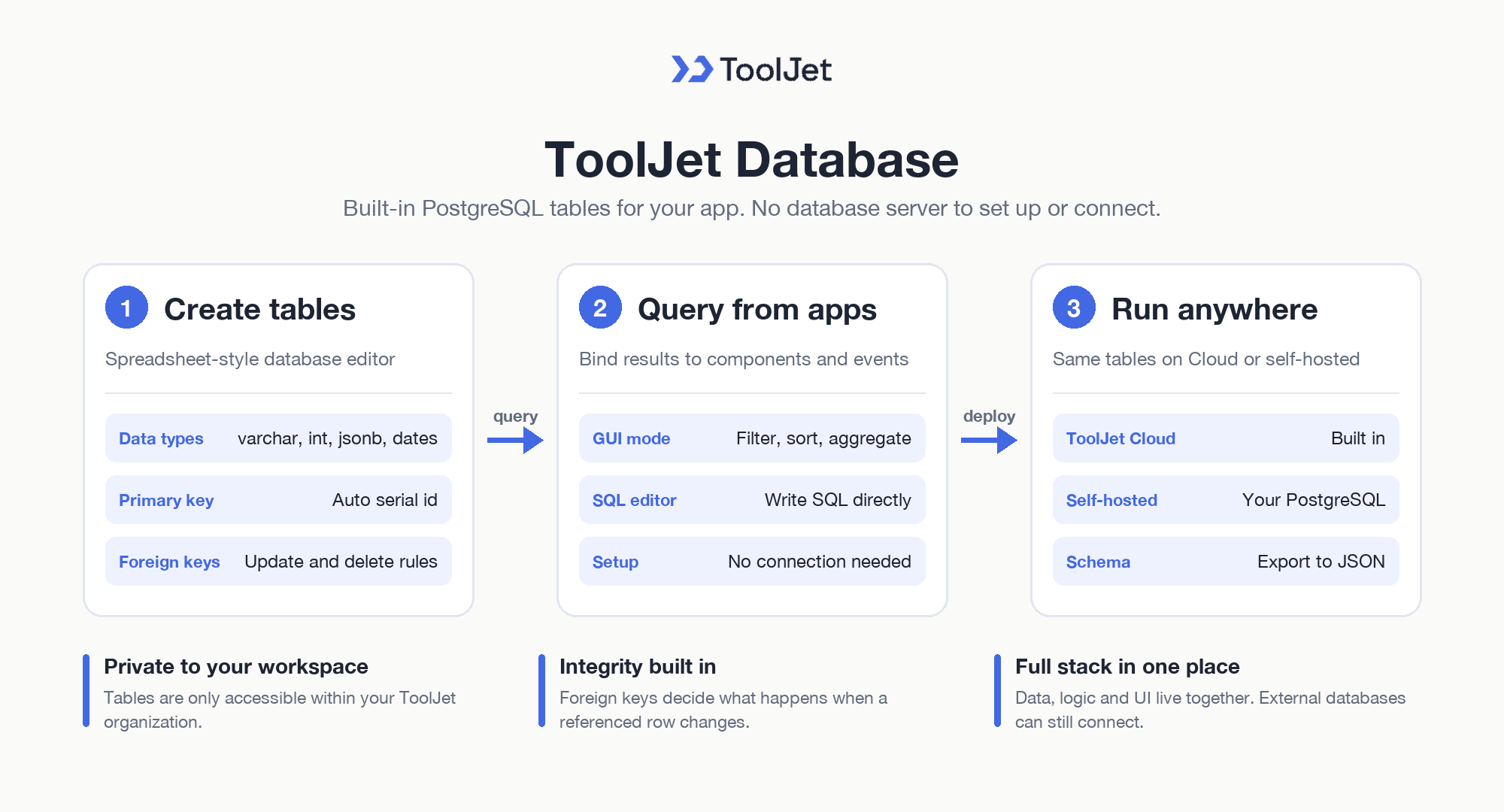
ToolJet Database: Built-In PostgreSQL Storage for Full-Stack Apps
Tables, Data Types and Relationships
- ToolJet Database overview: keep tables in a secure database that is only accessible within your ToolJet organization, on both ToolJet Cloud and self-hosted deployments.
- Database editor: create tables and edit, search, filter and sort rows in a spreadsheet-like interface.
- Supported data types: serial, varchar, int, bigint, float, boolean, date with time and jsonb columns, with an automatic serial id primary key on every new table.
- Foreign keys: link tables and choose what happens to a row when the referenced row is updated or deleted, keeping referential integrity.
Querying ToolJet Database from Apps
- GUI and SQL queries: list, filter, sort, aggregate and group rows in GUI mode, or write SQL directly in the SQL editor.
- Works like any data source: ToolJet Database queries bind to components and events the same way as other data sources, without connection setup.
- Self-hosted configuration: on your own deployment, ToolJet Database runs on a PostgreSQL database you configure and is exposed to the app through PostgREST.
- Schema export: export table schemas to a JSON file.
This lets the Vendor Risk Register app go full stack in one platform, with data, logic and UI together, while external databases can still be connected later. Table limits vary by plan on the ToolJet pricing page.
Enterprise Features for Your Vendor Risk Register
A vendor risk register handles supplier profiles, certificate records, and review notes. ToolJet covers that governance at the platform layer, so you configure it once instead of rebuilding it in every app.
- SSO and SCIM: sign in with SAML, OIDC or LDAP, and provision users automatically
- Role-based access control: scope permissions to the app, the data source, and each query
- Audit logs: track every login, edit, and approval decision for compliance review
- Air-gapped deployment: self-host on Docker or Kubernetes so your data stays in your network
- Multiplayer editing: several builders work on the same app, with versioning and Git sync
- ToolJet AI inside your own deployment: run the AI features in your tenancy rather than a shared service
You could add a notification layer with ToolJet Workflows. For example, a workflow could fire when a review is submitted, post to the manager in Slack, email the employee through Gmail, and write the decision back to vr_reviews.
Final Takeaways
This vendor risk register shows how procurement and compliance can keep vendor scoring, certificate checks, reviewer overrides, and audit history in one editable ToolJet app. The build moves the team away from a shared spreadsheet and into a register where Jev suggests a tier, the owner confirms or overrides it, and the review log stays tied to the vendor record. For a team that needs the process visible for NIS2 and customer audits, the result is a real application, not a static screen, and you can build your own vendor risk register with ToolJet MCP on [ToolJet Cloud].
Build your own with ToolJet MCP
Build your own vendor risk register with ToolJet MCP for procurement review, then request a ToolJet demo. Start free on ToolJet Cloud.


