Business application development is the process of turning a business process into software that people can use reliably. It combines user interfaces, data, business rules, integrations and access controls. Examples include an employee request portal, an inventory tracker, a customer support workspace and a purchase approval app.
This guide explains how to choose between buying software, extending an existing system and building a custom application. It covers requirements, architecture, testing, deployment and ongoing ownership, with a purchase-request example you can adapt to your own team.
What is Business Application Development?
A business application supports a specific operational task: recording information, making a decision or completing a transaction. A CRM tracks customer relationships; an ERP manages connected business functions; a custom internal app can handle a process that does not fit either system. Business application development includes both the initial build and the work needed to keep its data, permissions and integrations correct after launch.
The key components of business app development include:
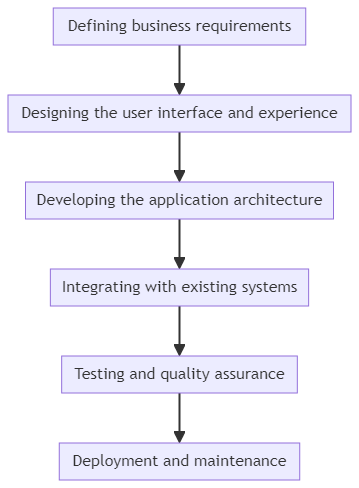
- Defining business requirements: Understanding the specific problems the application aims to solve and aligning them with overall business goals.
- Designing the user interface and experience: Creating intuitive and user-friendly interfaces that enhance productivity and adoption.
- Developing the application architecture: Choosing the right technology stack and designing a scalable and maintainable architecture.
- Integrating with existing systems: Ensuring seamless integration with an organization’s existing IT infrastructure and data sources.
- Testing and quality assurance: Conducting thorough testing to identify and fix bugs, ensure performance, and maintain high quality standards.
- Deployment and maintenance: Rolling out the application to end-users and providing ongoing support and maintenance.
Business applications can be grouped by purpose, such as finance, HR, sales or operations, and by delivery format. Web, mobile and desktop are delivery choices rather than mutually exclusive business categories:
- Web applications: Browser-based applications that can be accessed from anywhere with an internet connection.
- Mobile applications: Native or hybrid apps designed for smartphones and tablets, enabling on-the-go access to business functions.
- Desktop applications: Traditional software programs installed locally on individual computers for offline use.
Benefits of Developing Custom Business Applications
A custom application is worth considering when an important process does not fit the software you already use. Compare the expected benefit with the cost of building, operating and supporting it. The following benefits are possibilities to validate in a pilot, rather than guaranteed outcomes:
1. Improved efficiency and productivity
A purchase-request app can replace email handoffs with a single request record, an approval queue and a status visible to the requester. Measure time from submission to decision, duplicate entry and rework before and after the pilot. Automating an unclear approval rule can make mistakes happen faster, so agree on the process first.
2. Enhanced data-driven decision making
An operational dashboard can bring related records into one view without making a new copy of every source system. Define which system owns each field, when data refreshes and what happens when an integration fails. A visible last-updated time helps users distinguish current information from stale results.
3. Competitive advantage
Custom software can support a process that differentiates your business, such as a specialist quotation workflow or a customer onboarding experience. Build the distinctive part and reuse standard services where possible. Custom development alone does not establish a competitive advantage or guarantee revenue growth.
4. Improved customer experience
A customer-facing application can let users submit requests, attach documents and check progress without repeatedly contacting support. Test completion rates, accessibility and error recovery with representative users. Set expectations for response times and provide a human support route when the application cannot complete a task.
5. Enhanced collaboration and communication
A shared record can make ownership and handoffs clearer across departments. Store the current status, responsible person, decision history and relevant documents together. Notifications should direct people to that record rather than create competing versions of the same information.
6. Stronger security and compliance
Custom development gives you responsibility for implementing and maintaining security controls. Define who can read or change each record, enforce those rules on the server and test denied-access cases. Encryption, audit events, retention policies and recovery procedures must fit the data involved; choosing a platform does not by itself establish regulatory compliance.
7. Scalability and flexibility
Both packaged and custom applications can scale, and both have limits. Test your expected concurrent users, largest datasets and slowest integrations. Custom development offers control over changes, but also creates an ongoing obligation to maintain the implementation and its dependencies.
Step-by-Step Process of Business Application Development
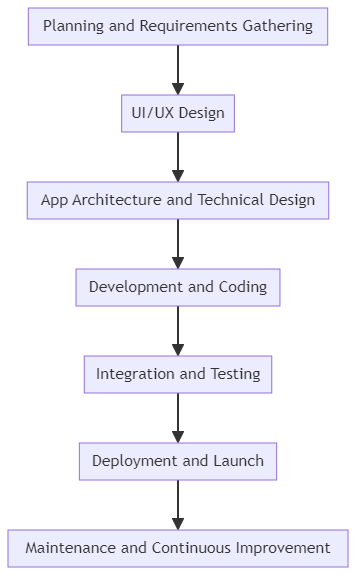
For a concrete example, consider a purchase-request app: employees submit an item and amount, managers approve requests within their authority, and finance records the purchasing outcome. The seven stages below show what to decide and what evidence to produce before expanding beyond a pilot.
| Stage | Purpose | Purchase-request example and deliverable |
|---|---|---|
| 1. Planning and requirements | Define the process and scope. | Record request fields, approval limits, user roles and success measures. Deliver an agreed requirements brief. |
| 2. UI/UX design | Prototype the essential journeys. | Test submission, approval and rejected requests with employees and managers, including on mobile. Deliver a reviewed prototype. |
| 3. Architecture and data design | Choose data ownership and integration boundaries. | Define request, approval and attachment records; identity mapping; server-side permissions; and ERP write behavior. Deliver a data model and access matrix. |
| 4. Development | Build one complete workflow before adding breadth. | Implement validation, queries, status transitions and audit events. Review AI-generated or manually written changes. Deliver a versioned pilot. |
| 5. Integration and testing | Verify correct behavior and failure cases. | Test unauthorized access, duplicate submissions, unavailable APIs, upload failures and concurrent approvals. Deliver test evidence and resolved defects. |
| 6. Deployment | Release to a controlled audience. | Separate environments, configure secrets, rehearse rollback and restoration, and train pilot users. Deliver a release and support plan. |
| 7. Maintenance | Operate and improve the application. | Monitor errors, process completion and costs; patch dependencies; review access; and retest backups. Assign an owner and prioritize measured improvements. |
For data-driven internal applications, ToolJet combines AI-assisted app generation with a visual builder. Teams can connect existing data and refine screens and queries. Review generated queries, validation and authorization before deployment; an app that looks complete can still contain unsafe write actions or incorrect business rules.
A practical ToolJet pilot can follow the same purchase-request example:
- Create the request form, approval queue and finance view.
- Connect the authoritative data source with appropriately scoped credentials.
- Implement validation and server-enforced permissions for each user role.
- Test rejected requests, duplicate clicks and failed integrations.
- Review the selected plan’s governance and deployment capabilities before production.
Agree on a release gate before the pilot starts: permitted users can complete the workflow, unauthorized users cannot access restricted records, failed writes are recoverable, and someone owns monitoring and support. Use the same acceptance criteria whether the application is coded manually, assembled visually or generated with AI.
Best Practices in Business App Development
To ensure the success of your business application development project, consider the following best practices:
1. Focus on user needs and experience
Prioritize user research and design thinking to create applications that solve real problems and provide a seamless user experience. Conduct regular user testing and gather feedback to continuously improve the application.
2. Ensure cross-platform compatibility
Test the actual devices and browsers your users have. For an employee portal, check sign-in, form inputs, file attachments and approval actions on Android and iOS browsers. A responsive web layout does not automatically provide a native app, installability or offline operation.
3. Prioritize performance and speed
Measure the slowest important user journeys with realistic data and concurrent users. Inspect database queries, pagination, API latency and large file transfers before focusing only on front-end assets. Cache only where freshness and access rules allow it, and make loading, timeout and retry states understandable.
4. Implement robust security measures
Use OWASP ASVS to turn security requirements into verification tasks. Test authorization on the server for every sensitive read and write; hiding a button is not access control. Keep service credentials out of browser code, validate uploaded files, record sensitive actions and verify that deprovisioned users lose access.
5. Design for scalability
Start with the simplest architecture that meets the workload and operational requirements. A modular application may be easier to operate than multiple services. Split services when independent scaling, ownership or isolation justifies the added deployment and monitoring work; microservices are not a prerequisite for a scalable business app.
6. Leverage emerging technologies
Separate AI that helps build an application from AI that runs inside it. Review generated code and queries before release. For runtime features such as a support assistant, define permitted knowledge sources, audience restrictions, escalation behavior and usage budgets. Test incorrect answers and unavailable models as well as successful responses.
7. Adopt agile development methodologies
Embrace agile practices such as Scrum or Kanban to enable faster delivery, increased flexibility, and better collaboration among development teams. Use tools like Jira or Trello to manage tasks, track progress, and ensure transparency.
Tools and Platforms for Business App Development
Choose an approach before selecting a tool. Buy packaged software for standard needs when its workflows fit. Extend an existing system when it already owns the relevant records. Use low-code for applications whose interface and integration needs fit the platform. Choose custom development when unusual behavior, device capabilities or architectural control justify the engineering and maintenance cost.
1. Low-code and no-code platforms
Low-code and no-code platforms provide visual tools and reusable components, but differ in extensibility, deployment options and governance. Evaluate a representative workflow using your own data and permissions. Confirm licensing for builders and end users, environment separation, deployment automation and a practical way to export or migrate your work.
| Platform | Description |
|---|---|
| ToolJet | An open-source, low-code platform for building and deploying custom internal tools with ease. |
| Microsoft PowerApps | A suite of apps, services, and connectors for building custom business applications with minimal coding. |
| Salesforce Lightning | A component-based framework for building responsive applications on the Salesforce platform. |
| OutSystems | A low-code platform for developing, deploying, and managing enterprise-grade applications. |
| Mendix | A low-code platform for building, testing, and deploying web and mobile applications. |
2. Popular programming languages and frameworks
For more traditional application development, organizations often rely on popular programming languages and frameworks. Each language and framework has its own strengths and is suited for different types of applications. Here are some of the most widely used options:
| Language/Framework | Description |
|---|---|
| Java | A versatile and widely-used language for enterprise application development. Frameworks like Spring and Hibernate simplify development and provide robust features. |
| Python | A high-level language known for its simplicity and extensive libraries. Frameworks like Django and Flask are popular for web application development. |
| JavaScript | The go-to language for front-end web development. Frameworks like React, Angular, and Vue.js enable building interactive and responsive user interfaces. |
| .NET | A cross-platform developer platform for building applications, including web services with ASP.NET Core. Individual application frameworks have their own operating-system support. See the .NET overview. |
3. Cloud platforms
Cloud platforms have become an essential part of modern application development, offering scalable infrastructure, flexible resources, and a wide range of services. Leading cloud providers include:
| Platform | Description |
|---|---|
| Amazon Web Services (AWS) | A comprehensive cloud platform offering compute, storage, database, and various other services for application development and deployment. |
| Microsoft Azure | A cloud computing platform with a wide range of services for building, deploying, and managing applications. |
| Google Cloud Platform | A suite of cloud computing services for developing, deploying, and scaling applications. |
4. Project management and collaboration tools
Effective project management and collaboration are critical for successful application development. Here are some popular tools that teams can use to streamline their workflow and collaborate effectively:
| Tool | Description |
|---|---|
| Jira | A popular project management tool for agile teams, enabling task tracking, sprint planning, and progress monitoring. |
| Trello | A visual collaboration tool that uses boards, lists, and cards to organize tasks and workflows. |
| Slack | A communication platform that facilitates real-time messaging, file sharing, and integration with other tools. |
| GitHub | A version control platform that enables code collaboration, review, and issue tracking. |
Estimate total operating cost rather than comparing only the initial build. Include licenses, implementation, infrastructure, integration usage, AI usage where relevant, monitoring, backups, support and future changes. Establish ownership for each dependency and document how the app can be recovered or replaced.
Successful Business Applications
The following examples illustrate different business functions. They are categories to learn from, not evidence that a custom application will reproduce a vendor’s commercial results:
Salesforce CRM
A CRM such as Salesforce organizes customer and sales records. When building an application alongside a CRM, decide whether it reads existing records, creates new ones or updates specific fields. Preserve record ownership and access rules, and handle failed updates without silently losing changes.
SAP ERP
An ERP such as SAP connects processes including finance, procurement and inventory. An internal application can provide a focused interface for one step while the ERP remains the system of record. Design reconciliation, approval and duplicate-prevention behavior before enabling writes.
Slack
A collaboration tool such as Slack supports communication around work. An application integration can notify an approver that a request is waiting, but the authoritative decision and audit history should remain in the designated system of record. Avoid exposing confidential case details in broadly accessible channels.
What’s Next in Business App Development?
As technology continues to evolve at a rapid pace, business application development must keep up with emerging trends and opportunities. Some key trends to watch out for include:
Greater adoption of cloud-native apps
Cloud deployment offers managed infrastructure and services, but availability, cost and recovery depend on the chosen architecture. Select managed hosting, your own cloud account or another deployment model according to data access, operational ownership and recovery requirements. Document who applies updates and restores backups.
Rise of progressive web apps (PWAs)
Progressive web apps can add capabilities such as installation and offline behavior to web applications. These capabilities require implementation and browser testing. For business workflows, define which actions may run offline, how conflicts are resolved and how sensitive local data is protected.
Increased use of AI and ML
AI-assisted development can produce an initial interface or query that a team then reviews and refines. Runtime AI is a separate design decision with its own data access and cost implications. Keep human approval for consequential actions, evaluate outputs on representative tasks and provide a fallback when an answer or action cannot be trusted.
Emergence of immersive technologies
AR and VR may be relevant to specialized tasks such as equipment training or spatial inspection. Validate the task, device availability and accessibility requirements before investing in these interfaces. A conventional web application is often sufficient for forms, approvals and operational dashboards.
Emphasis on accessibility and inclusivity
With growing awareness of the importance of digital accessibility, business applications will need to be designed with inclusivity in mind. This means following accessibility guidelines, providing alternative input methods, and ensuring compatibility with assistive technologies.
Conclusion
Start business application development with one measurable process, a named owner and a clear source of truth. Choose a delivery approach based on the work users need to complete, then test permissions, integrations and failure recovery before expanding the scope.
For a broader engineering checklist, see our enterprise application development guide. For a first implementation, the web app development walkthrough explains how to move from requirements to a working application.
If you are evaluating ToolJet, start with a representative internal workflow and review its integrations, security capabilities and plan requirements. ToolJet Workflows are available on self-hosted deployments. Confirm the deployment and licensed capabilities your application needs before committing to a rollout.