Enterprise application development is the process of building, integrating and operating software for an organization’s business processes. It includes employee portals, approval systems, customer operations and applications around ERP or CRM data. The work extends beyond the interface: teams must define data ownership, enforce permissions, integrate existing systems, test failures and maintain the application after release.
A practical development sequence: define the business outcome and users; map data and access rules; choose a build, buy or low-code approach; deliver one end-to-end workflow; test security, load and recovery; release through controlled environments; and assign ongoing ownership. Each stage should produce evidence that the next team can review.
For example, an employee-request portal needs more than a submission form. Employees should see only authorized records, managers should approve only their teams’ requests, and retries must not create duplicate cases in connected systems. Use a workflow like this as the acceptance test throughout development, rather than measuring progress by screens built.
Understanding Enterprise Application Development

1. Definition and Scope
Enterprise applications can be purchased SaaS products, configured platforms or custom-built software. Enterprise application development often means extending and connecting existing systems, not replacing every system with a new custom application.
Common examples include customer relationship management (CRM) systems, human resource management (HRMS) systems, enterprise resource planning (ERP) platforms, supply chain management (SCM) systems, and content management systems (CMS). The scope of enterprise applications encompasses all major industries and functional areas within large organizations.
2. Key Components and Architecture
The foundational pillars of any enterprise application are the user interface, business logic, and data layer. Architecting these components in a robust yet flexible manner is pivotal to application stability, scalability, and effectiveness over the long run.
3. User Interface
The user interface (UI) encompasses all the graphical front-end components that allow end-users to view data and interact with the system. This includes:
- Dashboards for visualized data insights
- Transactional application screens
- Analytical reporting interfaces
- Forms, charts, and UI widgets
The UI may be delivered on various devices like desktop browsers, mobile apps, or terminal interfaces based on user context. An intuitive, responsive UI with simplified workflows is proven to drive increased user adoption and productivity.
Hence, UI/UX design is pivotal and teams must focus on:
- Consistency across screens through standardized templates for layout, navigation, fonts, colors, and stylistic elements
- Optimized workflows via contextual placement of UI elements aligned to sequence of operations
- Responsiveness across form factors with fluid grids, flexible images, and media queries
- Accessibility compliance to support users with disabilities through alt text, ARIA tags, keyboard/screen reader navigation
Following UX best practices results in an appealing, cohesive, and easy-to-use application interface.
4. Business Logic
The business logic layer contains the core processing rules, conditional logic, calculations, process workflows, algorithms, integrations, and programmatic implementation of business requirements for an enterprise application. It serves as the brains of the application.
Common choices include Java with Spring, C# with .NET, JavaScript or TypeScript on Node.js, and Ruby with Rails. Choose a supported runtime and framework that fit the team’s skills, integration requirements and operating model. A language or framework alone does not determine whether an application is enterprise-ready.
Well-encapsulated business logic promotes reusability across the enterprise architecture. Logic implemented using a declarative approach instead of hard-coded rules provides more flexibility.
Segregating business logic into a services-based architecture simplified maintenance. It also allows individual components to scale independently depending on load.
Deliberately architecting business logic for stability, interoperability and agility enables the application to gracefully support evolving long-term enterprise needs.
5. Data Layer
The data layer handles data access, processing, persistence, structures the database schema, and defines data relationships fundamental to the application’s functioning.
PostgreSQL and MySQL are relational databases; MongoDB is a document database. Applications access them through drivers, query APIs or object-relational mapping tools such as Hibernate. JPA is a persistence specification in the Java ecosystem, not a programming language. Model keys, relationships, constraints and authorization before optimizing queries.
A resilient and high-performing data layer exhibits capabilities like:
- Caching: Temporary in-memory data stores, often using Redis, improves response times
- Sharding: Segmenting data across multiple database instances aids manageability
- Replication: Replication can improve availability but does not replace backups or recovery testing
- Encryption: Use encryption in transit and at rest with controlled key access; encryption does not replace authorization
- Integrations: APIs and batch synchronization with external systems expands available data
Careful data modeling, optimization of queries, and infrastructure sizing also bolsters overall performance.
6. Application Architecture

While the components form the foundation, the overarching application architecture ties everything together.
7. Monolithic Architecture
Historically, enterprise applications heavily relied on monolithic architecture where UI, logic, and data access were tightly coupled within a single, unified application.
A modular monolith can simplify deployment and transactions while keeping business capabilities separated in code. It can scale by adding capacity or instances where the design permits. Consider service extraction when a capability needs independent releases, ownership or scaling; avoid distributing the system solely because microservices sound more modern.
8. Service-oriented Architecture
Modern applications are transitioning towards service-oriented architecture (SOA), with business capabilities and data partitioned across discrete, independent services composable through API calls.
SOA improves modularity for easier changes, combines existing services easily into new applications, and allows specific capabilities to scale up as needed.
However, added network calls can affect performance, while complex coordination logic is required to orchestrate syncing across distributed databases.
9. Microservices Architecture
Microservices architecture maximizes decoupling by decomposing monoliths into narrowly focused, independently deployable mini-services.
Each microservice owns its own data persistence layer and exposes APIs for integration. For example, inventory management, order processing, payment handling, or user authentication could run as distinct microservices.
This approach optimizes for agility through continuous delivery and scalability via containers and serverless computing. Individual services can use optimal languages with polyglot capabilities.
Microservices add operational work around network failures, tracing, deployment coordination and cross-service data consistency. API gateways can centralize routing and policies, but they do not eliminate latency or distributed-transaction problems. Define timeouts, retry limits and safe handling of repeated writes.
Carefully determining optimal application architecture patterns matched to enterprise needs enables simplifying maintenance, availability, and incremental innovation vital for long-term success.
Planning and Strategy

1. Setting Clear Objectives
The planning and strategy phase sets the direction for an enterprise application development initiative and is thus pivotal for long-term success. With large-scale custom enterprise software solutions catering to complex business needs, upfront planning and deliberation pays rich dividends during execution.
All major enterprise application development endeavors must originate from explicitly defined business objectives that outline tangible, desired outcomes from the investment into new software capabilities.
Setting quantifiable, results-oriented Business application development goals aligned to overarching organizational strategy provides clarity on priorities that guides all downstream decisions.
For instance, strategic objectives could include:
- Request turnaround: Measure the current median and slowest approval times, agree a target with the process owner, and compare the same request types after launch.
- Operational accuracy: Track duplicate cases, reconciliation failures and manual corrections. Set an acceptance threshold before connecting the application to production systems.
- Adoption and task completion: Observe representative users completing the main workflow, record failures and time taken, and repeat the test after changes. These are measurement examples, not promised improvement percentages.
Goals framed this way as specific, measurable, achievable, relevant and time-bound (SMART) objectives provide tangible, quantitative targets for enterprise applications to deliver value against.
Such outcome-oriented goals also facilitate easier IT alignment with business priorities, guide MVP scoping, offer clear criteria for success measurement, and tie technology investments directly back to shareholder value generation.
Later, during the design and development phases, traceability back to established objectives keeps the team focused on solving primary pain points vs. straying into nice-to-have tangents.
Write acceptance criteria with the business owner before implementation. Record unresolved assumptions, the person responsible for each decision and the evidence needed to close it. This makes scope changes and release decisions reviewable without relying on unsupported claims about project failure rates.
Every strategic enterprise application development initiative must commence from a solid foundation of well-defined, outcomes-focused objectives tied to overarching business goals. Setting SMART goals guides solution shaping for maximum business impact.
2. Choosing the Right Technology Stack
The programming languages, frameworks, databases, and other technological components profoundly impact the performance, scalability, and capabilities of the application. Organizations must choose technologies balanced across four key criteria:
Functionality – How well can the technology fulfill functional requirements?
Innovation – Is the technology current, future-proof, and supported by its community?
Ease of use – Will the technology expedite or hinder development?
Security – Does the technology meet security best practices?
There are always trade-offs to consider between unproven cutting-edge and mature widely-used technologies.
3. Security and Compliance Considerations
Data privacy regulations like GDPR and industry-specific mandates like HIPAA deeply influence architectural decisions. Building compliance considerations into governance frameworks from the planning stage, particularly around access controls, encryption, consent management APIs, and breach notification is vital.
User-Centric Design
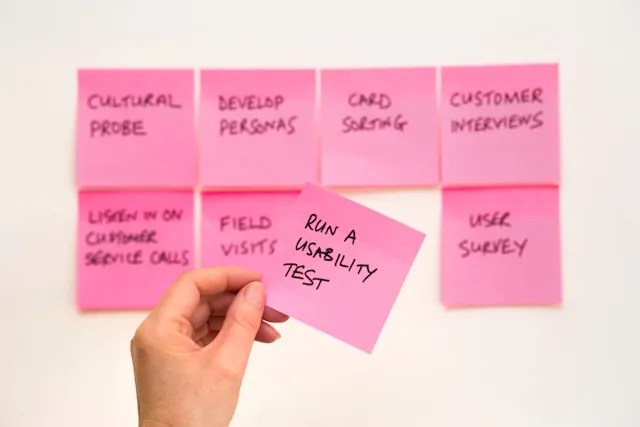
Observe users performing the real task before designing the interface. For an approval workflow, test finding a request, understanding its status, reviewing attachments and completing the decision on the devices employees actually use. Record completion time, errors and accessibility barriers.
Specific UX best practices, such as simplifying workflows, UI consistency, responsive design, personalization and actively soliciting user feedback throughout the design lifecycle results in more user adoption and productivity.
Integrating human-centered design thinking techniques like user journey mapping and storyboarding also leads to targeted user-focused improvements.
Agile and DevOps Integration
Agile software development is imperative for enterprise apps to keep pace with evolving strategic objectives and dynamic business environments.
1. Agile capabilities
Key agile best practices useful for enterprise application development include:
- Cross-functional teams: Developers, testers, ops and business users collaborate closely for user-focused outcomes
- Prioritized backlogs: Features mapped to business value and customer needs guide priority
- Iterative delivery: Smaller milestone releases every 2-4 weeks validate quickly
- Continuous integration: Automate builds, tests, and merges to detect issues sooner
- Reviews: Demo working software frequently to solicit feedback
- Test-driven development: Engineers focus on test cases upfront
Agile accentuates user needs, embraces changing requirements and empowers teams to pivot quickly.
2. DevOps Capabilities
Meanwhile, DevOps practices enhance collaboration between development and IT operations – enabling faster, higher quality releases.
Key DevOps capabilities include:
- Infrastructure as code: Version configuration, review changes and separate environment-specific secrets from source code.
- Controlled releases: Automate tests and deployment steps, require approvals where appropriate, and rehearse rollback with compatible database changes.
- Monitoring: Capture actionable errors, latency and security events. Exclude credentials, access tokens and unnecessary personal data; protect log access and retention. Use the OWASP logging guidance when defining the policy.
- Ownership: Assign an incident owner, alerts and escalation paths for the application, data services and external integrations.
| Development Stage | Agile Practices | DevOps Practices |
|---|---|---|
| Planning | Prioritized backlogs | Infrastructure coding |
| Development | Test-driven | Monitoring instrumentation |
| Testing | Continuous integration | Containerization |
| Release | Short iterations | Automated deployments |
| Production | Rapid feedback | Centralized logging |
Agile and DevOps can shorten feedback cycles when teams combine small releases with testing, review and operational ownership. Automation does not itself prevent instability; production promotion should depend on the application’s acceptance criteria.
Robust testing practices are pivotal for enterprise applications given the mission-critical nature and complexity. Meanwhile, security considerations are paramount right from architecture decisions through deployment and sustenance.
Quality Assurance and Testing

With intricate workflows, numerous integrations and vast data flows, testing enterprise applications thoroughly across multiple dimensions is imperative before trusting them for business operations.
| Test Type | Description | Example Tools |
|---|---|---|
| Unit | Validates code units work in isolation | JUnit, NUnit, Jest |
| Integration | Verifies combined components interact correctly | Selenium, Postman |
| System | Evaluates entire system functioning for issues | JMeter, Cucumber |
| Performance | Load and stress testing for capacity | Gatling, k6 |
| User Acceptance | UX testing with real business users | Beta releases |
Apply security throughout development. Define a role-and-data access matrix, enforce authorization on the server, keep credentials out of client code, and test denied requests as well as successful ones. Review dependencies and remediation ownership. The NIST Secure Software Development Framework provides a structure for integrating secure development practices into the lifecycle.
Scaling enterprise applications to manage spikes in traffic and optimize performance helps ensure availability and speed goals are met as organizational reliance on these mission-critical systems continues to increase. Meanwhile, integrating cloud services introduces compelling advantages but also serious due diligence.
Scalability and Performance Optimization
Adequately scaling application capacity and optimizing processing efficiency is pivotal to preventing instability or delays as usage ramps up due to business growth or seasonal peaks.
Common scalability strategies include:
| Tactic | Description |
|---|---|
| Horizontal scaling | Add instances and distribute load; validate shared state and database capacity |
| Database sharding | Distributing data across multiple database nodes |
| Caching | Storing frequently accessed data in temporary in-memory stores |
| Asynchronous processing | Move work to queues with bounded retries, duplicate handling and observable failures |
Meanwhile, performance tuning activities help optimize speed and responsiveness:
| Activity | Optimization Targets | Common Tools |
|---|---|---|
| Code profiling | Identify slow functions and memory leaks | AppDynamics, New Relic |
| Compression | Reduce payload size for faster network transfer | GZip, Brotli |
| Memory management | Tune JVM, CLR garbage collection params | Jconsole, Perfview |
| Metrics monitoring | Visualize all key app/infrastructure health parameters | Grafana, Kibana |
Cloud Integration and Deployment
Cloud services can provide managed infrastructure and scaling options, but availability, recovery and cost still depend on the chosen architecture, configuration and contract. Compare these responsibilities before deployment:
Key cloud advantages
| Benefit | Description |
|---|---|
| Elastic scalability | Configure scaling policies and test resource limits against the workload |
| High availability | Design and test failover; additional regions are not an automatic availability guarantee |
| Operational efficiency | Provider manages specified infrastructure tasks; the team retains application, access and configuration duties |
| Consumption-based cost | Budget metered usage, minimum charges, storage, network transfer and support |
| Innovation velocity | Evaluate supported features and compatibility before adopting changes |
However, selecting the ideal cloud provider entails rigorous due diligence across:
- Supported compliance standards
- Vendor lock-in risks
- SLAs for uptime, failover, security breach response
- Cost optimization and right-sizing tools
- Maturity of services required across compute, storage, networking
A cloud transition is also an opportunity to refactor applications specifically for cloud-native properties like microservices and baked-in scalability.
In summary, scalability, speed and cloud integration planning requires understanding performance constraints, sizing capacity for peaks, cloud nuances, and charting the migration.
Enterprise Application Maintenance and Updates
Business needs evolve. Supporting this evolution necessitates planning upfront for long-term application maintenance, including budgeting, resources, and roadmaps for major version upgrades.
Maintain a supported release and dependency inventory, assign patch owners, test changes in a non-production environment and document rollback steps. Updates reduce known risks but do not automatically establish security or regulatory compliance.
Likewise, strategies for eventually retiring legacy systems, like incremental data migration and preservation of interfaces for backward compatibility, must be outlined early on.
Conclusion
Before releasing an enterprise application, collect a small evidence pack: the accepted business workflow, role-and-data access tests, integration failure results, load measurements, restore and rollback records, and the named operating owner. Outstanding failures should have an explicit disposition before production use.
AI-assisted development in 2026: AI can help generate interfaces, queries and application logic, but generated output still needs review. Test permissions, data handling and error paths. For runtime AI features, define which approved data the model can access, how answers are checked, when humans approve actions and what happens when the model or provider is unavailable.
ToolJet is an option for internal dashboards, approval tools and operational applications using AI generation, visual editing and custom code. Its 100+ integration catalog connects existing data and services, and ToolJet Database supports built-in data storage. Choose Cloud or Self-hosted deployment; Workflows and Agent Builder are available on Self-hosted deployments. Governance features and deployment add-ons depend on the selected plan. Use the same security and release checks described above for applications built with the platform.