


What Is a BigQuery Sales Analytics Dashboard?
If you need to build a sales analytics dashboard with ToolJet MCP, this guide shows how to turn thelook_ecommerce into a live two-page view. ToolJet MCP creates the structured ToolJet application, with data, queries, and interface together. The dashboard gives analysts one place to compare revenue, orders, average order value, gross margin, return rate, conversion, and cohort retention without stitching charts together by hand. By the end, you can recreate the two-page layout, shared filters, and product drilldowns from BigQuery.
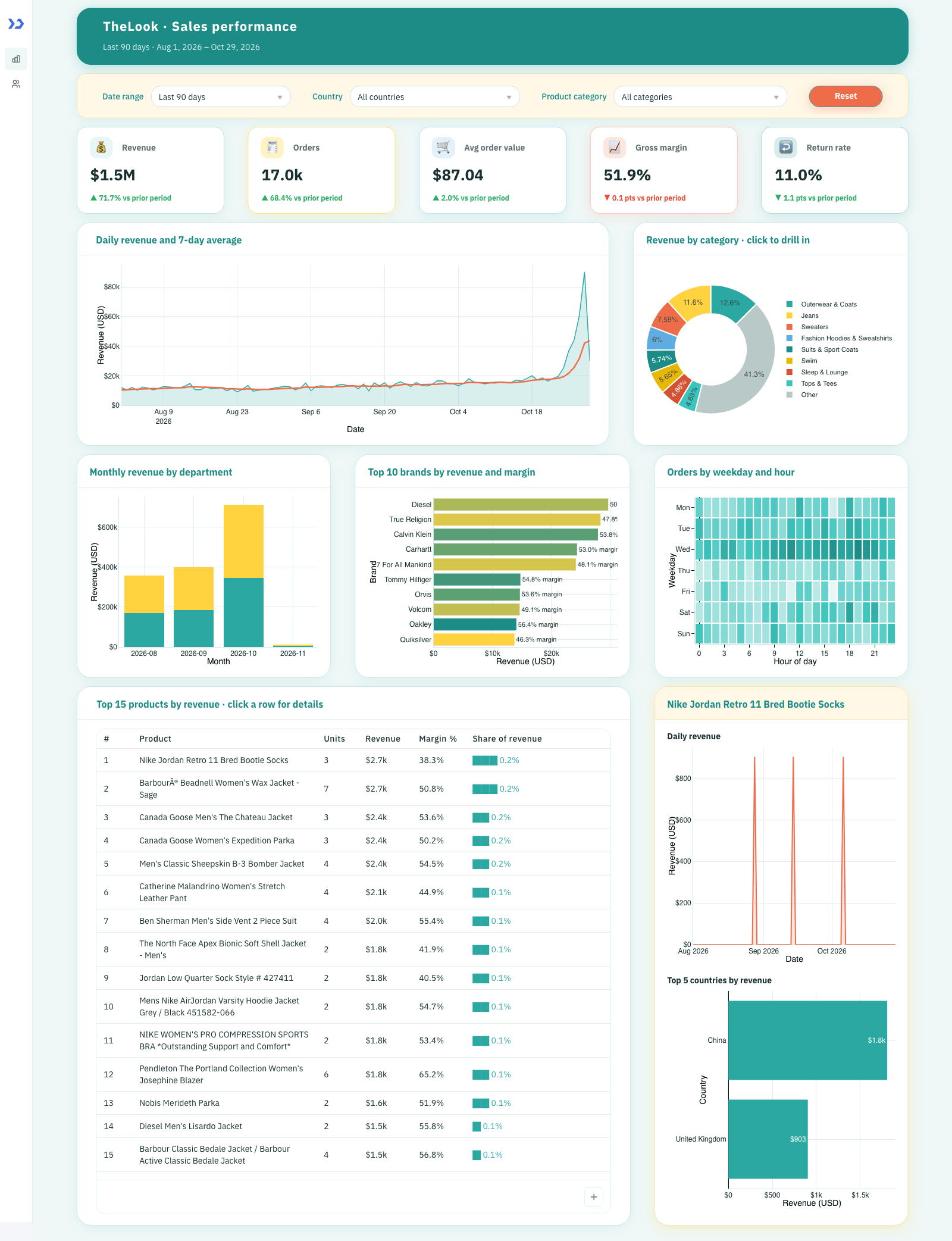
Sales performance: filters, five KPI tiles with change against the prior period, daily revenue with a 7-day average, category donut and the top products table with the product side panel.

Customers and channels: customer KPIs, the website funnel, revenue map by country, traffic sources, age and gender, and cohort retention.
How Do You Track Ecommerce Sales Performance?
Track ecommerce sales performance by pulling live order, customer and product data into a dashboard with shared filters, trend views and drilldowns that answer revenue and conversion questions. The ToolJet MCP path lets a coding agent build that as a working app, so the same requirements become a live dashboard.
- Connect the public sales tables
- Shape order and customer queries
- Build shared filters for date country and category
- Render KPIs charts heatmaps and tables
- Wire category drilldowns and product side panels
What Does The Dashboard Include?
The first page opens with a compact filter bar, then the sales KPIs, daily revenue trend, category split, department bars, brand ranking, order heatmap and top products table. The second page keeps the same controls in place and swaps in customer and channel analysis, so the same date, country and category choices keep working across the whole dashboard. A category slice tightens the view everywhere on page one, and a product row opens a side panel with that product’s revenue trend and country mix for the selected range. The layout stays dense, with cards, pills and chart blocks that read cleanly on a screen without wasting space.
- Live sales KPIs with prior-period change
- Daily revenue trend with a seven-day moving average
- Shared date, country and category filters across both pages
- Category and product drilldowns with a side panel
- Customer and channel views for funnel, map and cohort analysis
Build a Sales Analytics Dashboard with ToolJet MCP, BigQuery
Want to build it yourself? Start with the ToolJet MCP repository for setup instructions, supported agents, and everything you need to follow along.
How Do You Rebuild It From One Prompt?
The real build took a few passes, and the requirements are consolidated here into one prompt that could have been used from the start. Use it to reproduce the same dashboard in a single run without having to reconstruct the iterations.
Build a ToolJet app with 2 pages, using only native components, a dense layout and slightly larger fonts, on the BigQuery public dataset bigquery-public-data.thelook_ecommerce. Use a teal, gold, coral and cream look with rounded cards, pill buttons and soft coloured shadows, and a teal title band at the top of each page. Page 1, Sales performance: a filter bar with date range (30, 90 or 365 days), country and product category, plus a Reset button; five KPI tiles (revenue, orders, average order value, gross margin, return rate) each showing the change against the prior period; a daily revenue area chart with a 7-day moving average; a revenue by category donut; a monthly revenue by department stacked bar; a top 10 brands chart with margin; a weekday by hour orders heatmap; and a top 15 products table with a share-of-revenue bar. Drilldowns: clicking a donut slice sets the Product category filter so the whole page drills into it; clicking a product row opens a side panel with that product’s daily revenue for the selected range and its top 5 countries by revenue, and the panel opens on the top product by default. Page 2, Customers and channels: four KPI tiles (new customers, repeat purchase rate, revenue per customer, conversion rate), a website funnel from home to purchase with drop-off between steps, a choropleth map of revenue by customer country, revenue by traffic source, customers by age band and gender, and a monthly cohort retention heatmap. The filters are shared across both pages. Charts are the native Chart component in Plotly JSON mode, all in the same teal, gold and coral palette.
How Does ToolJet MCP Assemble It?
ToolJet MCP works through the whole application, not just the screen: the data model, queries, component tree and wiring land together as one structured ToolJet application, and the ToolJet MCP documentation shows the path. Enterprise app building does not end at the interface, so the generated app sits on a runtime that carries data connectivity, workflows, permissions, deployment and ongoing change where supported instead of handing the team a codebase to operate themselves. The path stays open, so you can move from AI generation to visual editing to code where a case needs it.
Why Did The Funnel Need Repair?
The funnel first rendered as flat bars, which made every step look identical. The cause was a strict ordered funnel that returned the same count at each step, and the query was adjusted so the drop-off now appears correctly.
What Did ToolJet MCP Generate?
| Metric | Result |
|---|---|
| Pages | 2 |
| ToolJet DB tables | 5 |
| Queries | 19 |
| Components | 100 |
| Code files to maintain | 0 |
| Repair cycles | 1 |
| Final validation | 0 errors |

The components ToolJet MCP created, in the ToolJet inspector
Which Teams Use Ecommerce Analytics?
Retail and e-commerce teams, especially fashion and apparel, plus any business that keeps order, product and web event data in BigQuery and wants a shared sales and customer view without a separate BI tool.
Who Can Use And Edit It?
The app reads only public, read-only BigQuery data and has no write paths, so no roles or permission groups were set up. Anyone given access to the app in the workspace sees the same dashboard and can change the filters; filters are per visit and are not saved.
Automating Processes with ToolJet Workflows and Sub-Workflows
A BigQuery Sales Analytics Dashboard app often needs work to happen behind the scenes, and ToolJet Workflows automate it with a visual, node-based editor that apps, webhooks and schedules can trigger. Notifications, multi-system updates and approvals run on the server instead of in someone’s browser.
If the sales dashboard needs a scheduled report or an alert when revenue drops, ToolJet Workflows can handle that in the background. The same app can publish updates to the team without changing the dashboard itself.

Automating Processes with ToolJet Workflows and Sub-Workflows
Workflow Triggers: Apps, Webhooks and Schedules
- Triggering workflows from an app: add a Run Workflow query in the query panel, pass parameters and attach it to an event handler such as a button click or form submit.
- Webhook triggers: start a workflow when an external system sends an HTTP request, with a separate endpoint URL for each environment.
- Scheduled workflows: run on intervals or cron expressions in a chosen timezone, available from the Team plan.
Sub-Workflows, Logic and Code Nodes
- Workflow node for sub-workflows: call one workflow from another and pass parameters, so shared steps such as logging or notifications live in one reusable child workflow.
- Logic nodes: branch with If-Else and iterate with Loop nodes, as outlined in the ToolJet Workflows overview.
- Data source nodes: read and write databases, REST or GraphQL APIs and SaaS tools inside the flow.
- JavaScript and Python nodes: transform data and apply business logic in server-side code.
- Workflow environments: build and test in Development and Staging before running in Production, on the Enterprise plan.
Workflows let the BigQuery Sales Analytics Dashboard app hand off slow or multi-step work, such as alerts or updates to other systems, to a reusable automation that any app in the workspace can call.
Enterprise Features for Your Sales Analytics Dashboard
This dashboard can hold revenue, customer profiles, and country, age, and gender data. ToolJet covers that governance at the platform layer, so you configure it once instead of rebuilding it in every app.
- SSO and SCIM: sign in with SAML, OIDC or LDAP, and provision users automatically
- Role-based access control: scope permissions to the app, the data source, and each query
- Audit logs: track every login, edit, and approval decision for compliance review
- Air-gapped deployment: self-host on Docker or Kubernetes so your data stays in your network
- Multiplayer editing: several builders work on the same app, with versioning and Git sync
- ToolJet AI inside your own deployment: run the AI features in your tenancy rather than a shared service
You could add a notification layer with ToolJet Workflows. For example, a workflow could fire when a daily sales report is published, post a Slack message to the manager, email the analyst through Gmail, and write the result back to events.
Final Takeaways
This build shows a sales analytics dashboard assembled from live BigQuery data, with shared filters, drilldowns, KPI tiles, chart views and a product side panel that supports day-to-day analysis. The team gets one place to compare revenue, orders, margin, conversion and customer behaviour without stitching together spreadsheets or custom scripts. Building a sales analytics dashboard with ToolJet MCP leaves the result inside ToolJet, so the same application can keep evolving as questions change and the data model shifts. That matters when the dashboard becomes part of the team’s daily operating rhythm.
Build your own with ToolJet MCP
Build a sales analytics dashboard with ToolJet MCP on your own data, then request a ToolJet demo to adapt the pattern. Start free on ToolJet Cloud.


