


Introduction
Build a supply chain control tower with ToolJet MCP when planners need one place to track exceptions, supplier drift, and stockout risk for a kitchen-appliance manufacturer. The app keeps open issues, supplier history, and inventory projections in one workflow so the team can decide what to escalate, what to close, and what to watch next. An agent generated a structured ToolJet application here, so the data, queries, and interface stay together as the team keeps running the control tower. The reader gets the page layout, the tables behind each view, and the prompt in this article to reproduce the build.
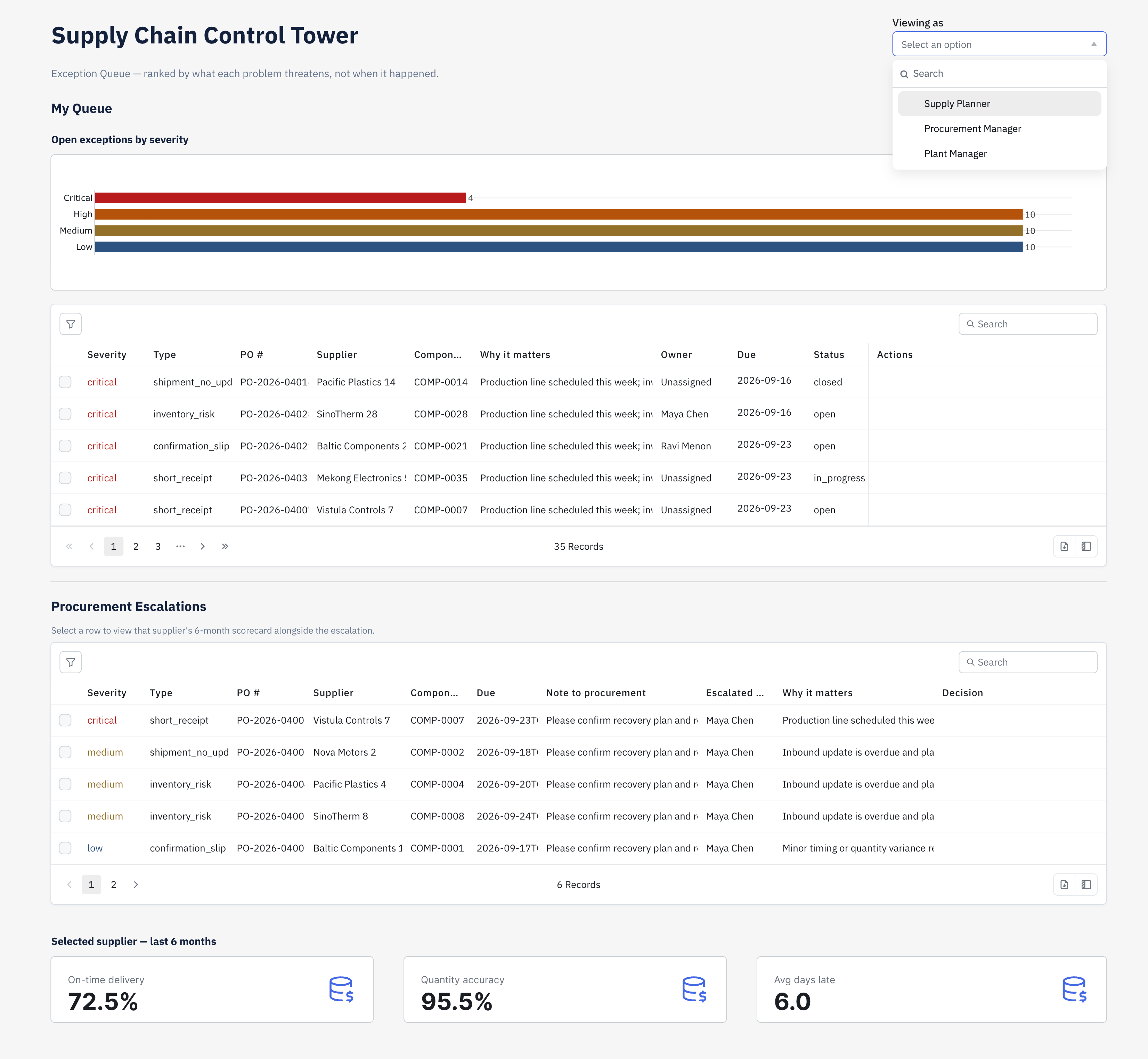
Exception Queue — severity-ranked queue with escalation flow, procurement approvals, and a live supplier scorecard

Supplier Scorecard — 6-month trend, sorted by suppliers declining fastest
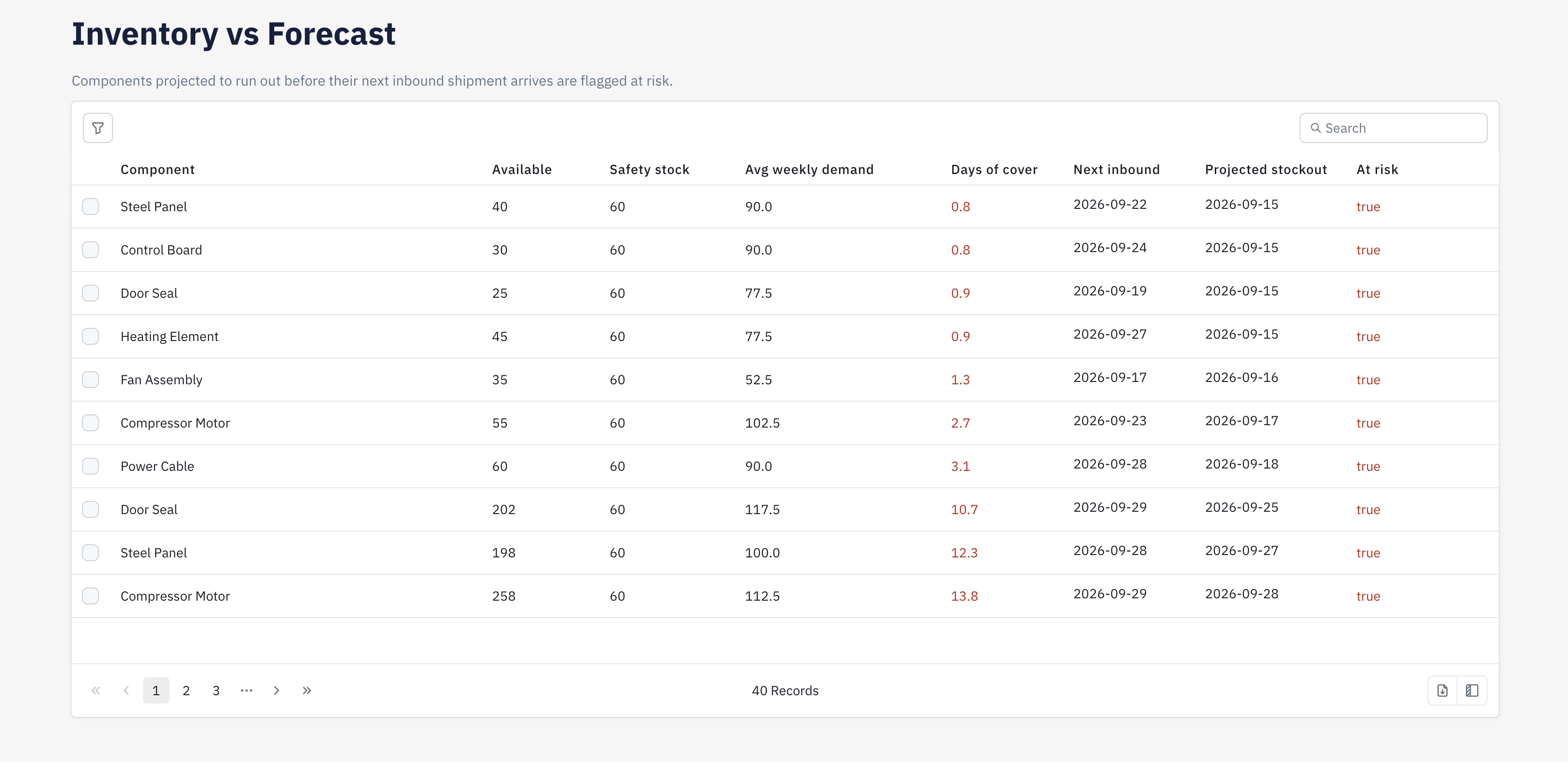
Inventory vs Forecast — components flagged at risk of stockout before their next inbound shipment
What We’re Building
The first page is a triage desk, the second turns supplier drift into a rank order, and the third checks whether stock covers demand until the next shipment lands. A planner starts by reading the reason in each exception row, then edits owner and due date inline before closing the item or sending it to procurement through the modal. Selecting an escalation brings the supplier’s scorecard into view, so the planner can compare the current case with trailing performance before approving or rejecting the handoff. The inventory page ends the loop by flagging any component whose coverage runs out before inbound supply arrives.
- The queue is severity ranked, so the highest-risk exceptions stay at the top without depending on date order
- Owner and due date stay editable in place, which makes the queue work like live planner triage
- Escalations carry a note from planning into procurement, then write the outcome back to the source exception
- The selected supplier’s scorecard appears next to the escalation, which gives procurement the recent history behind the case
- The inventory view compares stock with forecast demand and flags components that will run out before the next inbound shipment
Build a Supply Chain Control Tower with ToolJet MCP for Exception Triage and Forecasts
Want to build it yourself? Start with the ToolJet MCP repository for setup instructions, supported agents, and everything you need to follow along.
The Consolidated Build Prompt
The build took several passes, and the requirements are consolidated here into one prompt that could have been used from the start. You can feed the prompt in this article to the same workflow and recreate the application in a single shot.
Build a three-page supply chain control tower in ToolJet for a kitchen appliance manufacturer’s planning team.
Keep the app dense and corporate, with muted blues and greys, clear hierarchy, and restrained spacing. The first page shows open exceptions sorted by severity, with the reason visible in each row, inline owner and due date edits, a close action, and a modal path to escalate a case to procurement. That same page also shows open escalations, and selecting one reveals the linked supplier’s scorecard.
The second page aggregates trailing six-month supplier performance and ranks suppliers by who is deteriorating fastest, with a trend view for the selected supplier. The third page compares current stock with forecast demand for each component, calculates days of cover, and flags anything that will stock out before the next inbound shipment arrives.
Use the existing PostgreSQL datasource and read and write the current supply_chain_exceptions, exception_escalations, suppliers, supplier_performance_monthly, inventory_snapshot, component_forecast, inbound_shipments, and purchase_order_items tables. Keep the business rules intact: planners can edit and close exceptions and escalate to procurement, procurement managers can approve or reject escalations, plant managers can view everything without edit access, and approvals must write back to the source records.
How ToolJet MCP Builds the App
ToolJet MCP works through the whole application, so the data model, pages, components, queries, and the wiring between them land as one structured ToolJet application. That matters because enterprise app building is still data connectivity, workflows, permissions, deployment, and ongoing change, not just the visible screen, and the generated app sits on a runtime that carries those pieces where supported instead of handing you a codebase to operate yourself. You can still move from generation to visual editing and then into code when a page needs a special case.
Data Created
The app ended up with seven tables in three groups. supply_chain_exceptions holds the queue rows, exception_escalations records planner-to-procurement handoffs, and suppliers labels each record. supplier_performance_monthly stores the trailing six-month history for the scorecard, while inventory_snapshot, component_forecast, and inbound_shipments drive the coverage check and the next-arrival flag.
| Page | Components | What they cover |
|---|---|---|
| Exception Queue | 19 | Severity-ranked exceptions with escalation flow and procurement approvals |
| Supplier Scorecard | 5 | 6-month supplier performance sorted by worsening trend, with slippage chart |
| Inventory vs Forecast | 3 | Days of cover and stockout risk per component |
What Got Generated
| Metric | Result |
|---|---|
| Pages | 3 |
| ToolJet DB tables | 7 |
| Queries | 11 |
| Components | 27 |
| Code files to maintain | 0 |
| Repair cycles | 1 |
Industries That Run This
Manufacturers running multi-tier supplier networks — electronics, automotive, appliances, industrial equipment — where a single late or short delivery can stall a production line. Also relevant to procurement and supply-chain teams at retailers and distributors coordinating inbound logistics across many vendors.
Who Gets Access To The Built App
Supply planners own and close exceptions, edit the owner and due date, and escalate to procurement. Procurement managers see a separate escalation queue with the supplier’s live scorecard and can approve or reject, writing the outcome back onto the original exception. Plant managers can view all three pages but have no edit or action controls — enforced today through an in-app role selector, since the workspace had no dedicated ToolJet groups yet to bind native page and component permissions to.
Enterprise Features for Your Supply Chain Control Tower
This app handles supplier contact details, escalation notes, and inventory positions. ToolJet covers that governance at the platform layer, so you configure it once instead of rebuilding it in every app.
- SSO and SCIM: sign in with SAML, OIDC or LDAP, and provision users automatically
- Role-based access control: scope permissions to the app, the data source, and each query
- Audit logs: review supported platform events in audit logs; record business decisions and their reasons in application data
- Deployment isolation: self-host on Docker or Kubernetes; operation without internet access requires the Enterprise air-gapped add-on and internal dependencies
- Multiplayer editing: several builders work on the same app, with versioning and Git sync
- AI hosting: self-hosting the app platform does not make model inference local. Review gateway and model hosting separately; fully internal inference needs a customer-hosted gateway and a supported internal model endpoint
Final Takeaways
This build shows a control tower that keeps exception triage, escalation, supplier drift, and inventory risk in one set of pages. Once the agent finishes, you keep a structured ToolJet application rather than a screen and a cleanup job, so the team continues working in the same data model and action flow. That is where the platform matters: visual editing handles the common changes, code is there for special cases, and the runtime keeps the data and workflow pieces together where supported as the process changes. The result is an app you keep shaping, not a throwaway artifact.
Cost and Speed by Model
You can easily build a 4-page app with ToolJet MCP for as little as $0.17 with a lean model (Luna medium), or pay more for the latest flagship reasoning (Sol) if that’s what you’re after. The cost is your call, not a floor we set for you.
| Model | Credits | Minutes | Notes |
|---|---|---|---|
| Astra | 290 to 550 | 13 to 16 | The most polished pages, when cost matters less |
| Sol (Recommended) | 300 to 650 | 14 to 22 | The best balance of quality and cost for most apps |
| Terra | 85 to 210 | 5 to 12 | The fastest, and best kept to smaller apps |
| Luna max | 35 to 55 | 33 to 62 | The most complete Luna, and by far the slowest |
| Luna high | 25 to 50 | 22 to 41 | Mid-effort Luna, between medium and max |
| Luna medium | 10 to 30 | 14 to 20 | A quick first draft or a small tool |
Three to four builds per model across four-page apps. 1 credit = 1 cent. Credits and time are estimates only and will vary with the complexity of what you ask for. This measures cost and speed only, not how complete or polished the result is.
Even averaging across model tiers, ToolJet MCP can turn $10 into a dozen or more working 4-page apps.
Build your own with ToolJet MCP
Build your own supply chain control tower for planner triage, then request a ToolJet demo to map it onto your data. Start free on ToolJet Cloud.


