


What Is an Audit Trail Explorer?
Your audit team is chasing evidence across admin consoles and spreadsheets, with logic hidden in cells nobody can audit. Build an audit trail explorer with ToolJet MCP when you need one place to trace a person, account, setting, or dataset. An agent generated this into a structured ToolJet application, with data, queries, and interface together. By the end, you have a four-page audit workspace for trace review, day-by-day activity, investigations, and event records. That gives the compliance and IT audit team one place to review changes, capture findings, and follow the same evidence trail through every investigation. The reviewer can move from a subject search to the timeline, then into a case, without stitching evidence across consoles.
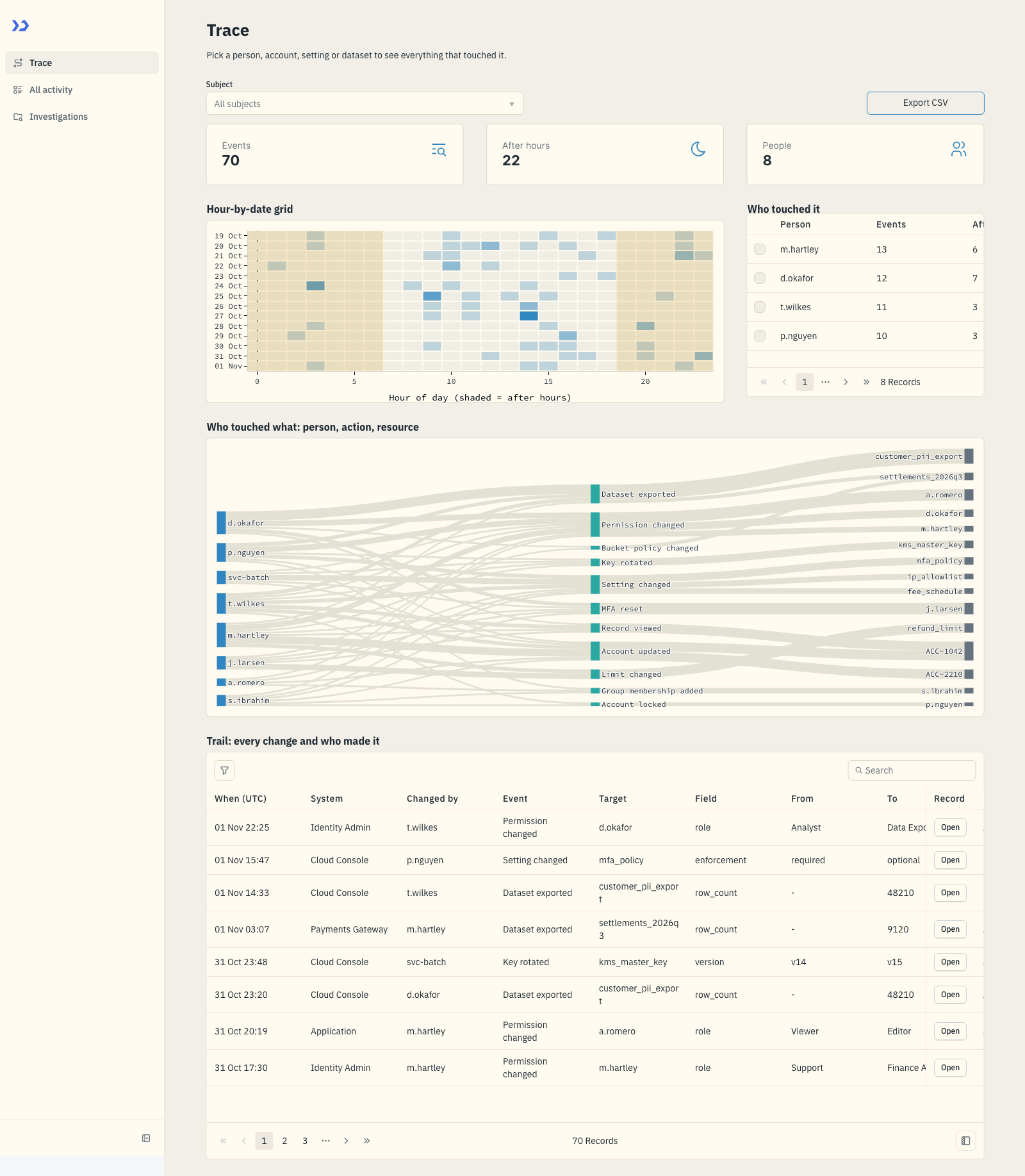
The Trace page: counters, the hour-by-date grid with after-hours hours shaded, who touched the subject, and the trail.
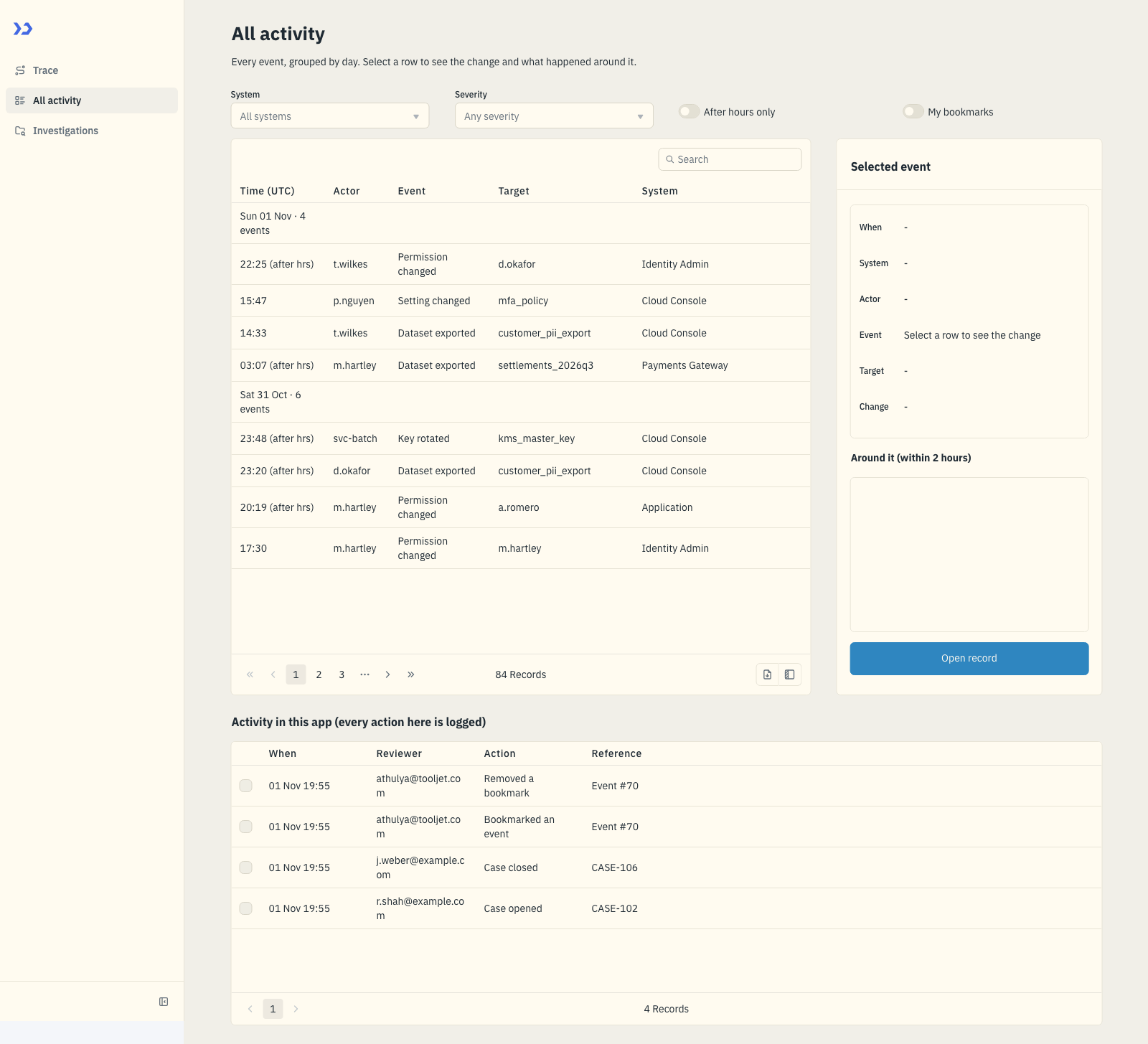
All activity: events grouped by day, with filters and a side panel showing the selected change and what happened around it.
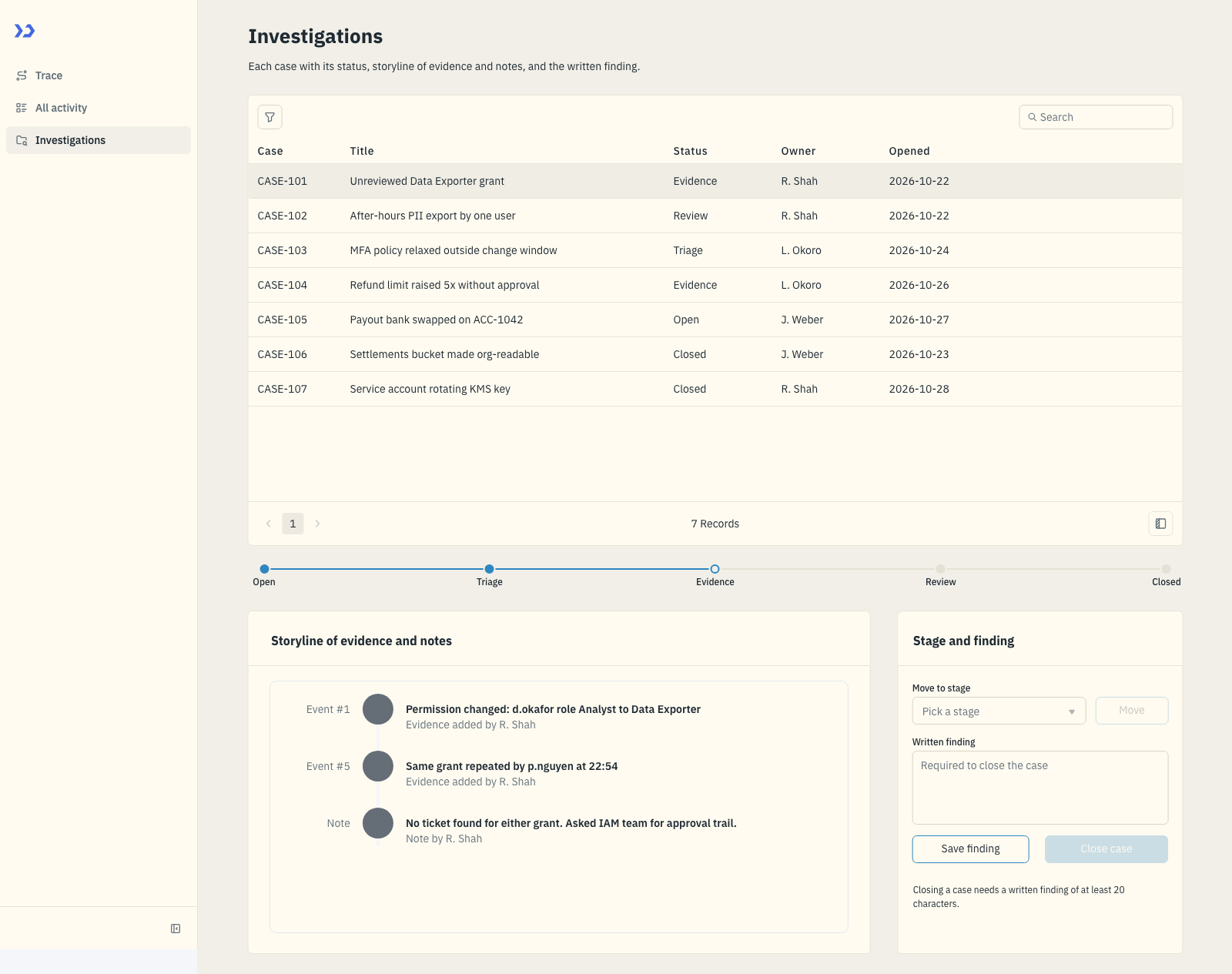
Investigations: the case list, a status tracker and the storyline of evidence and notes with the finding editor.
How Do You Trace A Person Across Systems?
Trace a person, account, setting or dataset by joining its events into one review path that shows what changed, who changed it, and when. A coding agent can build that flow as a working app with ToolJet MCP, turning the prompt into the audit workspace.
- Pick a person, account, setting or dataset
- Review the timeline and after-hours activity
- Open the day log and inspect the side panel
- Move into investigations and write the finding
- Open the event record, bookmark it, note it, or add it to a case
How Does The Audit Workspace Work?
The Trace page starts with a subject picker, then updates the grid, changed fields, who-touched-it table, and flow chart from the same query. The heatmap highlights after-hours activity, so the reviewer sees density and timing without leaving the subject view. All activity groups the audit log by day, adds filters for system, severity, after-hours status, and bookmarks, and opens a side panel with the current change plus nearby context. Investigations keeps each case in a status tracker with evidence, notes, and a finding editor, while the hidden event record handles bookmarks, signed notes, and case assignment. The layout stays dense, with slightly larger text and one theme shared across all pages. That keeps each investigation tied to the same record trail.
- Trace a person, account, setting or dataset across linked events
- See after-hours activity in an hour-by-date heatmap
- Filter the full log by system, severity, after-hours status and bookmarks
- Track investigations with evidence, status and written findings
- Open any event to bookmark it, sign a note, or add it to a case
Build An Audit Trail Explorer With ToolJet MCP For Four Pages
Want to build it yourself? Start with the ToolJet MCP repository for setup instructions, supported agents, and everything you need to follow along.
What Prompt Recreates The App?
The real build took several passes, and the requirements are consolidated here as one prompt that could have been used from the start. You can use the prompt below to reproduce the same application in a single shot.
Build a 4-page ToolJet app for the compliance and IT audit team of a payments software company (about 900 staff). Use ToolJet Database for audit events, investigations, evidence, bookmarks and reviewer notes. The application’s own audit log is not connected yet, so simulate its events and mark them as the Application system. Seed about 70 events across four systems (Application, Identity Admin, Cloud Console, Payments Gateway) with two weeks of history, and seven cases. Page 1, Trace: pick a person, account, setting or dataset and show everything that touched it: an hour-by-date grid with after-hours activity marked, every field that changed and who changed it, who touched it, a person-to-action-to-resource flow chart, and a clickable trail that exports to CSV. Page 2, All activity: one filterable log of every event grouped by day, with filters for system, severity, after hours and my bookmarks, and a side panel showing the change and what else happened around it. Page 3, Investigations: each case with a status tracker, a storyline of evidence and notes, and the finding; closing a case needs a written finding. Page 4, Event record (hidden): any event opens a record page where the reviewer can bookmark it, leave a note signed with their name, or add it to a case. Each reviewer works under their own name with their own bookmarks and signed notes. Log everything done in the app too. Use only native components, dense layout, slightly larger fonts, generic header text, and a sky-blue ledger look defined as one real app theme so switching theme restyles the whole app. Test the main flow in the viewer before finishing.
How ToolJet MCP Assembles The App?
ToolJet MCP works through the whole application, not just the screen: the data model, pages, components, queries and the wiring between them land together as one structured ToolJet application. The generated result sits on a runtime that can carry data connectivity, workflows, permissions, deployment and ongoing change where supported, instead of handing you a codebase to operate yourself. The path stays open through AI generation, visual editing and code when a case needs it, and you can read the ToolJet MCP documentation for the build flow.
What Bookmark Bug Did We Fix?
Removing a bookmark surfaced a “Could not remove the bookmark” message on the event record page. The bookmark row was being cleared from the interface before the underlying delete finished, so the action looked broken even though the row existed. The query was corrected and the removal now completes cleanly.
What Did ToolJet MCP Generate?
| Metric | Result |
|---|---|
| Pages | 4 |
| ToolJet DB tables | 6 |
| Queries | 24 |
| Components | 66 |
| Code files to maintain | 0 |
| Repair cycles | 1 |

The components ToolJet MCP created, in the ToolJet inspector
Which Teams Run Audit Reviews?
Payments, fintech and other regulated software companies whose compliance and IT audit teams must show who changed a permission or exported customer data. The same pattern fits any team that reviews admin and application logs, builds evidence trails and closes cases with a written finding.
Who Can Review And Approve Cases?
No groups or per-query permissions were built. Every signed-in user sees the same pages. Each reviewer’s bookmarks and notes are filtered by their own email and signed with their name, and every action is written to the app log. This filtering runs in the app, not as a server-side rule.
Self-Hosting ToolJet: Open Source, On-Premise and Air-Gapped Deployment
An Audit Trail Explorer app often works with data that cannot leave your network, and ToolJet lets you run the whole platform on infrastructure you control instead of a vendor cloud. Both the community edition and the enterprise edition can be deployed on-premise, and air-gapped deployment is available for environments with no internet access.
Audit Trail Explorer touches person records, account activity, settings and event history that the compliance and IT audit team should keep on company infrastructure. That matters when reviewers need the workspace to stay inside the systems they control.
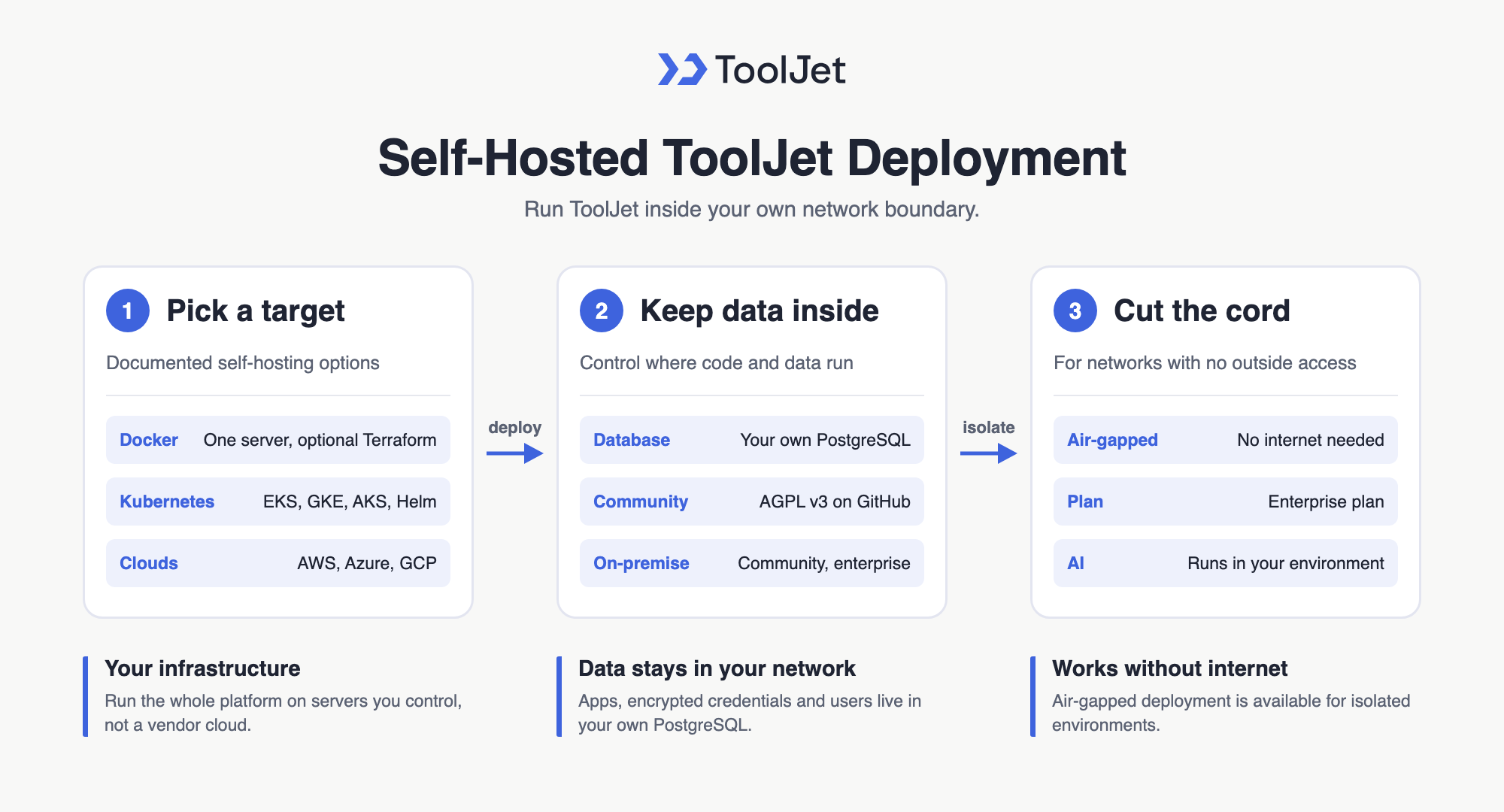
Self-Hosting ToolJet: Open Source, On-Premise and Air-Gapped Deployment
Deployment Options: Docker, Kubernetes and Major Clouds
ToolJet’s self-hosting setup guides cover the common ways to run it in your own environment:
- Docker Compose deployment: run ToolJet on a single server, with optional Terraform scripts to provision a VM on AWS, Azure or GCP first.
- Kubernetes deployment: run ToolJet on your own cluster, with dedicated guides for EKS, GKE, AKS, Helm and OpenShift.
- Your own PostgreSQL: ToolJet stores app definitions, encrypted data source credentials and user authentication data in a PostgreSQL database that you manage.
Open Source Core and Air-Gapped Enterprise Deployments
- Open source community edition on GitHub: the ToolJet repository is released under the GNU Affero General Public License v3.0 (AGPL), so your team can inspect the code and self-host the community edition.
- Air-gapped deployment: run ToolJet in fully isolated environments without external network access, listed on the ToolJet Enterprise plan.
- ToolJet AI Enterprise: deploy the AI server image inside your own environment so AI requests are processed on your servers, which suits private-cloud and air-gapped setups.
Self-hosting keeps the Audit Trail Explorer app, its data and its credentials inside the network and security boundary your team already governs, and a self-hosted community edition can be upgraded to the enterprise edition when you need enterprise features.
Enterprise Features for Your Audit Workspace
An audit workspace handles audit events, reviewer notes, and case findings. ToolJet covers that governance at the platform layer, so you configure it once instead of rebuilding it in every app.
- SSO and SCIM: sign in with SAML, OIDC or LDAP, and provision users automatically
- Role-based access control: scope permissions to the app, the data source, and each query
- Audit logs: track every login, edit, and approval decision for compliance review
- Air-gapped deployment: self-host on Docker or Kubernetes so your data stays in your network
- Multiplayer editing: several builders work on the same app, with versioning and Git sync
- ToolJet AI inside your own deployment: run the AI features in your tenancy rather than a shared service
You could add a notification layer with ToolJet Workflows. For example, a workflow could fire when a case is closed, post to the reviewer in Slack, email the owner through Gmail, and write the action back to aud_app_log.
Final Takeaways
This Audit Trail Explorer shows how a compliance and IT audit team can move from a single subject trace to a day-grouped activity log, then into investigations and a signed event record without leaving one application. The build keeps audit events, cases, bookmarks, notes and reviewer actions together, so reviewers do not have to stitch evidence across admin consoles. It also shows how an audit trail explorer built with ToolJet MCP turns a single prompt into a structured ToolJet application that the team keeps editing as the workflow changes. If you want to adapt the pattern to your own systems, build it on [ToolJet Cloud].
Build your own with ToolJet MCP
Build your own audit trail explorer with your review data, then request a ToolJet demo. Start free on ToolJet Cloud.


