


Introduction
In this walkthrough, you’ll learn how to build a supplier spreadsheet import workflow with ToolJet MCP for a wholesale operations team in Manchester. The app maps supplier data to product fields, validates changes, stages updates for review, and gives authorized users a controlled path to commit them. Instead of manually cleaning spreadsheets or maintaining a separate code workflow, the team can manage data, queries, validation, and review in one ToolJet application. You’ll also see how the agent-generated app handles the complete import workflow from file upload to final approval.
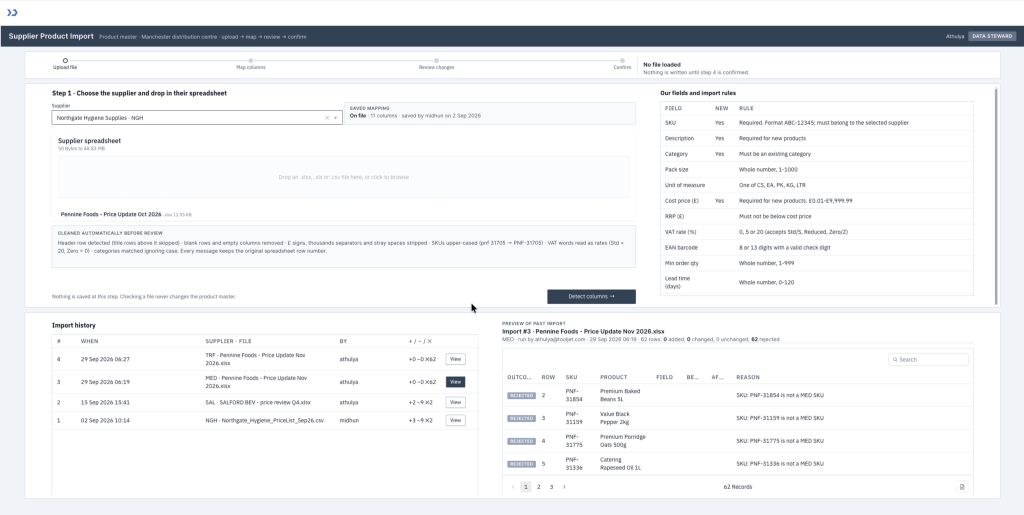
Review changes: counts for new, changed, unchanged and rejected rows, and every changed field with current and incoming value and the percentage move
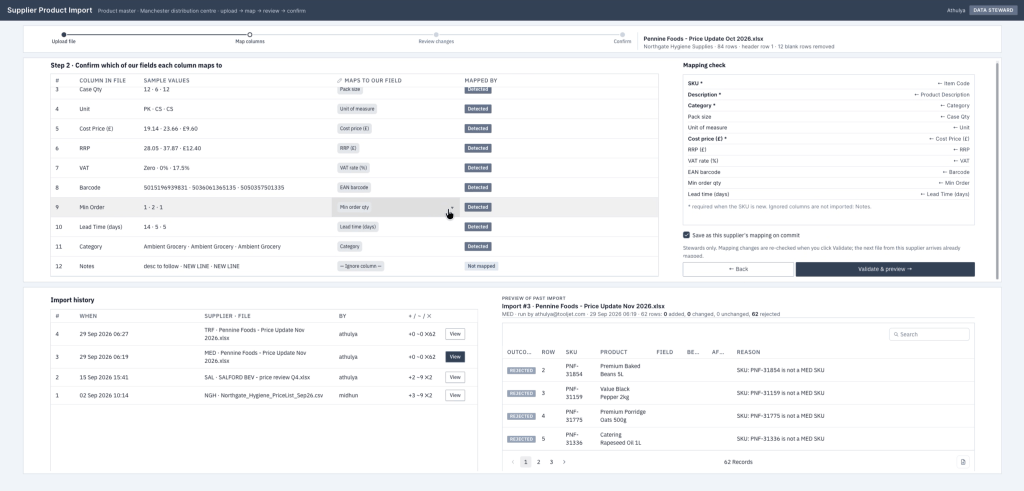
Map columns: the supplier’s saved mapping pre-fills each column, beside a mapping check of which of our fields are covered
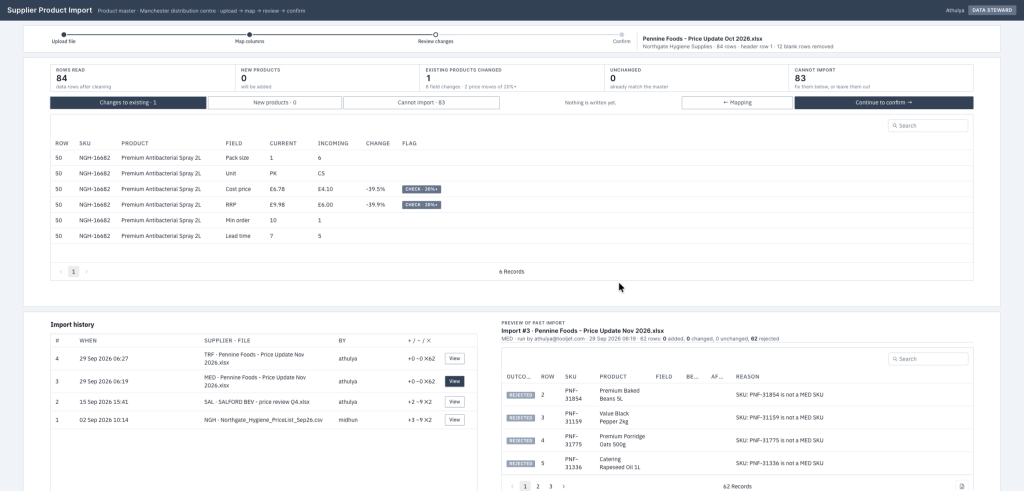
Cannot import: only the failing rows in an editable grid, with the problem cell highlighted and a re-check for just those rows
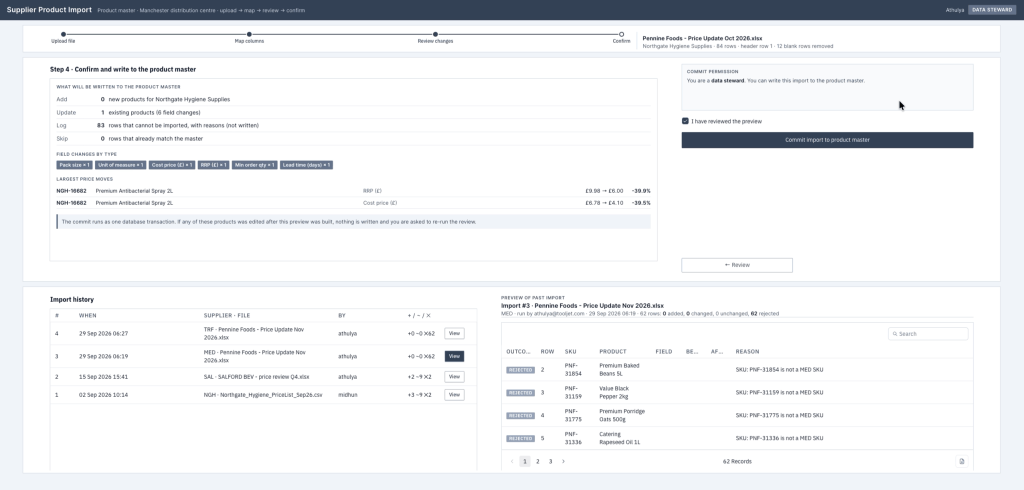
Confirm: what will be written to the product master, the largest price moves, and a steward-only commit behind a review tick
What We’re Building
The screen is a four-step workspace with a file summary beside the current step and a history pane underneath. Upload accepts .xlsx, .xls, or .csv files, shows the chosen supplier, and keeps the original row numbers ready for review. Map lines up file columns against internal fields with labels that show whether a mapping is saved, detected, or changed. Review splits the result into product changes, new products, and rejected rows, then lets you edit only the bad cells and re-check them. Confirm shows the final import summary and keeps commit locked until the review tick is set. The reviewer can trace each rejected row back to the source file.
- Drop in .xlsx, .xls, or .csv files and keep the original row numbers for review
- Reuse a supplier’s saved mapping and flag Saved, Detected, or Changed values in the mapper
- Preview added products, field-by-field changes, and rejected rows before anything is written
- Fix failed rows in place, then re-check only the corrected records
- Restrict commit and mapping-save actions to data stewards while keeping past imports visible
Build a Supplier Product Import App with ToolJet MCP
Want to build it yourself? Start with the ToolJet MCP setup guide for setup instructions, supported agents, and everything you need to follow along.
The Consolidated ToolJet MCP Build Prompt
The build took several passes across layout, data, and validation. The prompt below consolidates its requirements as a starting specification, not a tested guarantee of one-pass reproduction. Test mappings, rejected rows, stale previews, and commit permissions on a test database before importing production records.
Build a single-page supplier product import app in ToolJet for the operations team of a Manchester wholesale distributor.
Keep it as one dense workspace with four steps: Upload, Map, Review, Confirm, plus an import history pane. Upload accepts supplier spreadsheets and shows the selected supplier and file summary. Map aligns incoming columns to internal fields and makes saved mappings visible. Review previews added products, field-by-field changes, and rejected rows, and lets users fix bad cells in place before re-checking only those rows. Confirm shows what will be written and requires the reviewer acknowledgement before commit.
Use a Nordic Steel Blue visual style: cool greys, slate headers, restrained blue accents, compact rows, strong hierarchy, and status colours only where they help.
Use PostgreSQL for the product master and history, and ToolJet DB for suppliers, saved mappings, and import field definitions. Model imports so the preview and past runs come from stored records, not mutable status fields.
Only data stewards can save mappings or commit an import. Every commit must re-check that role, reject stale previews, and record adds, changed fields, and rejected rows in the history.
How ToolJet MCP Builds the Import App
ToolJet MCP works through the whole application, not just the visible page: the data model, queries, components, and wiring between them land as one structured ToolJet application. Enterprise app building does not end at the interface, because data connectivity, permissions, deployment, and ongoing change are part of the job, and the generated app sits on a runtime that carries those where supported instead of handing you a codebase to operate yourself. The path stays open: AI generation, then visual editing, then code when a case needs it.
The Mapping Validation Issue We Fixed
Changing a column mapping did not immediately refresh the mapping check, so the review step could still look valid after two columns pointed at the same field. The cause was the check not rerunning on dropdown edits, and the fix made the warning update as soon as the mapping changed.
Supplier Product Import Data Model
The app ended up with 8 tables in two groups. The PostgreSQL group covers spi_products, spi_categories, spi_app_roles, spi_import_runs, and spi_import_changes, while the ToolJet DB group covers spi_suppliers, spi_saved_mappings, and spi_fields.
| Page | Components | What they cover |
|---|---|---|
| Home | 50 |
What ToolJet MCP Generated
| Metric | Result |
|---|---|
| Pages | 1 |
| ToolJet DB + PostgreSQL tables | 8 |
| Queries | 16 |
| Components | 50 |
| Code files to maintain | 0 |
| Repair cycles | 2 |
| Final validation | 0 errors |
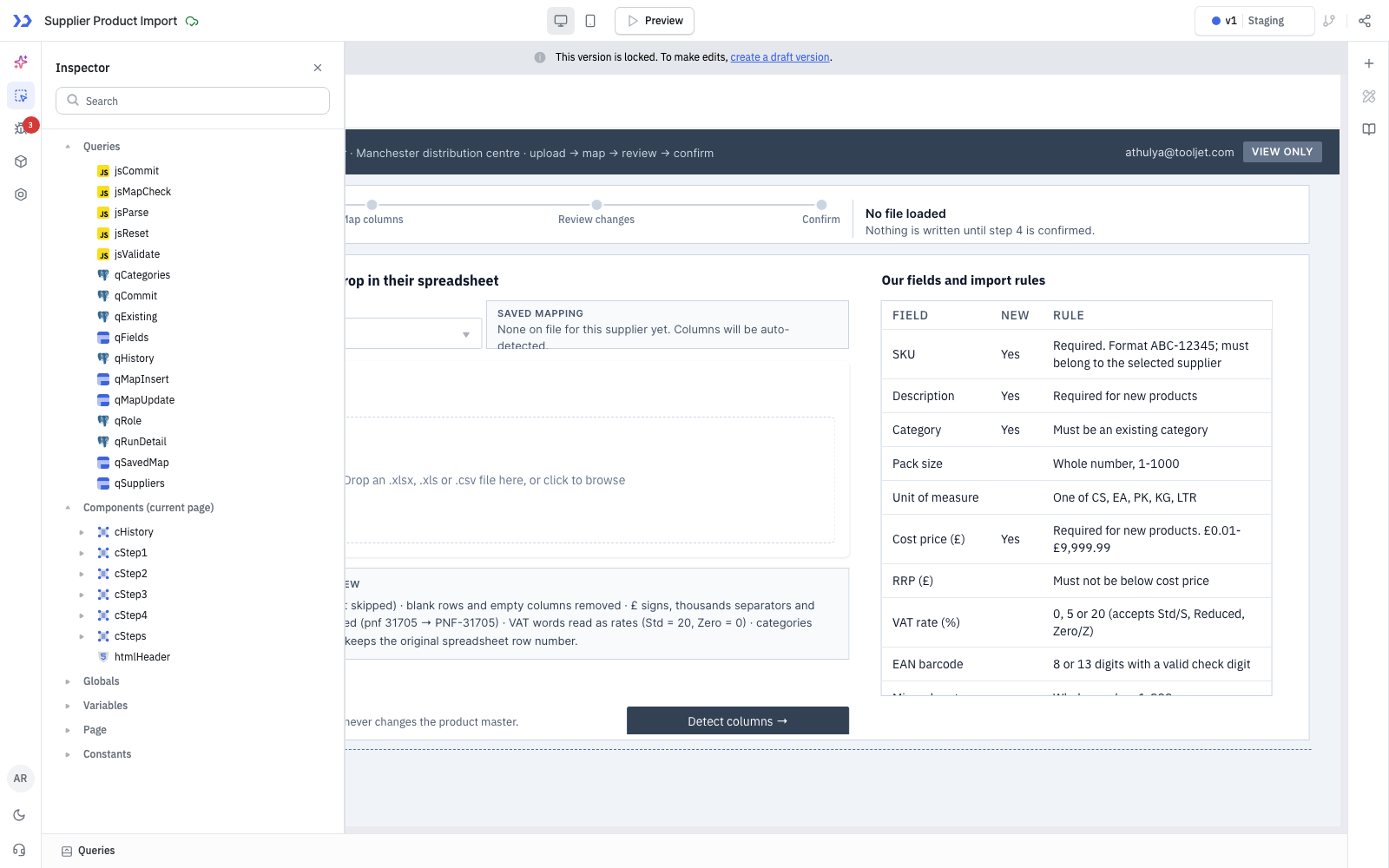
The components ToolJet MCP created, in the ToolJet inspector
Who Can Use This Supplier Import App
Wholesale and distribution businesses, cash-and-carry and foodservice suppliers, retail buying and merchandising teams, and any operations or master-data team that receives product, price or catalogue updates from many suppliers as spreadsheets and needs them checked before they reach the product master.
Control Access with Roles and Permission
As built, roles come from the signed-in user’s email in a PostgreSQL roles table. Two data stewards can commit an import and save a supplier’s mapping; ToolJet query permissions restrict the commit and mapping-save queries to those two users, and the commit function in the database checks the steward role again before writing anything. Everyone else with access to the app can upload a file, correct the mapping, see the full preview, fix rejected rows and browse the import history, but cannot commit.
Add SSO and SCIM for Enterprise Access
A Supplier Product Import app should use the company login your team already has, and ToolJet supports single sign-on (SSO) through SAML, OpenID Connect (OIDC) and LDAP, plus SCIM 2.0 for automated user provisioning. People sign in with their identity provider account, and access follows your directory instead of a separate password list.
When a steward joins or leaves the operations team, directory changes can flow into the same access controls that protect this importer. SSO and SCIM keep their access aligned with the company directory without separate hand edits.
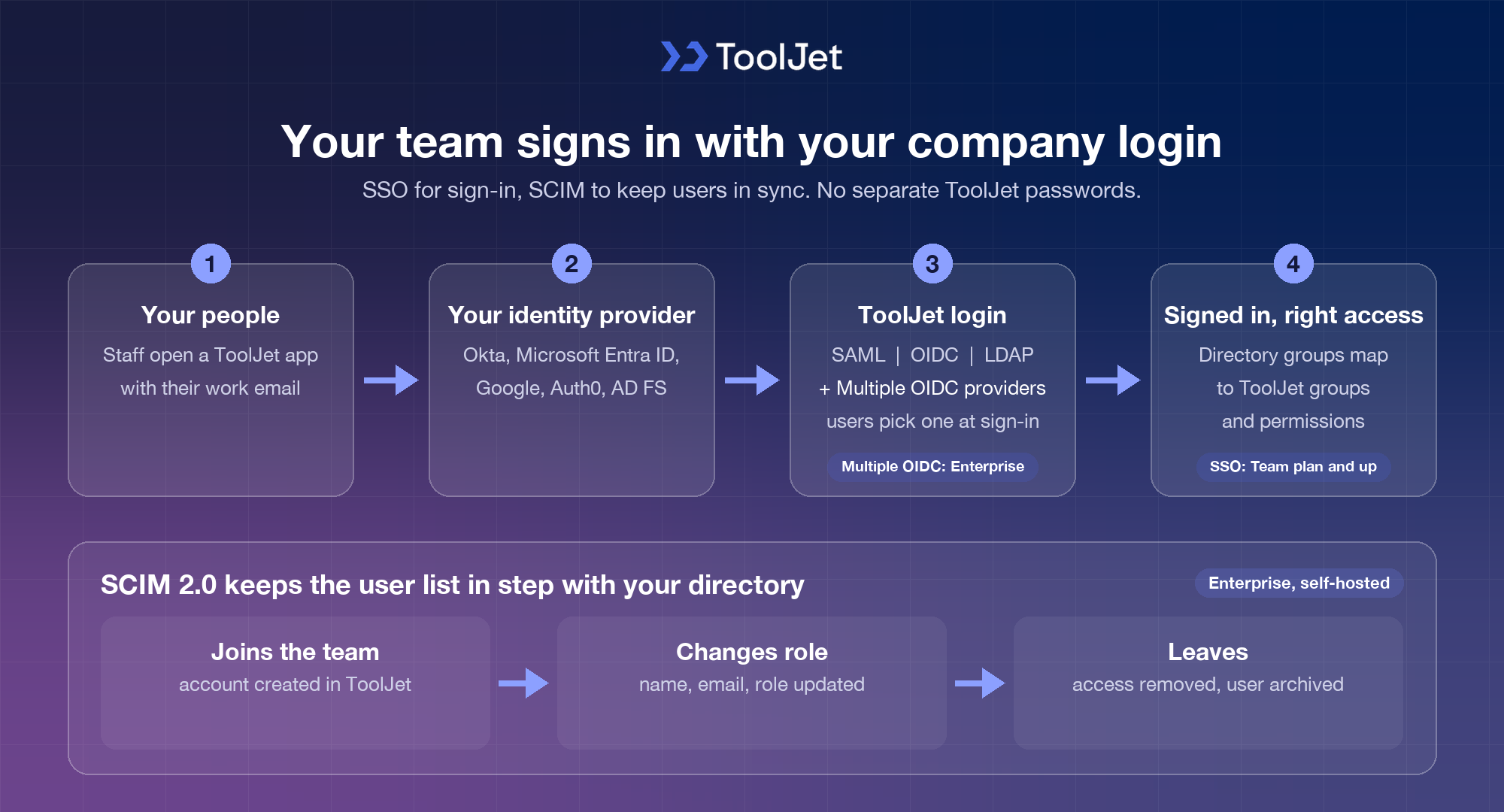
Single Sign-On and SCIM User Provisioning in ToolJet
Supported SSO Protocols (SAML, OIDC and LDAP)
Workspace admins turn each method on under Workspace settings > Workspace login, as described in the ToolJet SSO overview:
- SAML single sign-on: connect providers such as Okta, Active Directory Federation Services, Auth0 or Azure AD by pasting your identity provider metadata, with optional group sync from a group attribute.
- OpenID Connect: use Azure AD, Google or Okta with the Authorization Code or Authorization Code with PKCE grant, configured per workspace or for the whole instance. On the Enterprise plan you can set up multiple OIDC providers side by side, and users pick theirs on the sign-in page.
- LDAP authentication: sign users in against your directory server using Base DN search, CN or UPN usernames, optional SSL certificates and group sync on every login.
Automated Provisioning with SCIM 2.0
- SCIM user and group provisioning: connect Okta, Azure AD, OneLogin or another identity provider to create users when they join, update names, emails and role mappings in real time, and archive users as soon as access is revoked.
- Server-side setup: SCIM is switched on with environment variables on your ToolJet deployment and accepts Bearer token or Basic authentication.
With SSO and SCIM in place, onboarding and offboarding for the Supplier Product Import app happen in your identity provider rather than by hand. SAML, OIDC and LDAP are available from the Team plan, and SCIM provisioning is part of the ToolJet Enterprise plan.
Enterprise Features for Your Supplier Import App
A supplier product import app handles price files, product master data, and steward approvals. ToolJet provides platform controls, while each app still needs reviewed data permissions, business rules, and release tests. Availability depends on your plan and deployment.
- SSO and SCIM: sign in with SAML, OIDC or LDAP, and provision users automatically
- Role-based access control: scope permissions to the app, the data source, and each query
- Audit logs: review supported platform events in audit logs; record business decisions and their reasons in application data
- Deployment isolation: self-host on Docker or Kubernetes; operation without internet access requires the Enterprise air-gapped add-on and internal dependencies
- Multiplayer editing: several builders work on the same app, with versioning and Git sync
- AI hosting: self-hosting the app platform does not make model inference local. Review gateway and model hosting separately; fully internal inference needs a customer-hosted gateway and a supported internal model endpoint
You could add it with ToolJet Workflows. For example, a workflow could fire when an import is committed, post a Slack message to the operations channel, send a Gmail message to the steward, and write the decision back to spi_import_runs.
Final Takeaways
A supplier product import app can turn a manual spreadsheet process into a controlled workflow for mapping, validation, review, and approval. This ToolJet MCP build takes supplier files from upload to staged product changes, lets users correct rejected rows, and restricts final commits to authorized data stewards. The result is a working ToolJet application with the database tables, queries, components, permissions, and import history needed to support the workflow. For wholesale, distribution, retail, and master-data teams, the same pattern can be adapted to existing product databases and supplier processes. ToolJet MCP provides the starting point, while the resulting app remains editable as requirements change.
Build your own with ToolJet MCP
Build a supplier product import app with ToolJet MCP for your catalog files, then request a ToolJet demo. Start free on ToolJet Cloud.


