Building a custom application can solve your organization’s unique challenges, automate manual tasks, and set you apart from competitors. With the rise of low-code platforms and AI-powered features, creating robust, business-ready applications is now faster and more accessible than ever.
But with great power comes great responsibility: as AI takes a bigger role in business-critical apps, reliability and user trust become non-negotiable.
In this blog, we’ll talk about:
- How to plan, design, and build a custom application, leveraging low-code and AI, with reliability in mind
- Practical tips, best practices, and common pitfalls to avoid
- An illustrative expense-app pilot using ToolJet
- A step-by-step checklist to guide your own custom app project
- Strategies for building trustworthy, transparent AI into your applications
By the end, you’ll have a clear, modern roadmap for turning your custom app idea into a reliable solution that drives results, plus, you’ll see how AI is shaping the future of custom app development.
Why reliability and trust matter for AI-powered custom applications
AI can supercharge your custom apps, automating decisions, surfacing insights, and enhancing user experience. However, reliability and trust are essential for long-term adoption and business value.
Here’s how to ensure your AI-powered apps remain robust, credible, and responsible:
Transparency
Show the source evidence, applicable policy and recorded action behind a recommendation. Treat a generated explanation as something to verify, not as proof of the model’s reasoning or the answer’s correctness.
Data quality
Use representative, permitted test data with reviewed labels and known limitations. Check missing values, incorrect labels and underrepresented cases; clean data alone does not remove bias or guarantee reliable output.
Testing and monitoring
Implement ongoing testing for AI predictions, accuracy, fairness, and security. Monitor for “model drift” and set up alerts for anomalies.
Human-in-the-loop
Let users review or override AI-driven actions where it matters (compliance, finance, sensitive approvals).
Compliance and security
Map data sent to model providers, credential scopes, retention and permitted users. Review required assurance evidence and agreements with the responsible security and legal owners. ToolJet’s security information describes platform controls; the application still needs its own access and operating review.
Building user trust
Be upfront with users about AI’s role in the app. Offer clear error messages, source references where available, and feedback options. Do not present a model’s self-reported confidence as a calibrated probability of correctness.
Define who accepts the pilot results, which failures block release and how users get help when the system cannot provide a reliable answer. Keep a manual fallback for unsupported or uncertain cases.
Also read, “Top 6 AI app builders guide for 2026“.
Step-by-step guide: How to build a reliable, AI-powered custom application
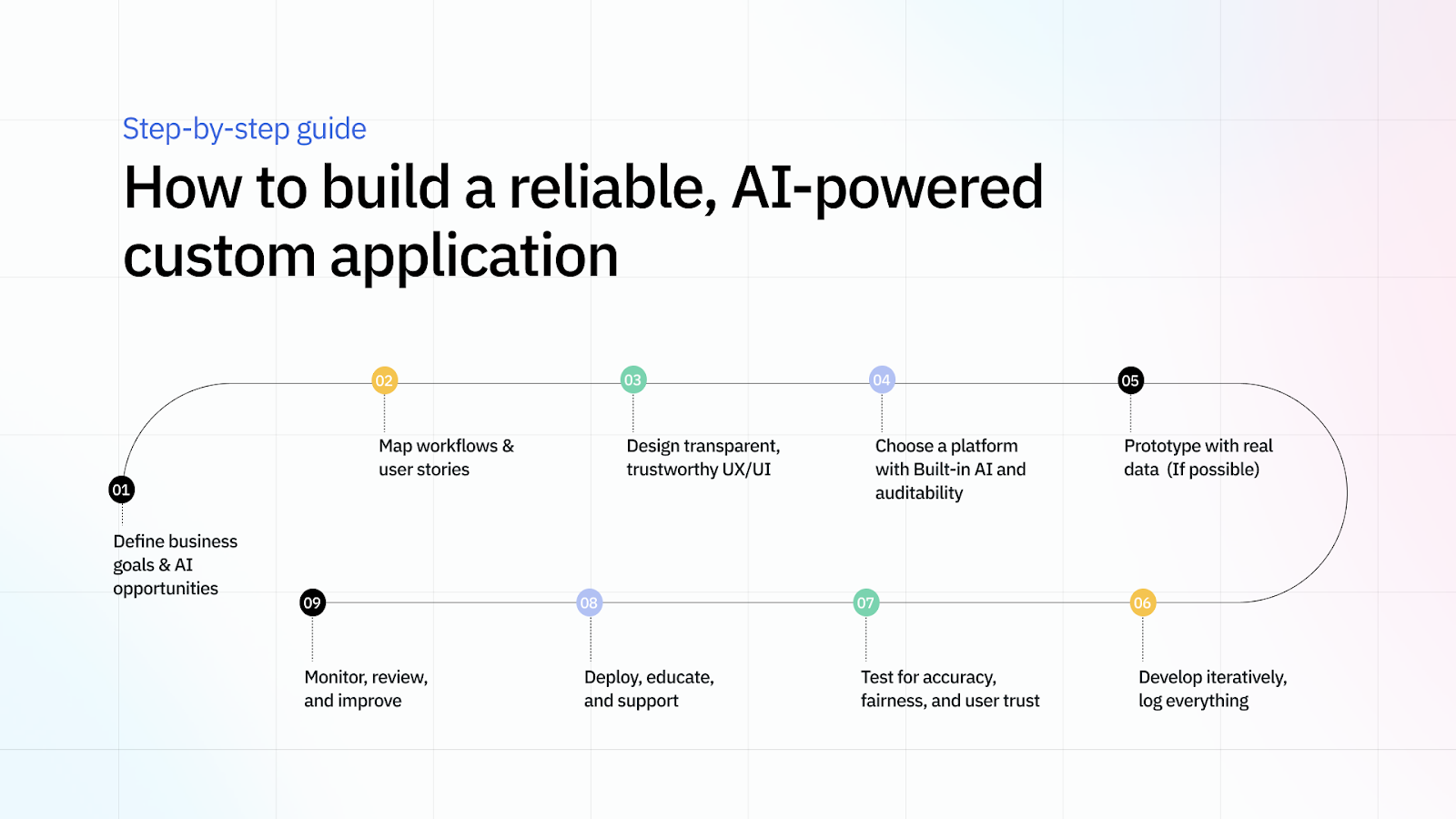
1. Define business goals & AI opportunities
- Identify your pain points and decide where AI can bring value (e.g., automating approvals, flagging anomalies, and predicting demand).
- Set workload-specific acceptance criteria: extraction accuracy, false approvals, missed policy violations, human review rate, latency and cost. Evaluate the exact approved model and configuration on representative cases.
- If you’re using AI, include “transparency,” “accuracy,” and “auditability” in your requirements.
2. Map workflows & user stories
- Draw your “as-is” and “to-be” process flows. Mark steps that will use AI.
- Write user stories for both human and AI-powered steps (e.g., “As a manager, I want AI to flag policy violations but still allow me to review.”)
- Make clear which parts of the process are handled by AI vs. by people.
3. Design a transparent, trustworthy UX/UI
- Visually show when AI is making a suggestion, prediction, or automation.
- Provide source references and policy checks for recommendations where available; show when supporting evidence is missing.
- Example: show the submitted amount beside the approved policy limit and route exceptions to an authorized reviewer.
- Make it possible to inspect and correct the input, challenge a recommendation and request human review.
4. Choose a platform with Built-in AI and auditability
- Separate the application platform from the model service. Verify the approved model endpoint, supported integration, credential scope and selected ToolJet plan.
- Test application authorization, data handling, failure recovery and required audit evidence in the proposed deployment.
- Use vendor evaluations as background, then run your own acceptance set against the exact approved model and configuration. Keep source references, human approvals and final actions in the application record.
5. Prototype with real data (If possible)
- Build a working demo quickly, using sample or anonymized real data if you can.
- Test the AI features in context (e.g., upload fake receipts, see if AI flags the right ones).
- Validate both the core workflow and any AI features with real users.
- Ask, “Do users understand and trust AI-driven recommendations? Are explanations clear?”
6. Develop iteratively, record required evidence
- Implement core features and AI modules in sprints.
- Record the model and prompt version, relevant source references, recommendation, reviewer and final action in an application decision record.
- Build and test AI integrations iteratively, focusing on small, high-impact features first.
- Define access, retention and redaction for those records. Avoid copying credentials or unnecessary personal data into logs; platform audit events and business decision records serve different purposes.
7. Test for accuracy, fairness, and user trust
- Run multiple scenarios: common, rare, and edge cases.
- Create test cases for both traditional and AI-powered workflows.
- Get feedback from non-technical users, do they understand and trust AI suggestions?
- Use test data to check for bias and unexpected errors.
- Involve non-technical users in testing to ensure AI outputs are understandable and appropriate.
8. Deploy, educate, and support
- Launch in phases. Train users on AI’s capabilities and limitations.
- Provide clear support contacts for users to flag errors, unexpected results, or concerns with AI outputs.
- Make it easy for users to report errors or override AI decisions.
- Build trust with transparency, training, and open support channels.
9. Monitor, review, and improve
- Use dashboards to track AI accuracy, user overrides, and flagged issues.
- Schedule regular “AI health checks” and update models as needed.
- Document improvements and share results to build ongoing trust.
- Build a “feedback loop,” so the app (and the AI) improve over time.
Illustrative pilot: A reliable AI-powered expense tracking app with ToolJet

Scenario
The following is a proposed pilot, not a documented customer deployment or a measured ToolJet result. A consulting team wants to review employee expenses more efficiently while keeping approval authority, policy checks and payment access under its control. Validate the workflow with test receipts before connecting production finance systems.
Step-by-step example
- Define goals & AI role
- Start with receipt extraction and policy-check recommendations; establish a baseline before setting an automation target.
- Flag risky/out-of-policy expenses for manager review.
- Record the evidence, policy version and human approval for each decision.
- Map workflow
- Employee submits expense (photo, amount, project).
- AI extracts receipt fields and proposes findings against approved policy content; validate fields and amounts with deterministic checks.
- Route recommendations to an authorized approver during the pilot. Do not use a model confidence label alone to authorize payment.
- Send policy exceptions, missing evidence and uncertain extractions to a reviewer with the receipt and applicable policy reference.
- Managers can override any AI recommendation with a comment.
- Store the reviewer, decision, timestamp, policy reference and downstream action in the application’s decision record.
- Design UX
- The dashboard distinguishes AI recommendations from approved decisions and unresolved exceptions.
- Show the source receipt and relevant policy rule; a generated explanation is not proof that the recommendation is correct.
- Authorized users can review the decision history, including approvals and overrides; restrict confidential receipts by role.
- Platform selection
- Use ToolJet for the interface and data integrations. Configure access in the selected plan and enforce record restrictions on the server or data layer. Platform audit logs do not replace the expense decision record.
- Prototyping
- Build a ToolJet prototype with synthetic or approved test receipts.
- Ask pilot users to test review, correction and override flows; record their feedback rather than assume the interface is clear.
- Development
- Connect an organization-approved model endpoint for receipt analysis; test that exact model, version and data-handling configuration.
- Use a sandbox finance integration first. Separate payment execution from AI analysis and require authorized approval.
- Test application decision records, denied access, retries and duplicate-payment prevention.
- Testing
- Test normal expenses, duplicates, policy violations, ambiguous receipts, provider outages and malicious instructions embedded in receipts.
- Have the finance team verify the evidence and final decisions. Apply prompt-injection defenses and least privilege; receipt content must not grant authority to call payment tools.
- Deployment
- Launch to the finance team, then company-wide.
- Train users on the approved automation scope and how to challenge decisions.
- Ongoing monitoring
- Monthly review of flagged cases, AI accuracy, and user trust feedback.
- Re-evaluate changes to the model, prompt or policy before release; use production data only under approved data-handling rules.
Results to measure
- Compare handling time and review workload with the baseline; report the sample size and observation period.
- Measure incorrect recommendations, missed violations, overrides and unresolved exceptions; investigate costly errors separately.
- Verify that each tested decision has the required source, reviewer and action record, with appropriate access and retention.
- Collect user feedback and measure reimbursement time. These are proposed evaluation measures, not claimed customer outcomes.
Pilot review checklist
- Early user feedback is crucial for trust; people want to know what the AI is doing and why.
- Audit logs are non-negotiable when money is involved.
- Review failures and re-run the evaluation set after model, prompt, policy or integration changes; monitoring does not guarantee that errors will be prevented.
Next, explore “Building generative AI-powered apps guide for developers“.
Not just custom, intentionally intelligent with ToolJet
A reliable AI-assisted application needs more than a plausible demo. Define the allowed task, test representative failures and keep approval authority separate from generated recommendations.
Start with a limited pilot and approved test data. Record the exact model, prompt and configuration so the team can reproduce failures and compare changes.
Before production, review the enterprise-readiness checklist for access, deployment, recovery and operating ownership.
Release only after the named owners accept the evidence and unresolved exceptions. Re-run the acceptance checks when models, prompts, policies or integrations change.