


Key takeaways
- Gartner’s November 2021 forecast estimated that 70% of new applications would use low-code or no-code by 2025. This is a historical forecast, not measured adoption in 2026.
- Enterprise readiness means operational reliability and governance controls, not drag-and-drop UI quality.
- Review security gaps, exit dependencies and commercial scope before production; this guide does not supply a study ranking the causes of deployment failure.
- Gartner’s August 2025 forecast predicted task-specific AI agents in 40% of enterprise applications by the end of 2026, not AI automation in general.
- Confirm the required SSO, roles and audit capabilities in the selected edition and proposal. A higher-priced license does not itself establish a production or compliance gap.
- Use a structured checklist to expose unresolved requirements and assign owners before rollout; it does not guarantee that deployment failures will be prevented.
Most enterprise teams begin evaluating a low-code platform with a prototype. Production evaluation must also establish access, operations and commercial scope. ToolJet’s Community platform is open source and self-hostable; governance, end-user allowances and deployment capabilities depend on the Cloud or Self-hosted plan. This enterprise readiness checklist covers eight capability areas, with a scorecard, red flags and an evaluation process.
Who This Guide Is For?
This guide is designed for:
- CTOs and VPs of Engineering evaluating low-code platforms for production use
- Platform engineering teams deploying internal tools at organizational scale
- Security and compliance leads validating governance controls before sign-off
- Enterprises migrating away from legacy internal tooling or spreadsheet-driven workflows
If your team is still evaluating based on prototype speed rather than production reliability, this checklist is your starting point.
What Does Enterprise-Ready Mean for Low-Code Platforms?
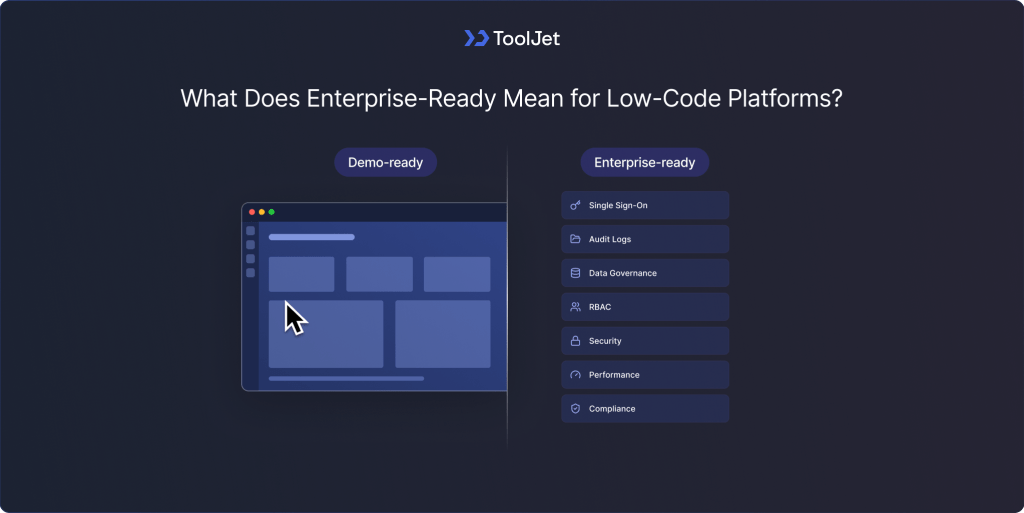
An enterprise readiness checklist for low-code platforms covers security, compliance, scalability, and operational reliability for production workloads. Enterprise-ready platforms provide deployment flexibility, governance controls, and predictable performance at real-world scale.
Enterprise readiness covers these core areas:
- Role-based access control and identity federation
- SOC 2, GDPR, HIPAA compliance support
- Self-hosted and hybrid deployment options
- Horizontal scaling and high availability
- Audit logging and change management
- Git-based multi-environment workflows
- Transparent, predictable pricing
Enterprise readiness does not mean template count, widget library size, or drag-and-drop polish. Production readiness lives at the infrastructure and governance layer. Teams building internal tools need platforms that pass a technical audit, not a design review.
In its November 2021 forecast, Gartner estimated that 70% of new applications developed by organizations would use low-code or no-code by 2025, compared with less than 25% in 2020. This historical projection is not a measured adoption rate for 2026.
Why Enterprise Teams Need a Readiness Checklist?
Without structured evaluation, enterprise teams discover capability gaps only after a platform reaches production. The cost of remediation at that stage consistently exceeds the cost of upfront validation across engineering time, vendor negotiation, and compliance exposure.
Here is what drives deployment failures:
- Security gaps surface during first internal audit
- Performance bottlenecks appear at user scale
- Lock-in blocks migration paths
- Compliance violations emerge after audit, not before
- Cost surprises hit at headcount growth
Teams that skip this evaluation often find the new tool creates as many operational risks as it resolves. The checklist below closes that gap before deployment, not after.
Did you know? Mordor Intelligence’s 2026 low-code market report projects the low-code development platform market at $31.59B in 2026, growing to $78.94B by 2031 at a 20.12% compound annual growth rate.
Enterprise Readiness Is an Operational Capability
Enterprise readiness needs evidence from the proposed deployment. Confirm that required SSO, roles and audit capabilities are licensed and configured before the pilot. Listing a feature does not prove it is included in your chosen edition; a higher-priced edition is not automatically a technical or compliance failure.
The relevant question for each checklist item is not “does this platform have the feature” but “can my team operate this reliably in production without vendor dependency.” Evaluate each requirement against deployment documentation, not sales materials.
Starting your platform evaluation? Run your shortlist through this readiness scorecard before your first vendor demo.
What Enterprise-Ready Platforms Must Support
Before diving into the full checklist, use this snapshot to assess where a platform stands across the four most critical enterprise readiness dimensions.
| Dimension | What to Look For | Red Flag |
| Security | Required access, identity and audit controls in the proposed edition | Required controls unavailable or undocumented in the proposal |
| Deployment | Hosting and isolation architecture that meets the organization’s requirements; verify offline licensing and add-ons | Proposed hosting or data boundary does not meet the organization’s requirements |
| Governance | Multi-environment, Git sync, change approvals | No version control or environment separation |
| Operations | Backup automation, rollback, monitoring integrations | No disaster recovery documentation |
A platform that fails two or more of these dimensions at the snapshot level warrants deeper scrutiny before proceeding to a proof of concept.
The Complete Enterprise Readiness Checklist for Low-Code Platforms
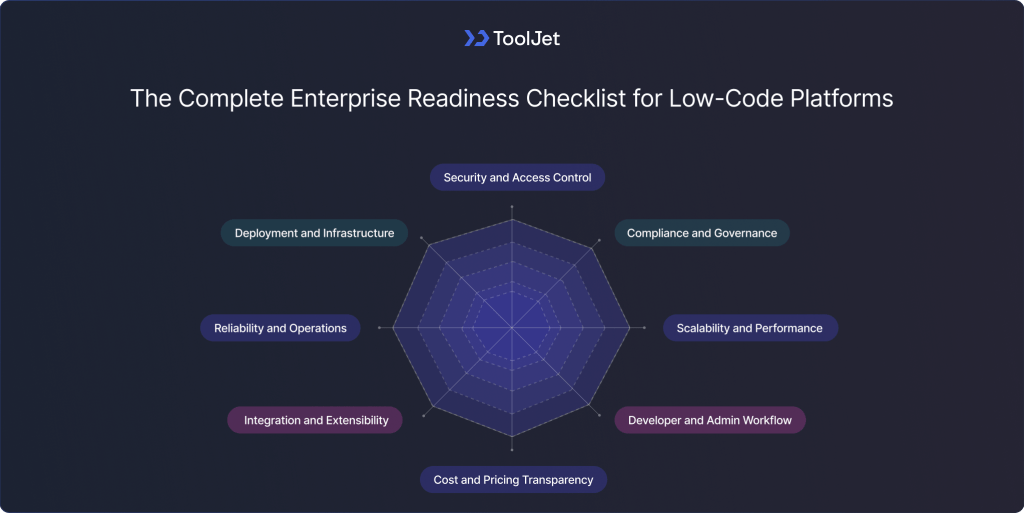
This checklist covers eight capability categories. Evaluate each requirement as Met, Partial, or Not Met against your platform shortlist.
- Security and Access Control
Strong access control protects every application the enterprise low-code platform hosts. Evaluate these before any production deployment.
- Granular RBAC, workspace to folder level
- SSO via SAML, OIDC, Okta, Azure AD
- Multi-factor authentication enforcement
- Audit coverage, retention and export for the actions your organization requires
- Encryption at rest and in transit
- Secrets management and variable isolation
- IP allowlisting and network isolation
- Where required, documented air-gapped operation, offline licensing and the applicable deployment/AI add-ons
Review the platform’s security documentation before shortlisting. Features absent from deployment docs, as opposed to marketing pages, often require separate engineering escalation to enable.
Evaluating platforms for a regulated industry? Review this low-code platform comparison for governance and compliance benchmarks.
- Compliance and Governance
Compliance support covers certification status and the platform’s ability to generate evidence for audits. Certification alone does not satisfy an auditor who needs transaction-level logs from a low-code platform evaluation.
- SOC 2 Type II certified
- HIPAA-capable with BAA support
- GDPR data residency and deletion workflows
- ISO 27001 alignment
- Full audit trails on all changes
- Workflow approvals and change gates
- Dev, staging, production separation via multi-environment setup
Did you know? Gartner’s August 2025 forecast predicted that 40% of enterprise applications would integrate task-specific AI agents by the end of 2026, up from less than 5% in 2025. This is a forecast about agents, not all AI-assisted automation. Evaluate the access, action approval and audit requirements for your own AI workflow.
- Deployment and Infrastructure
Deployment flexibility determines whether a platform fits your infrastructure strategy or forces architectural compromise. Review the deployment overview for your preferred hosting model.
- Self-hosting via Docker and Kubernetes
- Cloud deployment on AWS, GCP, Azure
- On-premise and private cloud options
- Hybrid deployment for mixed environments
- Where required, air-gapped installation with offline licensing and the necessary AI gateway/model configuration; confirm edition and add-ons
- Scalability and Performance
A platform performing well at 50 users may degrade sharply at 500. Scalability requirements must match your three-year growth forecast, not current team size.
- Horizontal scaling without manual intervention
- Load balancing across instances
- High availability with documented SLAs
- Auto-scaling for traffic spikes
- App performance monitoring tooling
- Background job processing support
- Reliability and Operations
Reliability requirements ensure the platform supports business continuity across your organization. Evaluate data security policies alongside operational recovery procedures.
- Automated backup with documented RTOs
- Disaster recovery with tested restore procedures
- Rollback capability for application changes
- Monitoring integration with existing observability stack
- Incident logging for post-mortems
- Integration and Extensibility
Enterprise internal tools connect to dozens of systems. Evaluate integration depth rather than raw connector count.
- REST API and GraphQL with auth passthrough
- Webhook support for event-driven architecture
- Native database connectors at production scale
- Event-driven workflow builder for automation
- Custom integration via code components
- Developer and Admin Workflow
Developer experience at the platform level directly affects how quickly teams ship, maintain, and audit applications in production.
- Git sync for version control
- Multi-environment pipeline management
- CI/CD pipeline compatibility
- Granular RBAC at all permission levels
- CLI and API access for infrastructure-as-code workflows
- Cost and Pricing Transparency
Pricing structure affects both procurement and long-term operational budget. Unpredictable cost models create financial risk at the same level as technical risk.
- Published per-builder pricing tiers
- Explicit end-user allowances and any additional-user charges in the selected plan
- SSO and access controls included in the proposed production license
- Clear scaling cost at 1,000-plus users
Did you know? Forrester’s 2026 report identifies developer hiring constraints as a growing operational pressure for enterprise technology teams in North America and Western Europe, making platforms with opaque or per-seat pricing structurally harder to budget as teams scale.
Enterprise Readiness Scorecard Template
Use this editorial scorecard to track your documented requirements, not as a validated risk model. Mark each applicable row Met, Partial or Not Met and record the evidence, owner and unresolved exception. Add requirements specific to your application; a numeric total cannot override a mandatory control.
| Category | Requirement | Met | Partial | Not Met |
| Security | Granular RBAC | |||
| Security | Required SSO included in the selected production plan | |||
| Security | Audit logging | |||
| Security | Air-gapped operation and offline licensing, if required; add-ons confirmed | |||
| Compliance | SOC 2 Type II | |||
| Compliance | GDPR data controls | |||
| Compliance | HIPAA support | |||
| Deployment | Self-hosted option | |||
| Deployment | Kubernetes support | |||
| Scalability | Horizontal scaling | |||
| Scalability | High availability | |||
| Reliability | Disaster recovery | |||
| Reliability | Rollback capability | |||
| Integrations | Required integration operations, authentication and limits verified | |||
| Dev Workflow | Git sync | |||
| Dev Workflow | Multi-environment support | |||
| Pricing | End-user allowances and total rollout cost confirmed | |||
| Pricing | Required identity-control license included in the quote |
Validate partial or unmet requirements with the appropriate technical, security or commercial owner. Treat missing mandatory controls as unresolved regardless of the total; this checklist does not establish a universal percentage threshold for production risk.
Red Flags That Signal a Platform Is Not Enterprise Ready
Assess these characteristics against the organization’s documented requirements. Missing required controls, unsupported hosting boundaries or unclear commercial scope are reasons to pause a shortlist decision. A paid feature or per-user billing unit alone does not prove a production risk.
- Required audit coverage or retention unavailable or undocumented in the selected edition
- No supported customer-operated deployment when that hosting boundary is required
- No Git-based version control for application management
- Required SSO unavailable or omitted from the proposed license
- End-user allowances, additional charges or expansion costs unclear
- Required app/data access cannot be constrained to approved roles
- No published compliance certifications or audit trail documentation
Teams evaluating platforms for secure internal dashboards should map required audit evidence, hosting and release controls to their workload and applicable obligations. Whether a control is included in a paid edition does not by itself determine compliance; document its availability, configuration and operating owner.
Real Risks of Running Self-Hosted Infrastructure
Self-hosting provides genuine advantages in security, compliance, and operational control. It also introduces risks that cloud-managed deployment does not. Teams must account for both sides before committing.
Common operational risks in self-hosted deployments:
- Misconfigured IAM policies that expose data to unauthorized roles
- Delayed security patches from internal teams managing update cycles
- Weak backup procedures that create unacceptable recovery time objectives
- Insufficient monitoring that delays incident detection
- DevOps capacity mismatches that accumulate technical debt over time
Security depends on operational maturity, not deployment model.
A well-managed self-hosted instance with automated patching, backup, and monitoring is more secure than a cloud-managed deployment with weak IAM governance. Evaluate your team’s operational maturity alongside the platform’s system requirements before committing to self-hosting.
How to Evaluate a Low-Code Platform Using This Checklist?
A structured evaluation process prevents the common failure mode where a platform passes a demo review and fails a production readiness audit six months later.
Step 1. Define requirements. List non-negotiables across the eight categories above. Weight security and compliance highest for regulated workloads.
Step 2. Validate platform capabilities. Test each requirement against the platform’s deployment documentation, not its marketing page. Features absent from docs require vendor escalation.
Step 3. Run a proof of concept. Deploy in a staging environment that mirrors production. Test RBAC, SSO, and audit log output directly.
Step 4. Conduct a security review. Have your security team evaluate access controls, encryption, and network isolation against your security baseline.
Step 5. Monitor performance under load. Simulate expected concurrent users and query volume. Verify horizontal scaling performs within SLA requirements.
Completed your proof of concept? Compare platform governance models before finalizing your vendor selection.
Why ToolJet Passes the Enterprise Readiness Checklist?
Enterprise teams need more than a feature list. Before committing, confirm the selected license, required controls, hosting architecture, assurance evidence and operating responsibilities. Record add-ons and exceptions before the production pilot.
ToolJet capabilities to verify against the selected plan:
- Access controls: Community roles and paid custom-group/permission capabilities have different scope; verify the required controls in the selected plan.
- SSO is included on Team and Enterprise plans; confirm the required provider and provisioning controls. SCIM is an Enterprise capability.
- Audit logs are included on Team and Enterprise plans; verify event coverage, retention and export for your requirements.
- Review ToolJet’s security information and Trust Center for assurance scope and applicable agreements. Platform reports do not automatically make a customer application compliant.
- Docker and Kubernetes self-hosting is distinct from private AI and offline operation. Customer-hosted AI gateway and fully air-gapped operation are Self-hosted Enterprise add-ons. Enterprise BYOK is available on both ToolJet Cloud and Self-hosted deployments; a supported internal model endpoint is needed to keep inference on your infrastructure.
- Multi-environment management is available on Self-hosted Team and Cloud Enterprise plans and above. Multiple separate deployments are included in Self-hosted Enterprise plans.
- Git sync is included on Team and Enterprise plans; confirm the release and promotion process in your deployment.
- Team plans include up to 100 end users; Enterprise plans include unlimited end users. Confirm builders, AI usage and any required add-ons in the current plan tables.
“According to EIN Presswire, ToolJet’s repositioning as an AI-first enterprise platform reflects growing demand for platforms that remove per-end-user pricing friction while delivering production-grade governance.”
Why ToolJet Passes the Enterprise Readiness Checklist?
ToolJet publishes its Community platform under AGPL-3.0 and offers Cloud and Self-hosted plans. Community source access is separate from commercial governance and support entitlements. Team includes SSO, custom groups, audit logs and Git sync with a 100-end-user allowance; Enterprise expands the licensed scope. Private AI and offline operation have Self-hosted Enterprise add-on requirements.
Try ToolJet for Free
Use the Free plan to evaluate a small internal tool. Before an enterprise rollout, confirm required governance, user allowances and deployment/AI add-ons in the selected plan.


