


Internal collaboration tools help employees communicate, coordinate tasks and maintain shared knowledge. Start with the bottleneck: chat, document editing, project tracking or a business process. Buying another all-in-one suite will not necessarily solve a problem caused by unclear ownership or duplicate records.
Quick shortlist: consider Slack or Microsoft Teams for conversations; Google Workspace for shared documents; Notion, Confluence or Document360 for knowledge; Asana, ClickUp or Trello for task coordination; and Zoom Workplace for meetings and related collaboration. For a custom approval or data-entry application, evaluate an app builder such as ToolJet alongside these tools.
This guide compares ten ready-made tools by use case, then explains when a custom internal app is useful. The shortlist is editorial guidance based on vendor product information, not a hands-on benchmark or a ranking by customer satisfaction.
Before selecting a platform, test one real team workflow and check the plan’s access controls, guest rules, retention, export options and total cost.
What are internal collaboration tools?
Internal collaboration tools are software used inside an organization to share messages, documents, decisions and task status. Examples include team chat, shared document editors, project boards and internal knowledge bases. Choose a system of record for each type of information so people know where to find the current version.
Here’s why it matters:
- Breaks down silos: Collaboration tools foster transparency and open communication, allowing employees across departments to share ideas, updates, and feedback without barriers.
- Boosts employee engagement: When employees can easily connect, contribute, and stay informed, they feel more involved and valued, which drives higher engagement and job satisfaction.
- Accelerates decision-making: With real-time access to information, stakeholders can collaborate faster, review documents together, and make informed decisions without delays.
- Supports remote and hybrid work: Internal collaboration tools provide the structure and accessibility teams need to stay productive, regardless of location or time zone.
- Improves knowledge retention: Documenting discussions, processes, and best practices in shared platforms ensures institutional knowledge is preserved and accessible to everyone.
Measure improvement in your own workflow: fewer missed handoffs, faster approvals, less time finding information and less rework. Market growth figures do not demonstrate that a particular tool will improve your team’s productivity.
Ready to supercharge your business processes? Discover the Top internal tools of 2026 and start optimizing your workflow today.
10 internal collaboration tools compared by use case
| Tool and official source | Consider for | Check in your pilot |
|---|---|---|
| Slack | Team conversations | Channel organization, retention and connected-app permissions |
| Microsoft Teams | Microsoft-based communication | Exact subscription, guest access and file permissions |
| Google Workspace | Shared documents and calendars | File ownership, storage and administration |
| Notion | Wikis and flexible workspaces | Page permissions, ownership and workspace structure |
| Asana | Cross-team tasks and projects | Dependencies, reporting and plan limits |
| Confluence | Shared organizational knowledge | Content ownership, search and restricted spaces |
| Document360 | Structured knowledge bases | Internal reader access, editorial review and export |
| ClickUp | Tasks, documents and collaboration | Workspace setup, permissions and feature entitlements |
| Trello | Visual task boards | Board access, automation limits and reporting needs |
| Zoom Workplace | Meetings and follow-up collaboration | Recording storage, meeting limits and bundled features |
6 principles for successful team collaboration
These six operating practices help a team use its tools consistently. Agree on them during a pilot rather than assuming that a new platform will establish them automatically.
1. Set clear goals and expectations
Why it matters: Clear objectives align everyone’s efforts and reduce ambiguity.
How to follow this principle:
- Define SMART goals (Specific, Measurable, Achievable, Relevant, Time-bound) for teams and projects.
- Use project management tools like Asana, Trello, or Monday.com to outline deliverables and timelines.
- Kick off projects with team briefings to align everyone on goals, roles, and priorities.
2. Promote open and transparent communication
Why it matters: Collaboration improves organically when team members feel informed and heard.
How to follow this principle:
- Use tools like Slack or Microsoft Teams for real-time communication.
- Create dedicated channels for projects, announcements, and informal conversations to keep discussions organized.
- Encourage regular check-ins and use asynchronous updates (e.g., daily standups in shared docs) to keep everyone in the loop.
3. Encourage accountability and ownership
Why it matters: Teams work best when individuals take full responsibility for their contributions.
How to follow this principle:
- Assign clear ownership of tasks within project boards or documentation.
Set milestones and track progress with tools like Notion, ClickUp, or Jira. - Use retrospectives or reviews to reflect on what was achieved and where improvements can be made.
4. Foster a culture of respect and inclusion
Why it matters: Collaboration thrives when team members feel valued and supported.
How to follow this principle:
- Promote inclusive meeting practices; rotate facilitators, ensure everyone can speak.
- Offer recognition and praise in public channels to boost morale.
- Create anonymous feedback loops to surface concerns or suggestions without fear.
5. Use the right tools and processes
Why it matters: The right tech stack simplifies workflows and eliminates unnecessary friction.
How to follow this principle:
- Audit your current tools to eliminate redundancy and ensure seamless integration.
- Train employees regularly to maximize the usage of collaboration platforms.
- Standardize processes (e.g., naming conventions, file sharing protocols) so everyone works efficiently and consistently.
6. Enhance your tools with the right collaboration plugins
Why it matters: Collaboration plugins can significantly boost team productivity by extending the capabilities of your existing tools by unifying processes, reducing context-switching, and automating repetitive actions. All of which are critical for sustaining productivity in fast-moving teams.
How to follow this principle:
- Review the permissions requested by each plugin and assign an owner.
- Test duplicate events, failed deliveries and account removal before relying on an integration.
- Keep a record of connected services, subscription costs and the process for revoking access.
By actively applying these principles and supporting employees with the right tools and habits, collaboration can become a strength rather than a struggle.
Types of internal collaboration software
Internal collaboration software comes in many forms, each designed to support different aspects of teamwork.
Depending on your organization’s size, team structure, and workflow preferences, you might use one or a combination of these tools to streamline communication, project execution, and knowledge sharing.
Here are the main types of internal collaboration software:
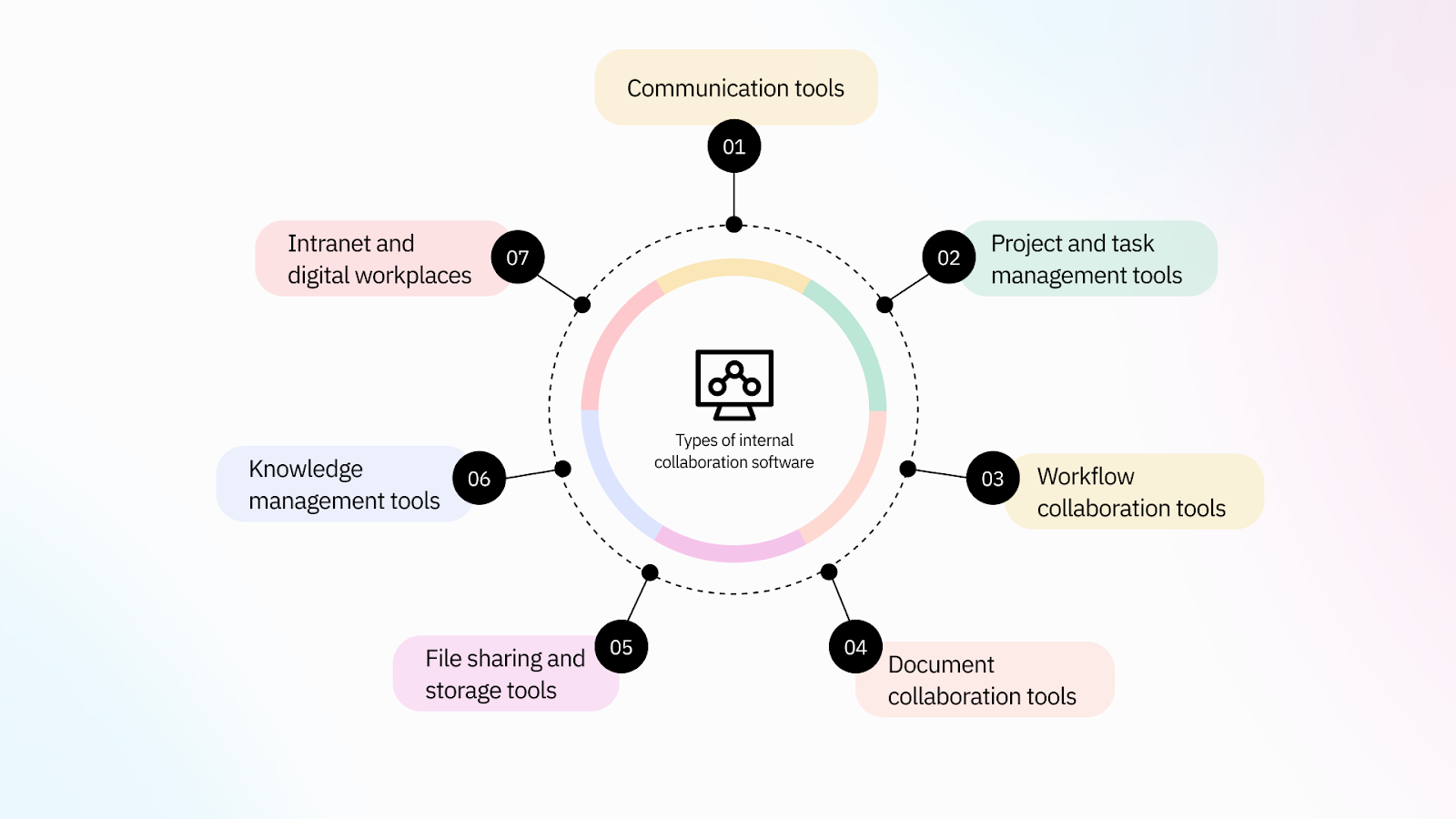
1. Communication tools
These platforms enable real-time messaging, video calls, and asynchronous updates to keep teams connected.
Examples: Slack, Microsoft Teams, Zoom
Use case: Quick updates, group chats, company-wide announcements, virtual meetings.
2. Project and task management tools
These tools help teams plan, assign, and track tasks, ensuring everyone knows what needs to be done and when.
Examples: Trello, Asana, ClickUp, Monday.com
Use case: Managing deadlines, assigning responsibilities, tracking project progress, and prioritizing work.
3. Workflow collaboration tools
These tools are designed to help teams streamline multi-step processes across departments, automate repetitive tasks, and maintain visibility into ongoing operations.
Examples include task and approval capabilities in work-management products. For a custom data-backed approval app, ToolJet can provide the interface and integrations; its separate Workflows product is available on Self-Hosted. Confirm the deployment and automation scope before choosing a solution.
4. Document collaboration tools
These platforms allow teams to co-create, edit, and store documents in real-time, reducing versioning issues and improving transparency.
Examples: Google Workspace (Docs, Sheets), Notion, Confluence
Use case: Collaborative editing, meeting notes, SOP documentation, internal wikis.
5. File sharing and storage tools
These tools make it easy to securely store, organize, and share files across teams and departments.
Examples: Google Drive, Dropbox, OneDrive
Use case: Centralizing resources, sharing media assets, document archiving, and permission-based file access.
6. Knowledge management tools
These systems organize internal knowledge, FAQs, and best practices, making it easier for employees to find what they need without asking around.
Examples: Document360, Guru, Slab
Use case: Creating internal help centers, onboarding hubs, or searchable company knowledge bases.
7. Intranet and digital workplaces
Intranets combine several collaboration features into one centralized platform, offering company news, social engagement tools, resources, and app integrations.
Examples: LumApps, SharePoint, Happeo
Use case: Unified employee portal, organization-wide communication, HR announcements, and policy distribution.
Organizations can empower their teams to communicate more effectively, manage tasks efficiently, and maintain a strong knowledge-sharing culture by understanding the different types of internal collaboration tools and choosing the right mix.
Essential features to consider when choosing internal collaboration tools
Test the features below in the plan you would purchase. Use ordinary employee, manager, guest and administrator accounts, including attempts to access information each role should not see.
Customization and flexibility
The ability to tailor the tool to your unique workflows and processes is essential. Look for platforms that allow you to create custom workflows, integrate with various data sources, and adapt to changing business needs. Workplace collaboration software should be adaptable to your specific business needs.
Intuitive user interface (UI)
UI tools play a vital role in boosting business efficiency by making collaboration software more accessible and user-friendly. A clean, well-designed interface ensures that users can quickly navigate, understand, and fully utilize the tool, regardless of their technical expertise.
Integration capabilities
Test the exact integration, not just the presence of a logo in a catalog. Confirm read and write operations, authentication, synchronization direction, failure handling and ownership of credentials.
Automation and workflow management
Features that automate repetitive tasks and streamline workflows can significantly boost productivity. Look for tools that support task automation and workflow optimization.
Data management and analytics
Collecting, analyzing, and visualizing data is crucial for making informed decisions. Ensure the tool provides robust analytics and reporting capabilities.
Security and access controls
Check SSO, account deprovisioning, guest access, document permissions, audit retention and export. A hidden button or filtered screen does not enforce access to underlying data. Test authorization on the server or source system as well as in the interface.
Scalability
Pilot with representative data volumes, concurrent users and large files. Obtain written limits for storage, API usage, automation and support before committing to a rollout.
Support and community
Look for tools with active support communities and comprehensive documentation to help you troubleshoot issues and optimize usage.
For AI features, verify which content the model can access and whether answers respect the viewer’s permissions. Review data processing terms, sources shown in answers, retention and behavior when approved information is unavailable.
Build or buy? Buy standard chat, document and meeting software when it fits. Consider a custom internal application when employees need to read or update business records, route requests or apply domain-specific validation across existing systems.
The future of app development with AI awaits you! Explore the Top 6 AI app builders of 2026 and create smarter solutions faster.
Types of internal collaboration tools for key industries
Internal collaboration tools are essential for enhancing communication, streamlining workflows, and improving productivity across various sectors.
Here are some key industries and examples of internal tools that can be built to boost collaboration and productivity:
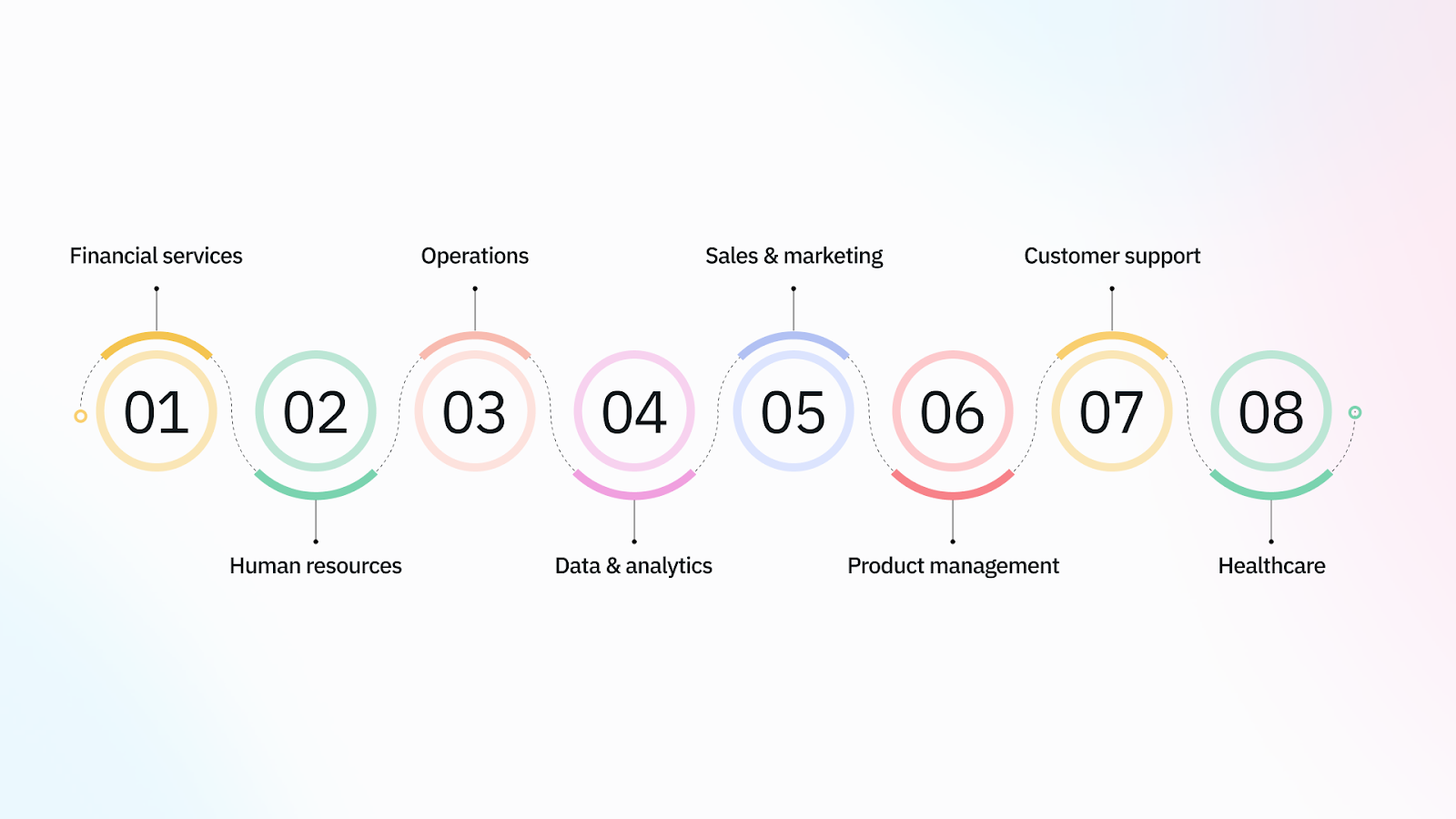
Financial services
In financial services, collaboration is crucial for managing client relationships, tracking transactions, and ensuring compliance. Here are some internal tools that can enhance collaboration:
- Account receivables: Automate tracking of payments and follow-ups with clients.
- Underwriting portal: Centralize underwriting processes, ensuring that all stakeholders have access to necessary documents and information.
- Mortgage Calculator: Provide a shared tool for calculating mortgage options and facilitating discussions between clients and advisors.
Human resources
HR teams rely heavily on collaboration to manage employee data, track performance, and facilitate communication. Here are some tools that can improve HR collaboration:
- Employee directory: Create a centralized directory for employee contact information and profiles.
- Leave management portal: Automate leave requests and approvals, ensuring seamless communication between employees and management.
- Applicant tracking system: Streamline the hiring process by centralizing candidate information and feedback.
Operations
Operations teams need tools that help manage inventory, track orders, and coordinate logistics. Here are some internal tools that can enhance collaboration in operations:
- Inventory management system: Provide real-time inventory tracking, ensuring all teams have accurate stock levels.
- Supply chain management: Centralize supply chain data to improve communication with suppliers and distributors.
- Travel booking portal: Automate travel arrangements for employees, making it easier to manage business trips.
Data & analytics
Data-driven decisions require effective collaboration among data analysts and stakeholders. Here are some tools that can improve collaboration in data & analytics:
- Business intelligence portal: Create a centralized dashboard for key performance indicators (KPIs) and data insights.
- Sales analytics portal: Provide real-time sales data to help teams make informed decisions.
- KPI management dashboard: Track and analyze key metrics across departments.
Sales & marketing
Sales and marketing teams must collaborate closely to align strategies and maximize impact. Here are some internal tools that can enhance collaboration:
- Lead management system: Centralize lead information to align sales and marketing teams.
- Campaign management: Automate campaign tracking and reporting, facilitating collaboration between teams.
- Promo code management: Manage and distribute promotional codes efficiently across teams.
Product management
Product management teams require tools that help track product development, manage feedback, and coordinate launches. Here are some internal tools that can improve collaboration:
- Project management: Use tools like Asana or Trello to track product development milestones and tasks.
- Digital asset management: Centralize product assets to ensure all teams can access the latest materials.
- Changelog application: Automate the tracking of product updates and changes.
Customer support
Customer support teams need tools that help manage tickets, track issues, and communicate with customers effectively. Here are some internal tools that can enhance collaboration:
- Customer support admin: Centralize customer support data to ensure all agents can access necessary information.
- Customer ticket system: Automate ticket assignment and tracking to improve response times.
Healthcare
In the healthcare sector, including hospitals, clinics, and pharmaceutical companies, internal collaboration is vital for delivering patient care, managing clinical operations, and ensuring compliance. Here are some internal tools that can improve collaboration in healthcare:
- Clinical trial tracker: Streamline collaboration across research, regulatory, and medical affairs teams by centralizing trial progress, documentation, and communication.
- Medical inquiry portal: Enable medical teams to log, assign, and resolve queries from healthcare professionals (HCPs), ensuring faster and more compliant communication.
- Regulatory compliance dashboard: Help pharma and healthcare orgs stay audit-ready by automating the tracking of SOP updates, documentation, and training completion.
- Sample management system: For pharmaceutical sales teams, this tool helps manage the distribution and tracking of drug samples, ensuring transparency and compliance.
- Internal knowledge base: Create a shared repository of standard operating procedures (SOPs), medical guidelines, and research updates accessible across departments.
Explore the current ToolJet template catalog for starting points. Review each template’s data model, integrations and permissions before adapting it to a production workflow.
Best cross-department employee collaboration tools and software you can try to boost productivity in 2026
With countless collaboration tools in the market, choosing the right one depends on your team’s size, needs, and workflows.
The tools below cover different jobs. Product scope and plan entitlements vary, so use their official product pages and your own pilot to validate the fit.
1. Slack
Slack is a leading real-time messaging platform designed for teams to communicate quickly and stay organized with channels, threads, and integrations.
- Best for: Team chat, instant communication, and app integrations
- Key features: Channels, threaded messages, video huddles, third-party app support (e.g., Google Drive, Trello)
- Pros: Intuitive UI, strong search functionality, excellent integration ecosystem
- Cons: Can get noisy; limited file storage on free plan
2. Microsoft Teams

Microsoft Teams provides chat, meetings and collaboration within Microsoft’s ecosystem. Check the exact Microsoft 365 or standalone Teams subscription, since packaging and included features vary.
- Best for: Companies already using Microsoft 365
- Key features: Team channels, document collaboration, built-in video meetings, OneDrive integration
- Pros: Deep Microsoft integration, powerful for enterprise teams
- Cons: Slightly steep learning curve for new users
3. Google Workspace

Google Workspace brings together services such as Gmail, Docs, Drive, Meet and Calendar. It is a candidate when shared document editing and coordinated communication are the primary requirements.
- Consider for: Shared documents, spreadsheets, email and calendars.
- Evaluate: Sharing permissions, file ownership, comments and revision history.
- Pilot: Have two departments edit and approve the same document, including an external collaborator if required.
- Check before purchase: Storage, administration, offline requirements and the exact Workspace edition.
4. Notion

Notion is an all-in-one workspace for notes, docs, tasks, and databases, ideal for flexible, document-driven collaboration.
- Best for: Team wikis, internal documentation, and lightweight project management
- Key features: Pages, templates, task boards, databases, real-time collaboration
- Pros: Highly customizable, visually clean interface
- Cons: May be overwhelming for new users due to flexibility
5. Asana
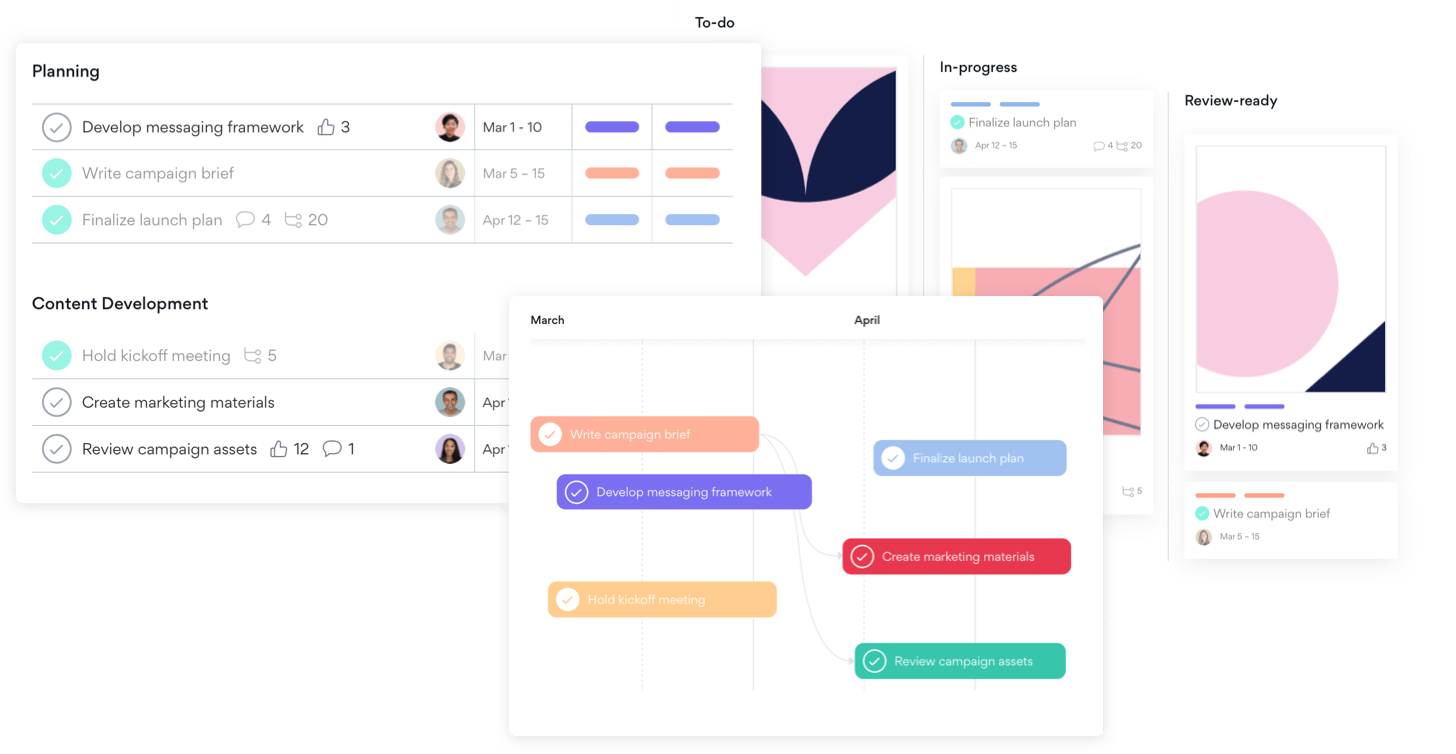
Asana is a powerful task and project management platform that helps teams plan, organize, and track their work.
- Best for: Cross-functional project collaboration
- Key features: Task lists, timelines, dependencies, workload tracking
- Pros: Great for visibility across teams; easy to assign and monitor tasks
- Cons: Limited features in the free version; can be complex for small teams
6. Confluence

Confluence is a robust documentation and knowledge management platform by Atlassian, perfect for internal wikis and team collaboration on content.
- Best for: Knowledge sharing and internal documentation
- Key features: Page templates, version history, comment threads, Jira integration
- Pros: Structured content hierarchy; strong integration with Atlassian tools
- Cons: Not ideal for task management or chat functionality
7. Document360

Document360 is a dedicated knowledge base platform that allows teams to build, manage, and share internal or customer-facing documentation.
- Best for: Internal knowledge bases, SOPs, FAQs, and product documentation
- Key features: Markdown editor, version control, category manager, analytics
- Pros: Clean UI, powerful documentation tools, granular access control
- Cons: Focused solely on knowledge management (requires other tools for chat/tasking)
8. ClickUp

ClickUp is a highly customizable all-in-one productivity platform for task management, docs, goals, and real-time chat.
- Best for: Teams looking for an end-to-end project and collaboration suite
- Key features: Task hierarchy, custom views, time tracking, goals, docs, chat
- Pros: Scalable for teams of all sizes, flexible UI
- Cons: Slight learning curve due to the depth of features
9. Trello
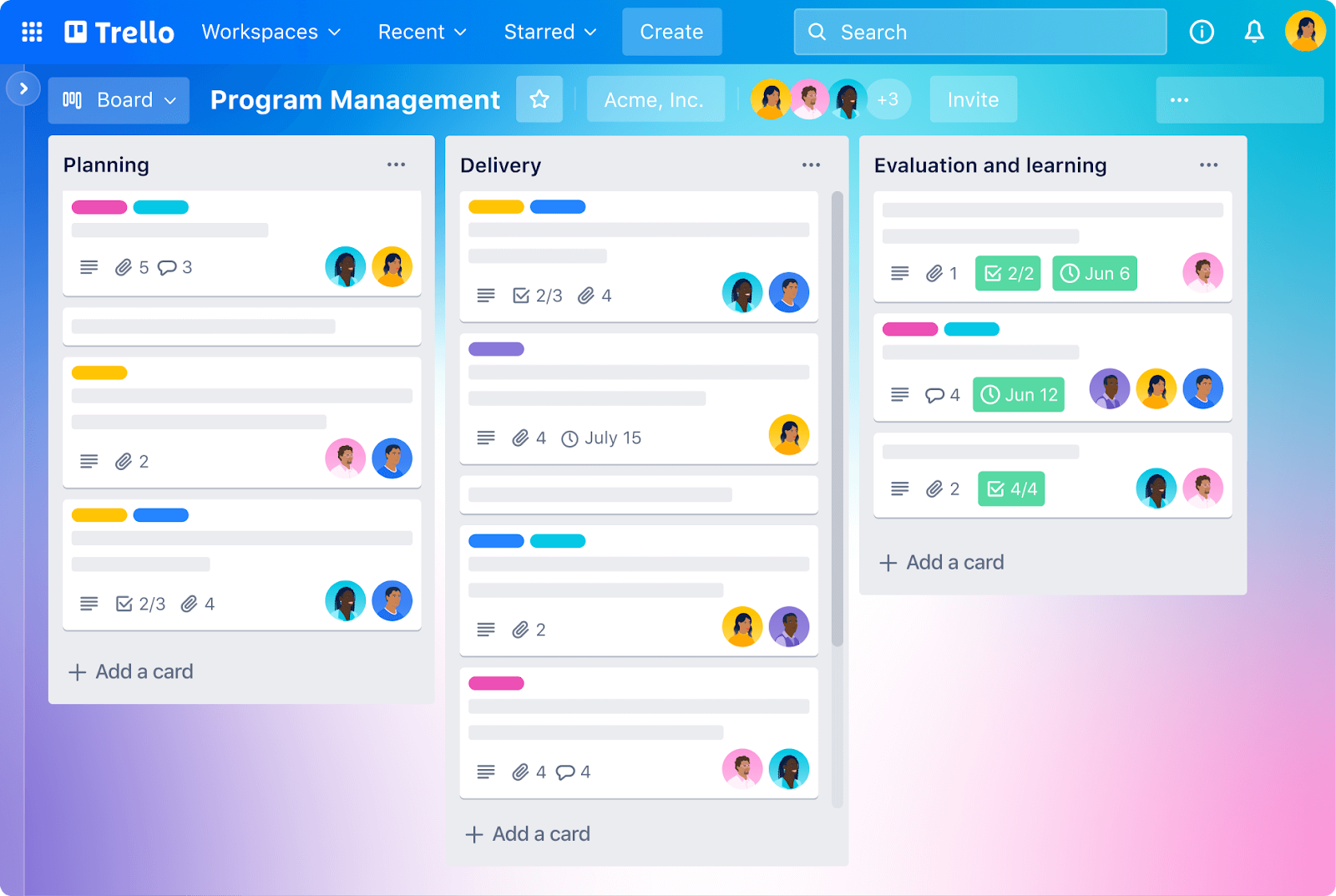
Trello is a visual collaboration tool based on boards, lists, and cards, ideal for managing tasks and workflows in a simple, intuitive layout.
- Best for: Lightweight project management and task tracking
- Key features: Drag-and-drop cards, checklists, calendar view, Power-Ups
- Pros: Easy to use, visual simplicity, great for agile teams
- Cons: Less suitable for complex project workflows without add-ons
10. Zoom

Zoom Workplace extends beyond meetings to chat, documents, whiteboards and tasks. Evaluate the features in the proposed plan rather than assuming it is only a video-call product.
- Consider for: Meetings and the follow-up work around them.
- Evaluate: Chat, shared documents, whiteboards, recordings and tasks in the proposed plan.
- Pilot: Turn a meeting into assigned actions and verify how absent colleagues receive context.
- Check before purchase: Meeting limits, recording storage, administration and AI entitlements.
Choosing the right internal collaboration tool depends on your collaboration goals. Whether it’s seamless messaging, efficient project tracking, knowledge management, or a combination of all three. Many companies benefit most from integrating two or more tools for a holistic collaboration ecosystem.
Need help choosing the right tools?
Collaboration and productivity consultancies or platforms can offer valuable support for businesses lacking in-house expertise or facing complex digital transformation needs. These consultancies help evaluate your current workflows, recommend the right mix of tools, and even assist in implementation and team training.
Whether you’re integrating a custom dashboard or launching a full digital workplace, working with a consultancy can ensure your internal tools are aligned with your long-term business goals.
If your gap is a custom operational workflow, an internal app may complement your existing collaboration stack. It still needs an owner, integrations, testing and ongoing maintenance.
Build your internal collaboration tool with ToolJet

ToolJet can help build internal interfaces for requests, approvals and shared business data. Use it to fill a specific workflow gap while keeping your existing communication and document systems where they work well.
Here’s how you can design, deploy, and optimize internal tools to boost productivity:
Step 1: Define your collaboration goals
Identify gaps in your current workflow. For example:
- Are teams struggling with inventory inaccuracies?
- Is there a need for centralized tool tracking?
- Do stakeholders waste time on repetitive tasks?
ToolJet’s flexibility allows you to build tools like inventory management platforms and automate workflows to address these issues.
Step 2: Utilize ToolJet’s integrations
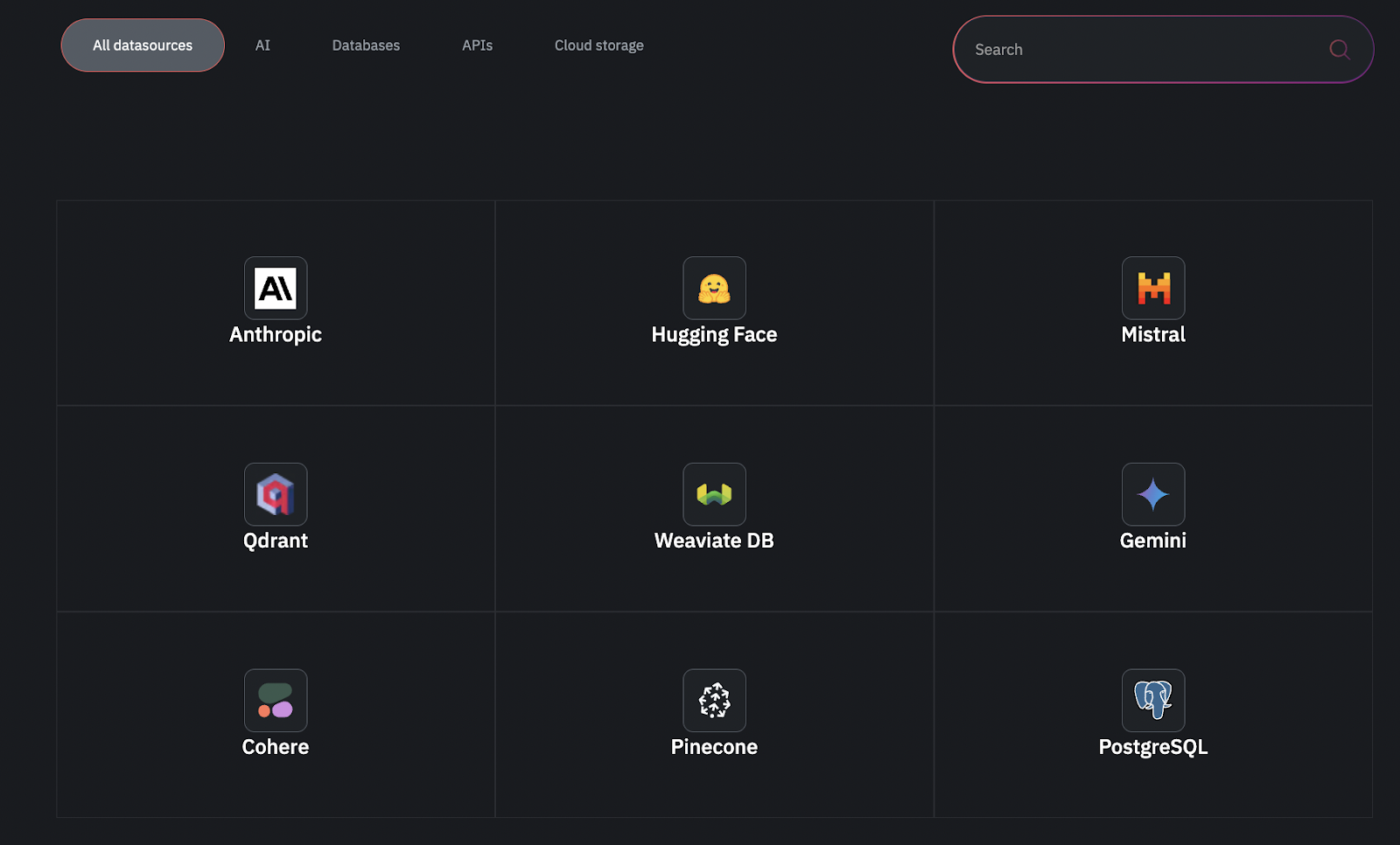
Choose the required connectors from ToolJet’s integration catalog, then test the operations and authentication your application needs:
- Databases: PostgreSQL, MongoDB, HarperDB.
- APIs: REST, GraphQL, or custom endpoints.
- Cloud Services: Google Sheets, AWS S3, OpenAI.
For example, integrate a Sales Analytics Portal with your CRM to auto-update lead data and share insights across teams.
Step 3: Design with AI-powered efficiency
Use AI to create a starting point, then review its queries, validation and behavior with your team:
- Describe a specific workflow, for example: “Build a request tracker using our PostgreSQL requests table. Include a submission form, status list and a manager review page.”
- Review the generated interface and queries. Verify the data model and define authorization independently of visible filters.
- Connect required notifications and test failures. If using ToolJet Workflows for background automation, confirm the Self-Hosted deployment and plan.
AI output is a starting point, not a production guarantee. Check database access, error handling, mobile layouts and permissions. Some integrations or business rules may require queries or custom code.
Step 4: Customize for smooth and easy collaboration

Add features critical for team productivity:
- Dashboards: Show status and metrics with an explicit refresh strategy.
- Approvals: Define transitions, authorized reviewers and behavior for rejected or duplicate requests.
- Notifications: Configure the external service or automation and verify retries and failures.
- Permissions: Enforce data access in the server or source system; hiding a component alone is insufficient.
Example: Build an Employee Feedback Portal with:
- Forms for submitting feedback.
- Tables to track responses.
- Integrations with HR systems like BambooHR.
Step 5: Deploy securely
Select the deployment and plan that meet your requirements, then configure and test the controls. Review ToolJet security and plan availability:
- Access: Configure roles and verify authorization at the application and underlying data source.
- Auditability: Confirm which events are logged, who can access logs and the required retention.
- Deployment: Choose Cloud or Self-Hosted. Separate deployments, customer-hosted AI and air-gapped operation require appropriate enterprise scope and add-ons.
Step 6: Iterate with team feedback
Run an acceptance review with employees and the application owner:
- Have users complete common tasks and report missing information or confusing steps.
- Test rejected inputs, failed integrations and unauthorized requests as well as successful actions.
- Prioritize changes using completion time, error rates and support requests.
Got questions about internal tools? Jump into The top 10 FAQs from the community and get the answers you need for 2026!
Best practices for introducing an internal collaboration tool for your team
Introducing a new collaboration tool can boost team productivity, but only if it’s adopted correctly. Without a thoughtful rollout strategy, even the best software can become underused or misaligned with your team’s workflows.
Here are some practical tips to ensure a smooth and successful implementation:
1. Identify clear objectives before choosing a tool
Before committing to any platform, understand what problems you’re trying to solve. Are you looking to improve communication? Centralized documentation? Streamline project management?
Tip: Make a list of must-have features and evaluate tools based on your team’s actual pain points and daily workflows.
2. Involve key stakeholders early
Getting buy-in from team leads, IT, and end-users ensures smoother adoption.
Tip: Involve representatives from different departments in the evaluation process so the selected tool meets diverse needs across the organization.
3. Provide proper onboarding and training
Even user-friendly tools can be intimidating at first. Offer training sessions, tutorials, and support resources to help your team get comfortable.
Tip: Create a quick-start guide tailored to your team’s use cases and schedule regular Q&A sessions during the first few weeks of use.
4. Integrate with existing tools and workflows
Collaboration tools work best when they connect with platforms your team already uses, like Google Workspace, Microsoft 365, Jira, or CRM systems.
Tip: Choose tools with strong integration capabilities to minimize disruption and reduce context-switching.
5. Establish usage guidelines
Without clear guidelines, tools can become cluttered and counterproductive.
Tip: Define how and when the tool should be used, e.g., Slack for quick updates, Notion for documentation, and Asana for task tracking. Set naming conventions and permissions to maintain structure.
6. Promote a culture of collaboration
Tools are only as effective as the culture behind them. Encourage open communication, knowledge sharing, and cross-functional collaboration.
Tip: Recognize and reward collaborative behavior. Lead by example. when leadership uses the tools consistently, others will follow.
7. Monitor adoption and gather feedback
Don’t treat implementation as a one-time event. Monitor tool usage, gather feedback, and refine processes as needed.
Tip: Use analytics (when available) to track engagement and run periodic surveys to understand what’s working and what needs improvement.
By combining the right tool with thoughtful implementation and ongoing support, your organization can unlock the full potential of internal collaboration, fostering a more aligned, productive, and engaged workforce.
How to measure the effectiveness of internal collaboration with tools?
Measuring internal collaboration is essential to ensure that your tools, strategies, and efforts are actually driving productivity and team alignment.
While collaboration might seem intangible, there are several qualitative and quantitative ways to assess how well your teams are working together.
Here are key methods to measure employee and internal collaboration:
1. Tool usage and engagement metrics
Track how frequently employees are using collaboration platforms. This includes logins, messages sent, tasks completed, documents shared, and meeting participation.
What to look for:
- Active users per day/week/month
- Number of conversations or threads created
- File uploads and document edits
- Project/task completion rates
Usage shows adoption, not necessarily productivity. More messages and meetings can also indicate friction. Pair activity counts with completion time, quality and employee feedback.
2. Employee feedback and surveys
Direct input from employees offers valuable insights into what’s working and what’s not. Regular surveys can help assess satisfaction, ease of use, and perceived value of collaboration tools.
What to ask:
- “Do you feel connected to your team?”
- “Are the current tools helping you collaborate effectively?”
- “What barriers are affecting team communication?”
Why it matters: Feedback highlights pain points and areas for improvement that metrics alone might miss.
3. Project delivery and outcome metrics
Measure how collaboration affects actual performance outcomes, such as project delivery times, error rates, and client satisfaction.
What to track:
- Time taken to complete projects
- Milestone achievement rate
- Rework or revision cycles
- Post-project feedback
Why it matters: Efficient collaboration should lead to smoother execution and better results.
4. Cross-departmental participation
Strong collaboration often includes effective communication between departments, not just within teams.
What to observe:
- Number of cross-functional projects
- Participation in shared documentation or meetings
- Interdepartmental feedback loops
Why it matters: Silos limit growth, wider collaboration shows that knowledge and effort are flowing across the company.
5. Knowledge sharing and document access
Evaluate how often employees create, access, and contribute to shared knowledge bases or documentation tools.
What to track:
- Page views and edits in platforms like Confluence or Notion
- Contributions to FAQs, SOPs, or wikis
- Use of internal search features
Why it matters: The more knowledge is shared and reused, the less time is wasted on redundant questions or recreating content.
By combining usage analytics, employee input, and outcome-based metrics, organizations can get a 360° view of how well their internal collaboration efforts are working and where to optimize for better performance.
Tool up for tomorrow with ToolJet
As we’ve explored, the landscape of internal software tools is vast and vital for businesses aiming to thrive in today’s competitive environment. The right internal tools can revolutionize your organization’s efficiency and productivity, from automating repetitive tasks to enhancing collaboration and improving decision-making.
For a custom workflow, measure the pilot against the previous process. Include implementation and maintenance effort, subscription and infrastructure costs, and the time users spend completing the task. Avoid assuming a universal percentage saving.
Start with one workflow, establish a baseline and expand only when the result justifies the ongoing cost.
Ready to take the next step? Sign up now!


