


GitHub stars are bookmarks and signals of interest, not a count of active users or proof that software is production-ready. Use them to discover projects, then check maintenance, security, licensing and suitability for your workload before adopting one.
For a quick evaluation, record the star count and date, compare recent growth with similar repositories, and inspect releases and contributor activity over the same period. A large lifetime total can hide stalled maintenance; a small specialist project can still be the right choice.
This guide explains what stars mean, how to track GitHub star history, and when to evaluate counts during an open-source selection process. It also separates useful community signals from claims a star chart cannot support.
This guide provides the insights you need, whether you’re a CTO evaluating tools, a developer contributing to open source, or a project maintainer looking to grow your repository.
What are GitHub Stars?
GitHub describes starring as a way to save repositories, discover related projects and show appreciation. A star does not establish that someone installed, tested or purchased the software.
Unlike traditional social media likes, starring a GitHub repository serves multiple purposes:
1. Bookmarking function
Stars help developers save interesting repositories for future reference. Your starred repositories appear in a dedicated section of your GitHub profile, making them easy to revisit.
2. Interest indicator
Treat stars as an indication of attention. To judge quality, run the software on a representative task, inspect tests and review how maintainers handle bugs and security updates.
3. Discovery mechanism
Stars can help people discover projects through GitHub rankings and Explore. They do not establish that a project will be the first result for every relevant search.
A large total can justify taking a closer look, but enterprise adoption, satisfied customers and community trust require their own evidence. Ask for relevant references, support terms and a successful pilot.
However, it’s crucial to understand that stars don’t tell the complete story. They’re one data point among many that should inform your evaluation of open source projects.
Who are the contributors?
Contributors (in GitHub or open-source projects in general) are individuals who have actively contributed to a project, usually by submitting code, documentation, design, or other changes that are merged into the project’s repository.
In short:
Contributors = anyone whose accepted work becomes part of the project.
Why GitHub Stars matter for open source projects?

1. Building credibility and trust
ToolJet launched in 2021 in the low-code platform category. Its repository gives prospective users a way to inspect the project and participate in its development.
ToolJet has passed 41,000 GitHub stars. That milestone reflects repository interest; it is not a count of customers, production deployments or enterprise users. Check the ToolJet repository for the live total.
Discovery can support community growth, but the useful outcomes to measure are:
- People completing the documented setup and trying a real use case
- Useful bug reports and contributions that maintainers can review
- Released improvements and clear upgrade instructions
- Continued use and support feedback, measured separately from stars
2. Attracting top talent
Developers also evaluate contribution guidelines, issue quality and maintainer responsiveness. Make a first contribution straightforward instead of relying on popularity to attract contributors.
3. Facilitating business development
Stars can start a conversation with a prospective customer. The buying decision should rest on a workload demonstration, deployment fit, security review and clear licensing and support terms.
4. Improving search visibility
GitHub supports repository search qualifiers such as stars:>100, language:TypeScript and archived:false. Use them to narrow a shortlist, then review the matches. Do not assume a universal weighting formula or confuse GitHub discovery with Google ranking.
How to track and analyze GitHub star history?

Understanding star history provides deeper insights than snapshot star counts. Several tools and techniques help you analyze star growth patterns and extract meaningful insights.
1. Native GitHub analytics
Open a repository to read its current star total. Under Insights, Pulse summarizes issues, pull requests and commits. It should not be described as a built-in historical star-count chart. Use the appropriate source for each measurement:
- Current interest: the repository star total, recorded with the observation date
- Maintenance: Pulse, releases and recent issue discussions
- Historical growth: a star-history service or your own dated snapshots
2. Advanced star history GitHub tools
Star History accepts a repository name or URL to display a growth chart. For comparisons, use the same time window and note repository age. Check the chart’s coverage and data source before treating it as a complete history.
Before choosing a GitHub star tracker, check what its chart actually measures:
- Does it show stored count snapshots or reconstruct history from currently available stargazers?
- How often is the data refreshed, and are gaps or rate limits identified?
- Can you compare the same dates and export the evidence used in your evaluation?
3. Analyzing star patterns
Read the shape of a chart as a prompt for investigation, not a diagnosis:
- Steady growth: continued attention, which should be checked against actual usage and maintenance
- Spikes: compare dates with announcements or mentions; timing alone does not prove what caused the increase
- Plateaus or declines: investigate project maturity, visibility and data coverage before concluding that a project is abandoned
When evaluating ToolJet or another project, keep a dated record of the chart and the releases you reviewed. Do not attribute star growth to AI features, press coverage or a campaign without evidence connecting the events.
Also read, “Build GitHub Star history tracker in 10 minutes using low-code“.
Most starred GitHub repositories: What makes them special?
Repositories serve different audiences. The examples below are not a ranking of the most-starred projects, and their totals change continuously. Compare tools within the same category rather than using a tutorial collection or framework as the benchmark for an internal-app platform.
Repository examples and what to evaluate
| Category | Repository | Evaluation question |
| Internal-app platform | ToolJet/ToolJet | Does it fit your data, permissions and deployment requirements? |
| Machine learning | tensorflow/tensorflow | Does it support the models and hardware you need? |
| UI library | facebook/react | Does it fit your application and team’s development approach? |
| Code editor | microsoft/vscode | Are the required extensions and workflows supported? |
| Container orchestration | kubernetes/kubernetes | Can your team operate, secure and upgrade the deployment? |
Common characteristics of highly-starred projects
- Relevant problem: confirm the project addresses your task before comparing popularity
- Usable documentation: follow the installation and upgrade instructions yourself
- Responsive maintenance: inspect recent substantive issue responses and reviewed changes
- Evidence of quality: evaluate tests, release notes and security handling separately from stars
Evaluating ToolJet beyond its star count
For ToolJet, move from repository discovery to a small internal-app pilot. Use the following checks rather than treating a star milestone as an adoption guarantee:
- App fit: connect representative data and test the required screens and actions
- Deployment fit: compare Cloud and Self-Hosted requirements and operating responsibilities
- Governance: review security controls and plan entitlements, then test permissions with representative roles
GitHub stars vs other metrics: A complete comparison
While GitHub stars provide valuable insights, savvy evaluators consider multiple metrics when assessing open source projects.
1. Star count vs fork count
Forks are copies of a repository. They may support proposed changes, experiments or personal backups; a fork count does not prove active development. Inspect the activity behind the number:
- Recent changes in forks that matter to your use case
- Pull requests submitted upstream and whether they receive review
- Whether important fixes exist only in an unmaintained fork
There is no universal healthy fork-to-star ratio. Compare a project’s purpose, age and contribution model, and inspect a sample of recent activity instead of applying an arbitrary threshold.
2. Stars vs issues and pull requests
Issue and pull-request activity can reveal how a project is maintained. Counts alone are ambiguous: a large backlog is not automatically unhealthy, and few reports do not prove that software is reliable. Check:
- Whether critical issues receive a substantive response and a fix or documented workaround
- Whether open pull requests are reviewed and maintainers explain decisions
- Whether support happens in another documented channel rather than GitHub issues
3. Stars vs release frequency
Review the latest supported release, upgrade notes and handling of security fixes. Frequent releases can be useful, but a stable specialist library and a fast-changing platform may have different appropriate release schedules.
4. Stars vs documentation quality
Test the documentation directly: install the supported version, complete a representative task, and follow an upgrade or recovery procedure. A high star count cannot compensate for missing operational instructions.
How do you evaluate open source projects beyond stars?
When should you evaluate GitHub star counts? At shortlisting, record the current total and recent trend. Before a pilot, pair them with maintenance and security evidence. Before production adoption, prioritize test results, support and licensing. Revisit the assessment before major upgrades or when maintenance changes.
1. Technical assessment framework
Code quality indicators:
- Automated testing coverage and CI/CD implementation
- Code review processes and contribution guidelines
- Security scanning and vulnerability management
- Performance benchmarks and optimization efforts
Architecture evaluation:
- Performance and concurrency tests using representative data
- Integration capabilities with your existing systems
- Customization options and the work needed to maintain extensions
- Deployment, backup, recovery and upgrade responsibilities
Community health metrics:
- Response time to issues and community questions
- Contributor diversity and maintainer sustainability
- Conference presence and industry recognition
- Enterprise adoption and case studies
2. Enterprise-specific considerations
When evaluating projects like ToolJet for enterprise use, additional factors become crucial:
- Governance and compliance: verify access controls, audit capabilities and available assurance reports against your requirements; a star count proves none of these
- Support: confirm escalation channels, response targets and commercial terms
- Licensing and exit: review the license for the exact components you will use, paid capabilities and a realistic data/application export path
- Total cost: include implementation, infrastructure, training, upgrades and ongoing operation
How to build a useful open-source community

ToolJet’s earlier launch stories below document historical milestones. The screenshots are historical snapshots, not current star totals. Use the practical ideas as hypotheses to test for your own project, not a guaranteed growth formula.
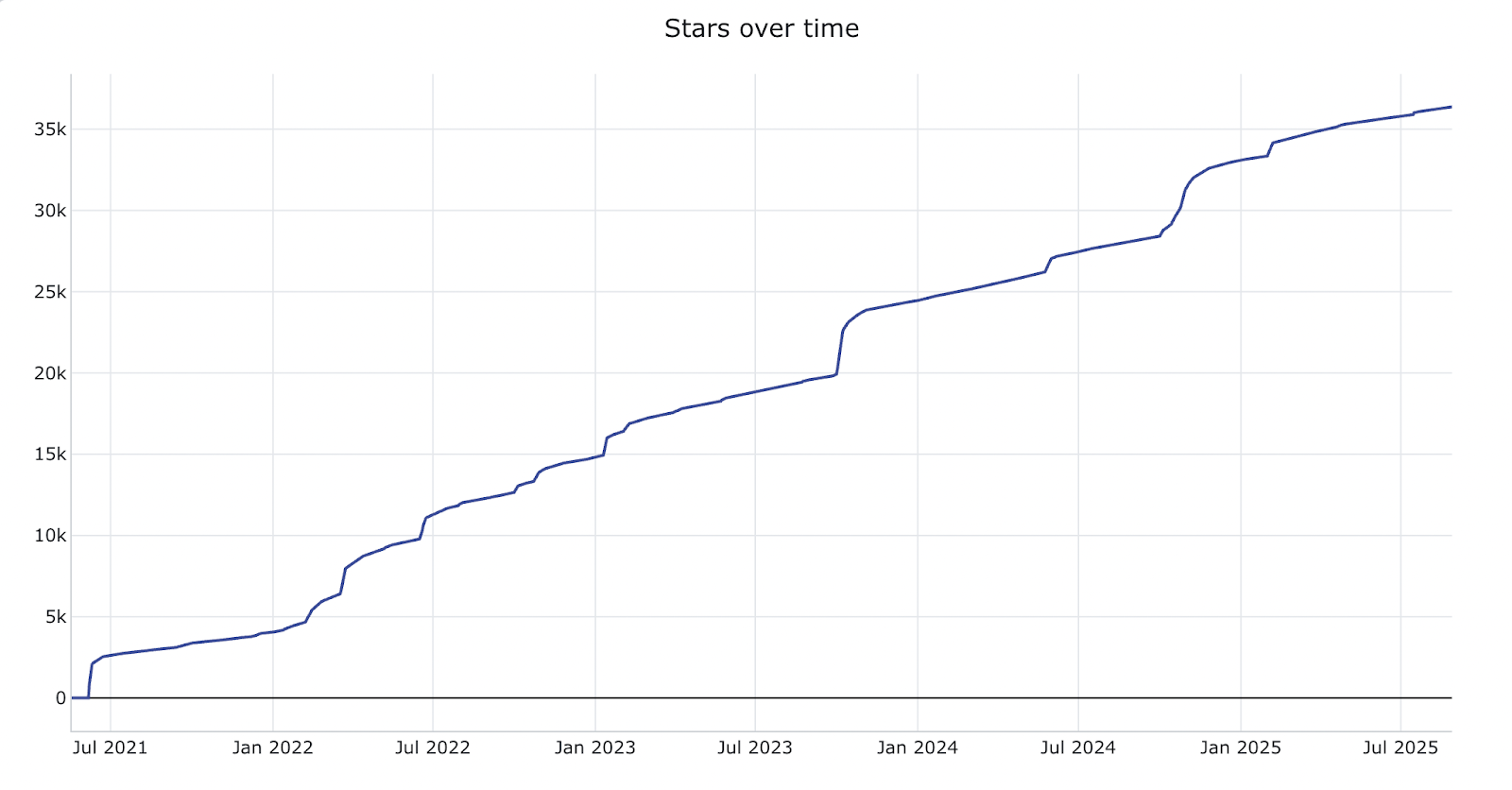
Phase 1: Foundation and initial growth (0-1k Stars)
When you’re starting your open source project, focus on these foundational elements that helped us establish early credibility:
- Solve a concrete problem: show a working example and explain who it is for
- Make setup approachable: publish a reliable quick start and a clear place to ask questions
- Welcome contributions: document review expectations and identify suitable first issues
Related read: “Zero to 10,000 stargazers on GitHub”.
Phase 2: Accelerated growth (1k-10k Stars)
After launch, make the project easier to discover and use:
- Useful content: publish examples and tutorials that solve real tasks
- Community participation: answer relevant questions without spamming or asking for artificial engagement
- Release communication: explain what changed, who benefits and how to upgrade
Related read: “How ToolJet grew from 10 to 2000 Stars on GitHub in 3 days“.
Phase 3: Supporting production adoption
As you scale beyond 10k stars, you can emphasize enterprise adoption while maintaining community growth:
- Product evidence: demonstrate capabilities with reproducible examples
- Security and operations: document supported versions, reporting channels and deployment responsibilities
- Customer evidence: publish authorized case studies with specific results and context
Key takeaways:
- Consistency: keep documentation and release communication current
- Useful outcomes: measure successful setup, retained usage and resolved problems separately from stars
- Maintainer capacity: set contribution and support expectations your team can sustain
Tools and trackers for monitoring GitHub Stars
Effective star monitoring requires the right tools and systematic approaches to extract actionable insights.
Free GitHub Star tracking tools
- Repository page: read the current star count and record its date
- Star History: use its chart for historical context, checking coverage and methodology
- GitHub Pulse: inspect issue, pull-request and commit activity alongside the star trend
Custom tracking and API limitations
- Snapshots: store dated aggregate counts when you need a consistent monitoring series; a count difference is net growth, not a list of every new star
- Permissions: review the current GitHub starring API documentation before implementing a tracker; stargazer-list access and rate limits can affect availability
- History: distinguish recorded snapshots from reconstructed timestamps, and document missing observations rather than filling them with invented values
Setting up effective monitoring
- Choose a window: compare recent activity over consistent dates, such as 30 or 90 days
- Record context: save the repository, observation date, source and relevant releases
- Compare similar projects: account for category, age and intended audience
- Investigate changes: use alerts to prompt a review, not to automatically label software reliable or risky
The future of GitHub Stars and open source evaluation
A repeatable evaluation is more useful than predictions about future GitHub features. Keep evidence that someone else can inspect and update.
1. Maintain an evaluation record
- Record the repository and version evaluated
- Save dates and sources for community metrics
- Document pilot results, unresolved risks and the decision owner
2. Check the data source
- Read current API and service documentation before relying on an automated chart
- Note permissions, missing dates and changes in collection methods
- Do not equate reconstructed star history with a complete audit trail
3. Reassess before critical changes
- Revisit supported versions and upgrade instructions
- Check changes to licensing, maintainers and commercial support
- Repeat workload and recovery tests before a significant production upgrade
You can also watch this video to understand how to get more Github stars:
Also read: “12 ways to get more GitHub Stars for your open-source project“.
Conclusion
GitHub stars help you discover and revisit projects. Star history adds context about attention over time, but neither proves adoption, security or production suitability.
Choose a project by combining those signals with a representative pilot, maintenance evidence, license review and an operating plan. Keep a dated record so the decision can be revisited.
Evaluating an internal-app platform? Explore ToolJet, review its repository and test a representative app with your own data and permission requirements.
Join our community of innovators who are transforming how organizations build and deploy internal applications.
Book a demo to see how ToolJet’s enterprise features can accelerate your internal tool development while maintaining the security and governance standards your organization demands.


