For a first Python desktop GUI, start with Tkinter. For a complex desktop app, compare PySide6 and PyQt6, including their different licenses. Consider Kivy for a custom touch interface and wxPython for native desktop controls. PySimpleGUI offers a simpler wrapper API, but check the current release and your target platform before committing.
This guide covers desktop and touch GUI toolkits. A browser-based internal app builder serves a different need; it is not a replacement for a native Python GUI library. If you are selecting a database administration interface, see our PostgreSQL GUI tools guide.
What is a Python GUI?
A Python GUI, or Graphical User Interface, is a visual interface that allows users to interact with a software application. It provides users with a set of graphical elements, such as buttons, checkboxes, dropdown lists, and sliders, to perform various tasks and access different functionalities of the application. Python GUI frameworks enable developers to create these interfaces efficiently by providing a set of tools, libraries, and pre-built components that simplify the development process.
Create a small Python GUI with Tkinter
First run python -m tkinter in a terminal on a computer with a graphical desktop. If the test window opens, save the following as gui_starter.py and run python gui_starter.py. Use python3 instead if that is your Python executable.
import tkinter as tk
from tkinter import ttk

root = tk.Tk()
root.title("Python GUI starter")
root.columnconfigure(0, weight=1)
root.rowconfigure(0, weight=1)

frame = ttk.Frame(root, padding=16)
frame.grid(sticky="nsew")
frame.columnconfigure(1, weight=1)

name = tk.StringVar()
message = tk.StringVar(value="Enter a name, then choose Greet.")

def greet():
    value = name.get().strip()
    message.set(f"Hello, {value}!" if value else "Please enter a name.")

ttk.Label(frame, text="Name:").grid(row=0, column=0, padx=(0, 8))
entry = ttk.Entry(frame, textvariable=name)
entry.grid(row=0, column=1, sticky="ew")
ttk.Button(frame, text="Greet", command=greet).grid(
    row=1, column=0, columnspan=2, pady=12
)
ttk.Label(frame, textvariable=message).grid(
    row=2, column=0, columnspan=2, sticky="w"
)
entry.bind("<Return>", lambda event: greet())
entry.focus_set()

root.mainloop()
The window contains a name field, a button and a status message. Try an empty name, then enter a name and press Enter. Resize the window to check the layout. This example keeps its state in memory; it does not save records or implement authentication.
If it does not open: a missing _tkinter module means your Python installation needs Tcl/Tk support. A display-related error may mean you are running in a headless environment, such as a server or notebook runtime. Follow your distributor’s installation guidance and the official Tkinter documentation. Use ttk for themed controls.
Benefits of Using Python GUI Frameworks
Python GUI frameworks offer several advantages over building GUIs from scratch. Firstly, these frameworks provide a rich set of pre-built widgets and components that can be easily customized to suit your application’s needs. This saves you a significant amount of time and effort in designing and implementing the basic building blocks of your GUI.
Secondly, Python GUI frameworks abstract away the low-level details of GUI programming, making it easier for Python developers to focus on the application logic rather than the intricacies of the graphical interface. This allows you to write clean and maintainable code, reducing the chances of errors and improving the overall quality of your application.
Lastly, Python GUI frameworks are highly extensible and support integration with other libraries and tools. Whether you need to connect your GUI application to a database or leverage the power of data visualization libraries, these frameworks provide seamless integration options, enabling you to create robust and feature-rich applications.
A GUI framework is also essential for effective GUI development in Python. It offers several advantages that make the life of a developer easier:
- Consistency: GUI frameworks ensure consistency in design and functionality across different screens and devices, providing a seamless user experience.
- Customizability: GUI frameworks offer a wide range of customization options, allowing developers to tailor the interface according to their specific requirements and branding.
- Cross-platform Compatibility: Many GUI frameworks support cross-platform development, enabling developers to create applications that run on different operating systems without significant modifications.
Advanced Python GUI Use Cases
Python GUI frameworks aren’t limited to basic applications; they are versatile tools for building specialized and advanced interfaces. Here are some common advanced use cases:
- Data Visualization Dashboards
A desktop dashboard can display charts and refresh data in response to events. Choose a plotting library with an embedding approach supported by your toolkit, and keep data loading off the GUI event loop. - Machine Learning and AI Applications
GUIs are critical for user-friendly machine learning tools. For instance, a Tkinter-based app can be used to upload datasets, trigger model training, and visualize predictions. Frameworks like PySide can also help build intuitive interfaces for AI-powered tools. - Game Development Interfaces
Kivy, with its robust graphics engine, is excellent for building interfaces for 2D games or interactive entertainment applications. Developers can leverage its touch support for mobile gaming. - IoT Device Control Panels
A device-control panel needs to handle connection failures, delayed responses and safe cancellation. Prototype those behaviors on your target hardware; cross-platform support alone does not establish performance or reliability.
Comparison of the Best Python GUI Frameworks
Choose by interface requirements, distribution model and target platforms. These are starting points, not performance rankings.
| Framework | Useful starting point | Decision to check |
|---|---|---|
| Tkinter | Learning, forms and compact desktop utilities | Check Tcl/Tk installation; use ttk themed widgets |
| PySide6 | Qt widgets or Qt Quick for a substantial app | Official Qt binding; review LGPLv3/GPLv3 or commercial terms |
| PyQt6 | Qt desktop apps with extensive widgets and tooling | GPLv3 or Riverbank commercial license; not LGPL |
| Kivy | Custom touch interfaces on desktop and mobile | Separate packaging toolchains and platform testing |
| wxPython | Desktop apps using native-style controls | Verify supported wheels and operating-system integration |
| PySimpleGUI 6 | Small utilities or prototypes with a wrapper API | LGPL3 release; test the chosen release and platform |
Tkinter
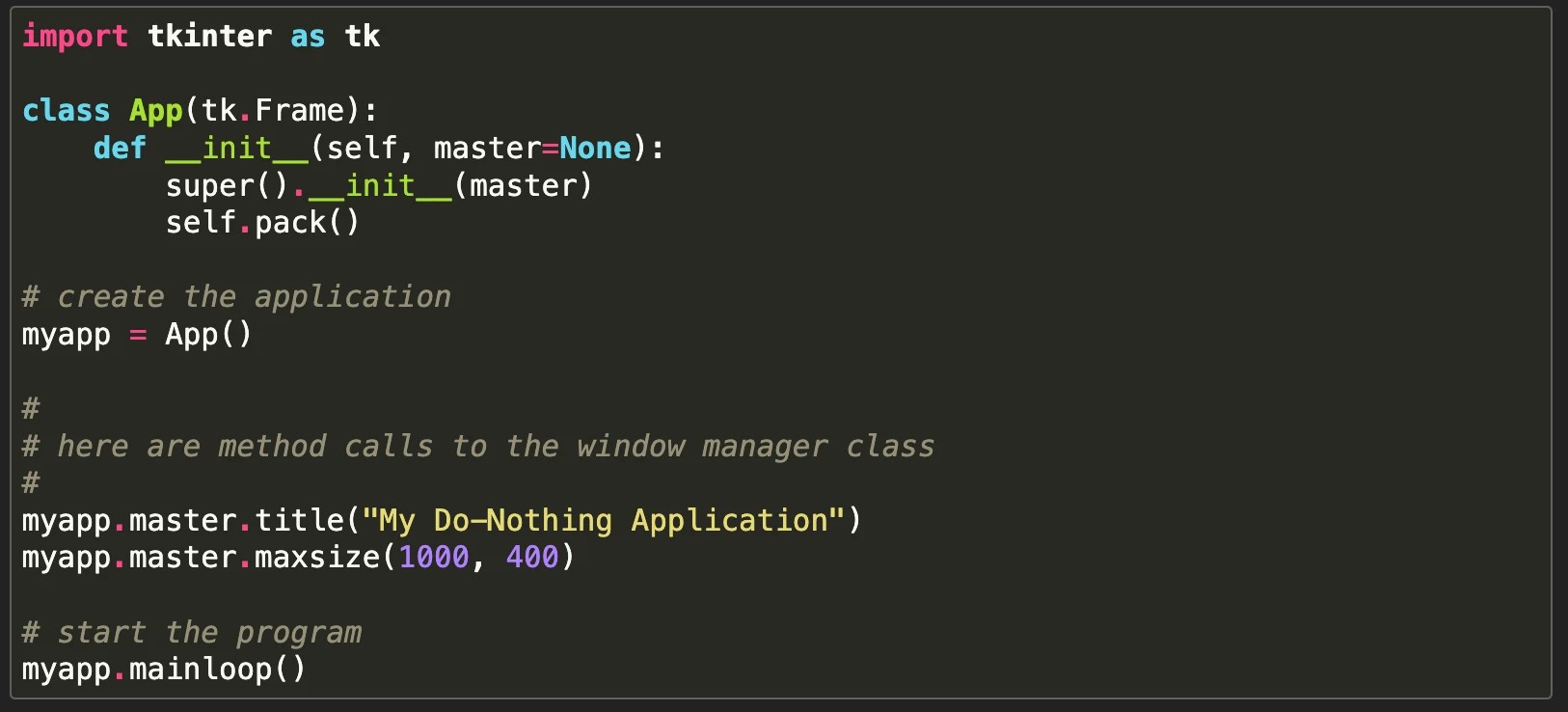
Tkinter is the standard GUI framework for Python. It is a wrapper around the Tk GUI toolkit, which was originally developed for the Tcl scripting language. Tkinter provides a set of easy-to-use classes and functions that allow developers to create simple and intuitive GUI applications.
Pros
- One of the major advantages of Tkinter is its simplicity. It has a small learning curve, making it an ideal choice for beginners.
- Support for both commercial and open-source projects.
- Tkinter is included in many Python distributions but is an optional module. Run
python -m tkinterto check your installation; if it is missing, consult your Python or operating-system distributor.
Cons
- Tkinter’s simplicity comes at the cost of limited customization options. While it provides a basic set of widgets like buttons, labels, and entry fields, creating complex and visually appealing GUIs can be challenging with Tkinter alone.
- Use tkinter.ttk for themed widgets. More elaborate interfaces still require layout and styling work.
PyQt
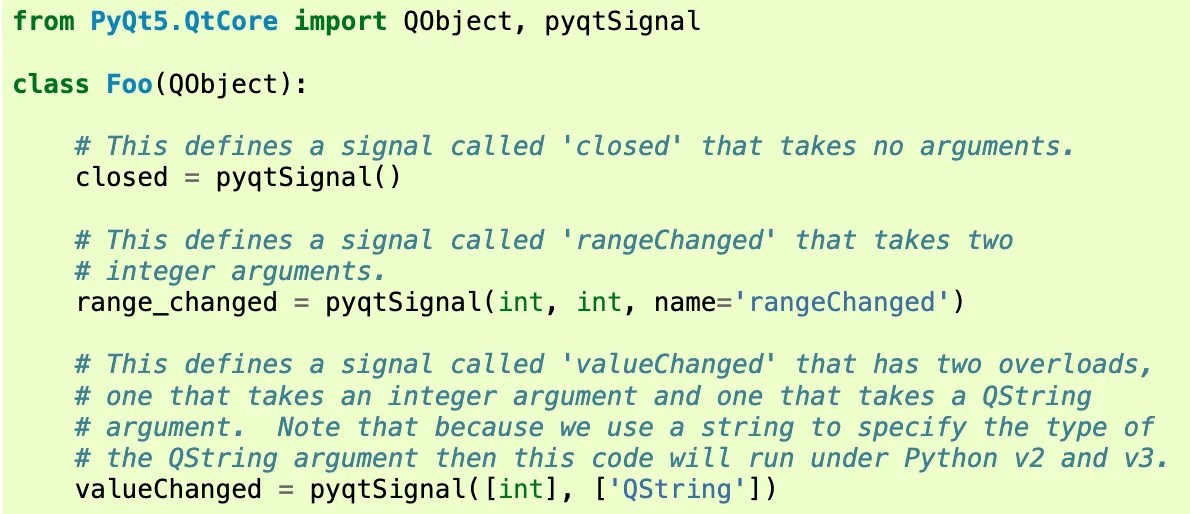
PyQt is a comprehensive set of Python bindings for the Qt application framework. Qt is a powerful and versatile GUI toolkit that provides a wide range of features and capabilities. PyQt combines the simplicity of Python with the power of Qt, making it an excellent choice for developing complex and visually stunning GUI applications.
Pros
- One of the key advantages of PyQt is its extensive set of widgets and components.
- Provides a vast collection of pre-built widgets that can be easily customized to create highly interactive and modern-looking GUIs.
- Supports advanced features like internationalization, network programming, and multimedia integration, making it suitable for a wide range of applications.
Cons
- PyQt has a steeper learning curve compared to Tkinter due to the complexity of the Qt framework.
Licensing and version: PyQt6 binds Qt 6 and is offered under GPLv3 or a Riverbank commercial license, not LGPL. Review the license before distributing an application. The screenshot above is a PyQt5 example; use the PyQt6 documentation for current imports and APIs.
PySide6: the official Qt for Python binding
PySide6 is the official Python binding for Qt 6. It offers Qt widgets, Qt Quick and access to Qt APIs for substantial desktop interfaces. The package can be installed with python -m pip install pyside6.
Trade-off: like PyQt, it requires learning Qt concepts, event handling and deployment. PySide6 is available under LGPLv3/GPLv3 and commercial terms. Module-specific licenses and distribution obligations matter; do not assume every Qt module has the same license.
Kivy

Kivy is an open-source Python framework for developing multi-touch applications. It supports cross-platform code reuse, but each target still needs packaging, dependency checks and testing. Kivy documents separate Windows, macOS, Android and iOS packaging paths. Kivy provides a rich set of tools and widgets that enable developers to create highly interactive and visually appealing applications.
Pros
- Kivy supports touch input and gestures. It allows you to create touch-enabled applications that can run on devices like smartphones and tablets.
- Provides a powerful graphics engine that supports hardware acceleration, enabling you to create smooth and responsive user interfaces.
- Open-source and free to use.
Cons
- Mobile distribution involves platform-specific toolchains, permissions, signing and testing; verify your required Python dependencies before choosing it.
- Unique syntax and programming paradigm, which may require some time to get used to.
wxPython
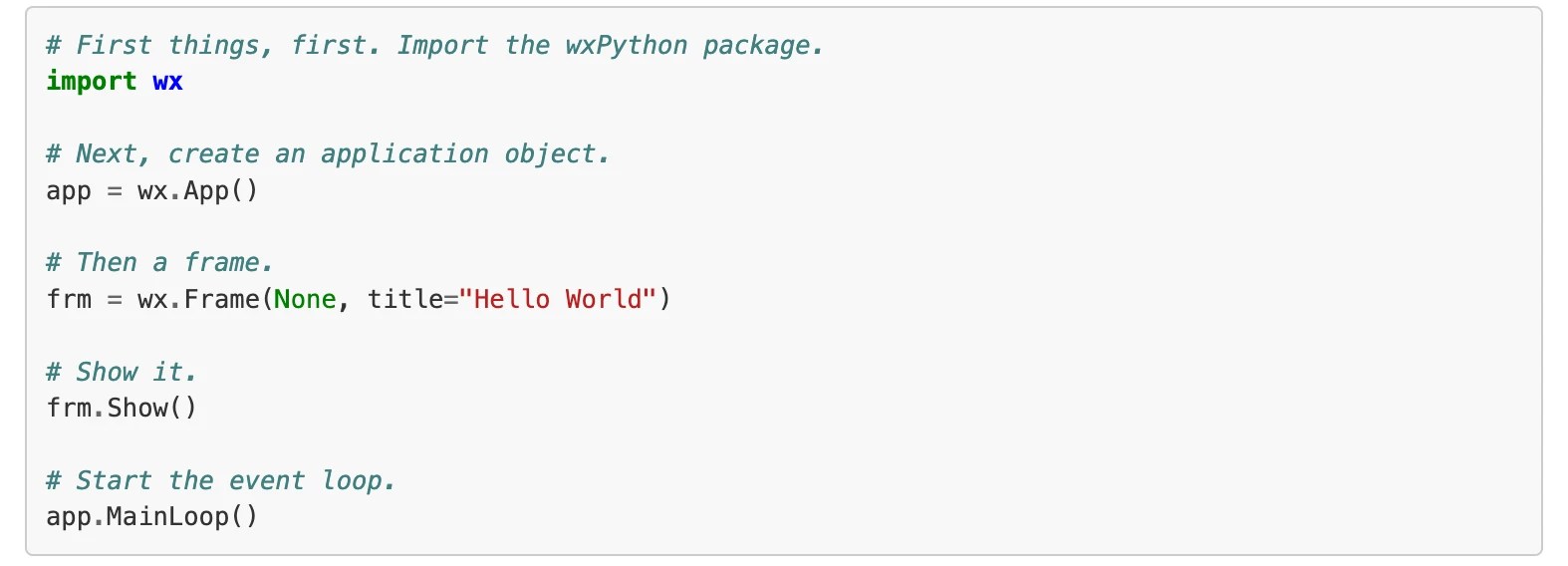
wxPython is a Python wrapper for the wxWidgets C++ library. wxWidgets is a mature and stable GUI toolkit that provides a native look and feel on multiple platforms, including Windows, macOS, and Linux. wxPython combines the power of wxWidgets with the simplicity of Python, making it a reliable choice for developing cross-platform GUI applications.
Pros:
- wxPython offers a native look and feel. It provides native widgets and controls that seamlessly integrate with the underlying operating system, giving your application a polished and professional appearance.
- wxPython also supports advanced features like drag-and-drop, printing, and clipboard operations, making it suitable for a wide range of applications.
Cons
- Check the official documentation, release activity and available wheels for the Python version and operating systems you plan to support.
- Steeper learning curve compared to Tkinter due to the complexity of the wxWidgets library.
- Limited customization options compared to some other frameworks.
PySimpleGUI
PySimpleGUI wraps GUI libraries with a simpler layout and event-loop API, making it useful for compact utilities and prototypes. The official project released version 6 as open source in April 2026; its repository identifies the license as LGPL3. Use current installation instructions rather than older version 5 licensing guidance.
Pros
- Exceptional ease of learning and using the framework.
- A concise wrapper API can reduce the code needed for common controls. Verify the current release on each operating system you need.
Cons
- Limited customization options compared to more advanced frameworks.
- For a long-lived product, evaluate whether the wrapper exposes the features you need and whether its maintenance and release process fits your support requirements.
Python GUI Frameworks for Beginners vs. Professionals
Experience is only one part of the choice. Start with Tkinter to learn widgets, layouts and event handling. PySimpleGUI can reduce boilerplate for a utility, provided the current release works for your targets.
For a substantial desktop product, compare PySide6, PyQt6 and wxPython using a small prototype of your hardest screen. For a custom touch interface, evaluate Kivy and its mobile packaging requirements. Qt-based professional projects also need an explicit licensing and distribution decision.
Choosing the Right Python GUI Framework for Your Project
Choosing the right Python GUI framework for your project depends on several factors, including the complexity of your application, your familiarity with the framework, and the specific requirements of your project. Here are some guidelines to help you make an informed decision:
- Simplicity vs. Power: If you are new to GUI programming or developing a small to medium-sized application, Tkinter is a good choice due to its simplicity and widespread adoption. If you need advanced features and customization options, PyQT or wxPython may be more suitable.
- Cross-Platform Compatibility: Cross-platform support does not remove packaging or testing work. Check wheels, dependent libraries, file handling, fonts, scaling and operating-system integration on every target.
- Touch Input and Gestures: For a custom touch interface, evaluate Kivy on the actual devices you need. Confirm packaging, permissions and required platform APIs before selecting it.
- Native Look and Feel: If you want your application to have a native look and feel on multiple platforms, wxPython is an option to evaluate due to its integration with the underlying operating system.
It is also worth considering the availability of resources, community support, and documentation for each framework. Take the time to explore the official documentation, online tutorials, and community forums to get a sense of the level of support available for each framework.
Distribution and licensing: decide whether users will run from source or install a packaged application. Compare PyQt6’s GPLv3/commercial terms with PySide6’s LGPLv3/GPLv3/commercial terms, then check the licenses of the Qt modules and third-party dependencies you actually ship.
Integrating Python GUI Frameworks with Modern Tools
A significant advantage of Python GUI development is its ability to integrate with modern tools and technologies:
- Database Integration
Keep database access separate from widget callbacks. Decide whether the desktop app should access a local database or call an authenticated backend API. Do not distribute privileged database credentials inside a client application. - Web-Based Applications
With tools like Flask or Django, Python GUI apps can communicate with backend web services. This setup is useful for hybrid applications that merge desktop and web functionalities. - Embedding AI and Automation
Python’s AI libraries (e.g., TensorFlow, OpenCV) can be embedded into GUI apps. For example, an image recognition tool can use a Tkinter or PyQt interface for uploading and analyzing images.
Best Practices for Developing with Python GUI Frameworks
Regardless of the Python GUI framework you choose, there are some best practices that you should follow to ensure a smooth and efficient development process:
- Separation of Concerns: Separate your application logic from the GUI code by following the Model-View-Controller (MVC) or Model-View-ViewModel (MVVM) design patterns. This will make your code more modular, reusable, and easier to maintain.
- Use Layout Managers: Take advantage of layout managers provided by the framework to easily position and resize your widgets. This will ensure that your GUI looks consistent across different screen sizes and resolutions.
- Handle User Input Gracefully: Implement proper error handling and validation to handle user input effectively. Provide meaningful error messages and feedback to guide users and prevent crashes or unexpected behavior.
- Keep the event loop responsive: do not run slow network requests, database queries or model training directly in a button callback. Use the toolkit’s worker and scheduling mechanisms, then pass results back through its supported GUI update path. Python’s Tkinter threading documentation explains why long-running handlers block the interface.
- Testing and Debugging: Test your application thoroughly to ensure that it works as expected. Use debugging tools and techniques provided by the framework to identify and fix any issues or bugs.
- Test the packaged app: test on the target operating system without your development environment installed. Verify assets, dependent libraries, permissions, high-DPI scaling, keyboard navigation and clear error feedback.
By following these best practices, you can ensure that your Python GUI application is well-structured, efficient, and user-friendly.
Conclusion
Python GUI frameworks provide a powerful set of tools and libraries that enable developers to create visually appealing and interactive applications with ease. Each framework has its own strengths and weaknesses, and the choice depends on various factors such as the complexity of your application, cross-platform compatibility, touch input requirements, and native look and feel.
Regardless of the framework you choose, it is important to follow best practices such as separation of concerns, using layout managers, handling user input gracefully, optimizing performance, and thorough testing and debugging. By following these guidelines, you can develop high-quality GUI applications that meet the needs of your users and provide a seamless user experience.
When a browser-based internal app is the better fit: if your users need a shared admin panel, approval interface or operations dashboard, ToolJet can build an internal web app connected to databases and APIs. It is not a native Python GUI framework. You can keep Python business logic in a backend service and connect the interface through a REST API.
Before selecting a framework: build your hardest screen with representative data, test keyboard navigation and resizing, simulate a slow operation, and run a packaged build on a clean target machine. Record the remaining work and support requirements. This gives you a more useful comparison than the number of available widgets alone.
Frequently asked questions
- Is Python suitable for GUI development?
Yes, Python is suitable for GUI development. It provides several libraries and frameworks that make it easy to create graphical user interfaces. Some popular options include Tkinter, PyQt, PySide, Kivy, and wxPython. These libraries offer a wide range of features and functionalities, allowing developers to create interactive and visually appealing GUI applications using Python.
- Can I create mobile applications using Python GUI frameworks?
Kivy is an option for Python-based touch applications, including mobile targets. Check the platform-specific packaging process, signing, permissions and compatibility of every required dependency. Test on real target devices before committing; a desktop prototype does not prove mobile readiness.
- Are Python GUI frameworks suitable for developing complex and feature-rich applications, or are they only suitable for simple projects?
Python GUI frameworks are versatile and can be used for a wide range of applications, from simple to complex. While they excel in creating quick prototypes and user-friendly interfaces for smaller projects, they are equally capable of handling more substantial and feature-rich applications. Many Python GUI frameworks provide extensive libraries and tools, enabling developers to implement advanced features and complex functionality. Additionally, Python’s rich ecosystem allows you to integrate with other libraries and technologies, making it a solid choice for ambitious software projects.
- What is the difference between PyQt6 and PySide6?
Both bind Qt 6 for Python applications. PyQt6 is Riverbank’s binding and is licensed under GPLv3 or a commercial license, not LGPL. PySide6 is the official Qt for Python binding and is offered under LGPLv3/GPLv3 and commercial terms. Review module-specific licenses and distribution requirements before choosing.